Guide 1 · Connect and reconnect an MYM creator
Add a creator, connect her with the e-mail and password of her MYM account, reconnect her when her password has changed, and understand MYM’s refusals.
How to read this guide
The screens are the real MYMIK screens on the web, with a fictional agency (“Agence Lumière”), fictional creators (including Emma) and fans with made-up nicknames: no real data. The numbered black dot and the purple outline show where to click or look; the same number is used in the text.
Language of the screens
The MYMIK interface is not translated yet: the screens stay in French. For each step, the text gives the exact French label shown on screen, followed by its English meaning.
The order to remember
- In Agence › Créateurs (“Agency › Creators”), Ajouter un créateur (“Add a creator”): the creator’s name and e-mail.
- On her row, Connexion (“Connect”): the e-mail and password of her MYM account, then Se connecter (“Sign in”).
- The status turns to Connecté. If the session ever expires, click Reconnecter (“Reconnect”) and type the password again.
- An MYM refusal appears in the window: read it, it says what to do.
0. Before you start
What to know in one minute.
What you need
- The e-mail and password of the creator’s MYM account (the one she uses on MYM, not a MYMIK account).
- A role that allows connecting creators (founder, HR, manager). Otherwise the screen says « Votre rôle ne permet pas de connecter cette créatrice. »
What MYMIK does with the password
- It is stored encrypted, so the session recovers by itself if MYM cuts it. It is never displayed: the field is masked.
- An MYM account can only be connected to one creator profile at a time.
The button does not appear?
Write to us in private at @MymikAppBot with your agency and the creator: we will check with you.
MYM asks you for a verification code?
Ask the creator for the code and type it in the « Connecter » (“Connect”) window, in the Code reçu (“Code received”) field: see section 4.
The four statuses
| Status | What it means | The button |
|---|---|---|
| Connecté (connected) | The guardian checked the session less than 30 minutes ago. | Déconnexion |
| Non vérifié (not checked) | No recent check: nothing is proven either way. | Déconnexion |
| Session expirée (session expired) | MYM no longer accepts the session (for example after a password change). | Reconnecter |
| Hors ligne (offline) | The creator is not connected, or was disconnected by hand (the row then says by whom and when). | Connexion |
1. Add a creator
The list of creators, then a new profile.
1. Open Agence › Créateurs
In the left menu, open Agence, then Créateurs. Each row shows a status (Connecté, Non vérifié, Session expirée, Hors ligne) and, on the right, the right connection button: Déconnexion if the creator is connected, Reconnecter ❸ if her session has expired ❷, Connexion if she is offline. Ajouter un créateur ❶ opens the form of a new profile.
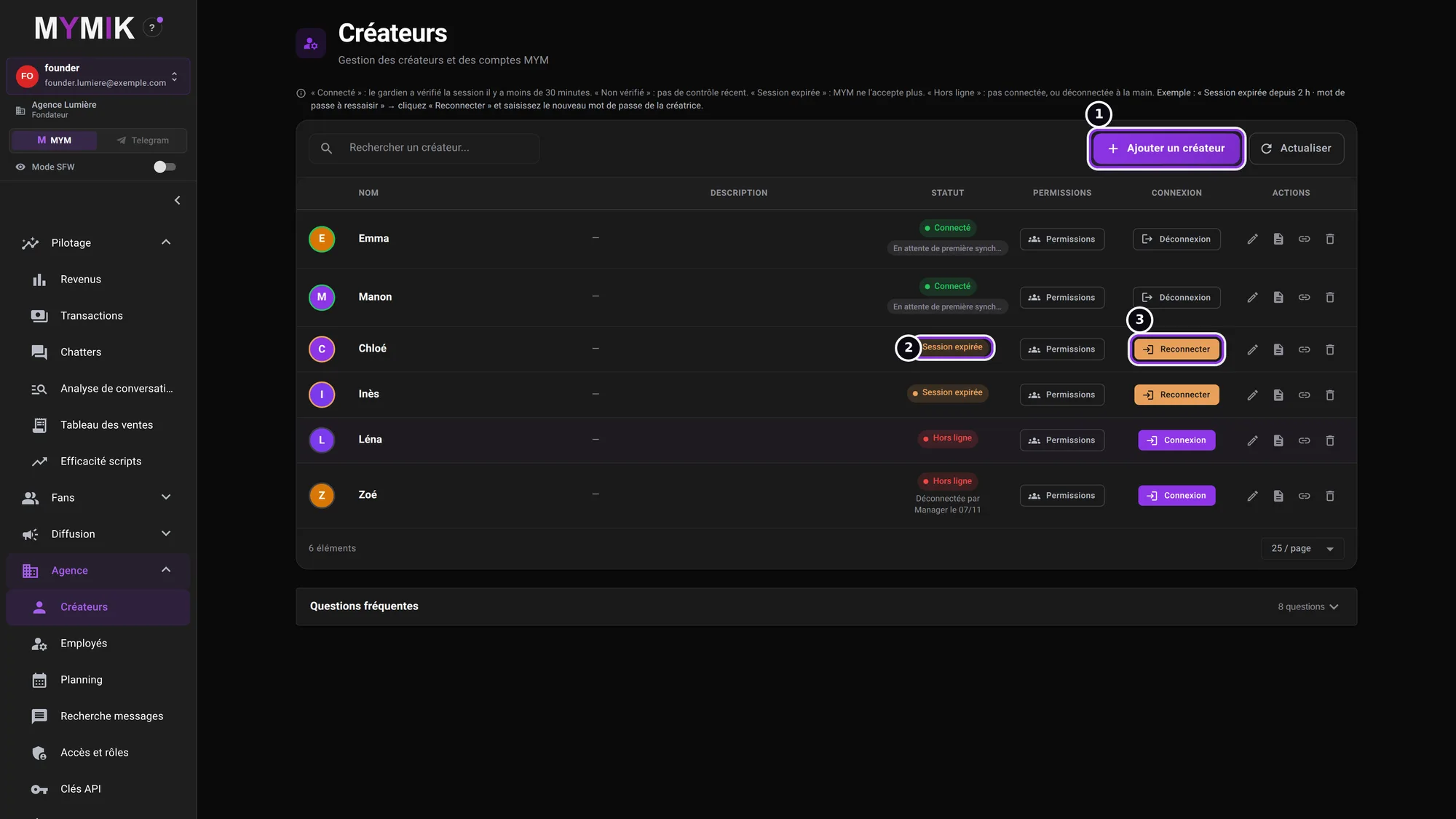 The creators of the fictional agency, in four different states.
2. Fill in « Nouveau créateur »
Type the creator’s name ❶ and her e-mail address ❷ (both are compulsory; the phone number and description are optional), then click Ajouter le créateur (“Add the creator”) ❸. The profile is created at once; it is not connected to MYM yet.
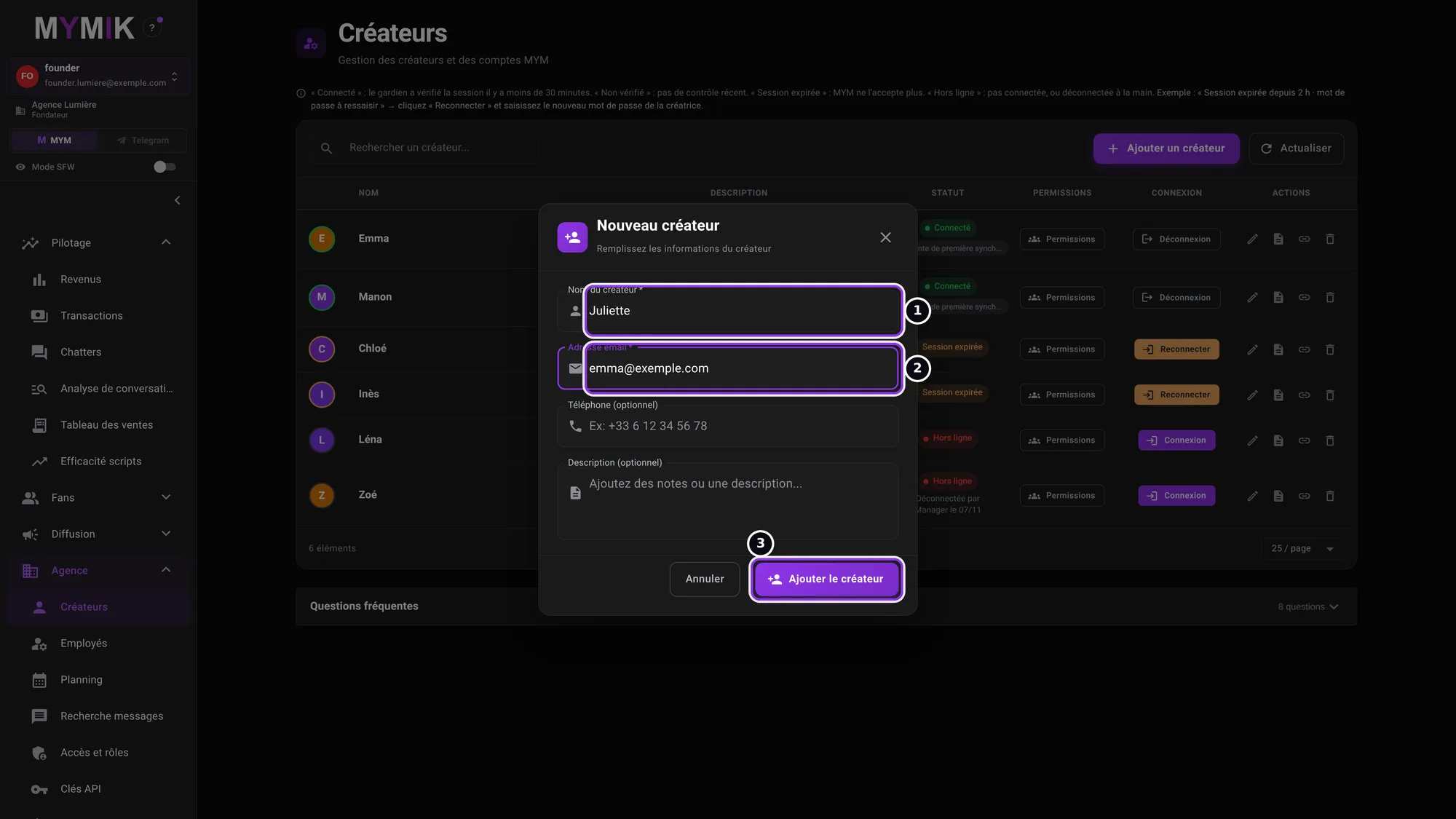 The « Nouveau créateur » form (made-up address).
3. The new creator is « Hors ligne »
The new row ❶ appears with the Hors ligne status and a Connexion button ❷. That is the next step.
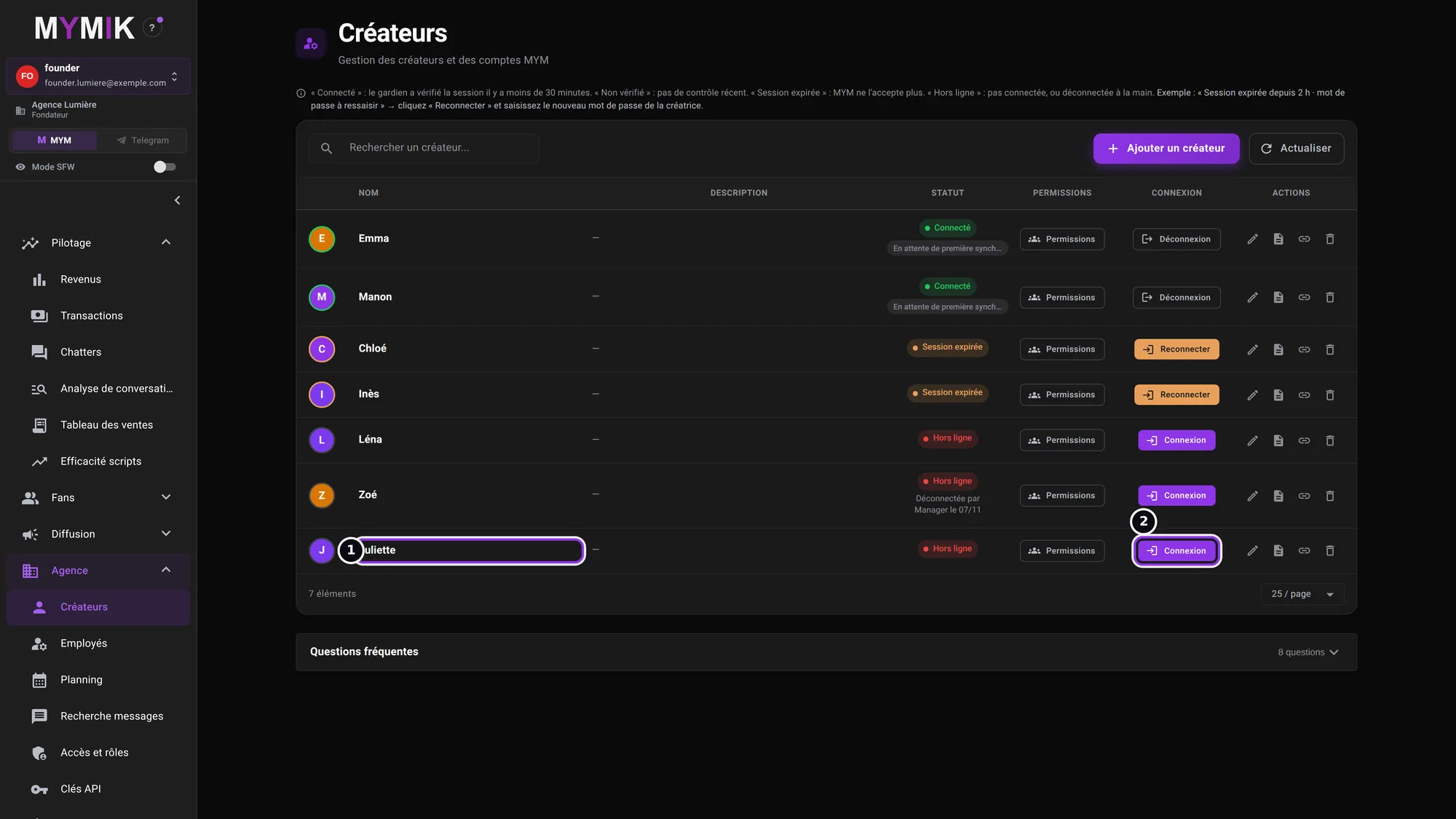 The profile has just been created: it is waiting to be connected.
2. Connect the creator
The MYM e-mail and password, then the « Connecté » status.
1. Type the MYM e-mail and password
Click Connexion: the Connecter @nom window opens (“Identifiants du compte MYM de la créatrice”, the creator’s MYM account credentials). Type the E-mail MYM ❶ and the Mot de passe MYM ❷: the field is masked, and the eye on the right reveals it if you want to check what you typed. Then Se connecter ❸.
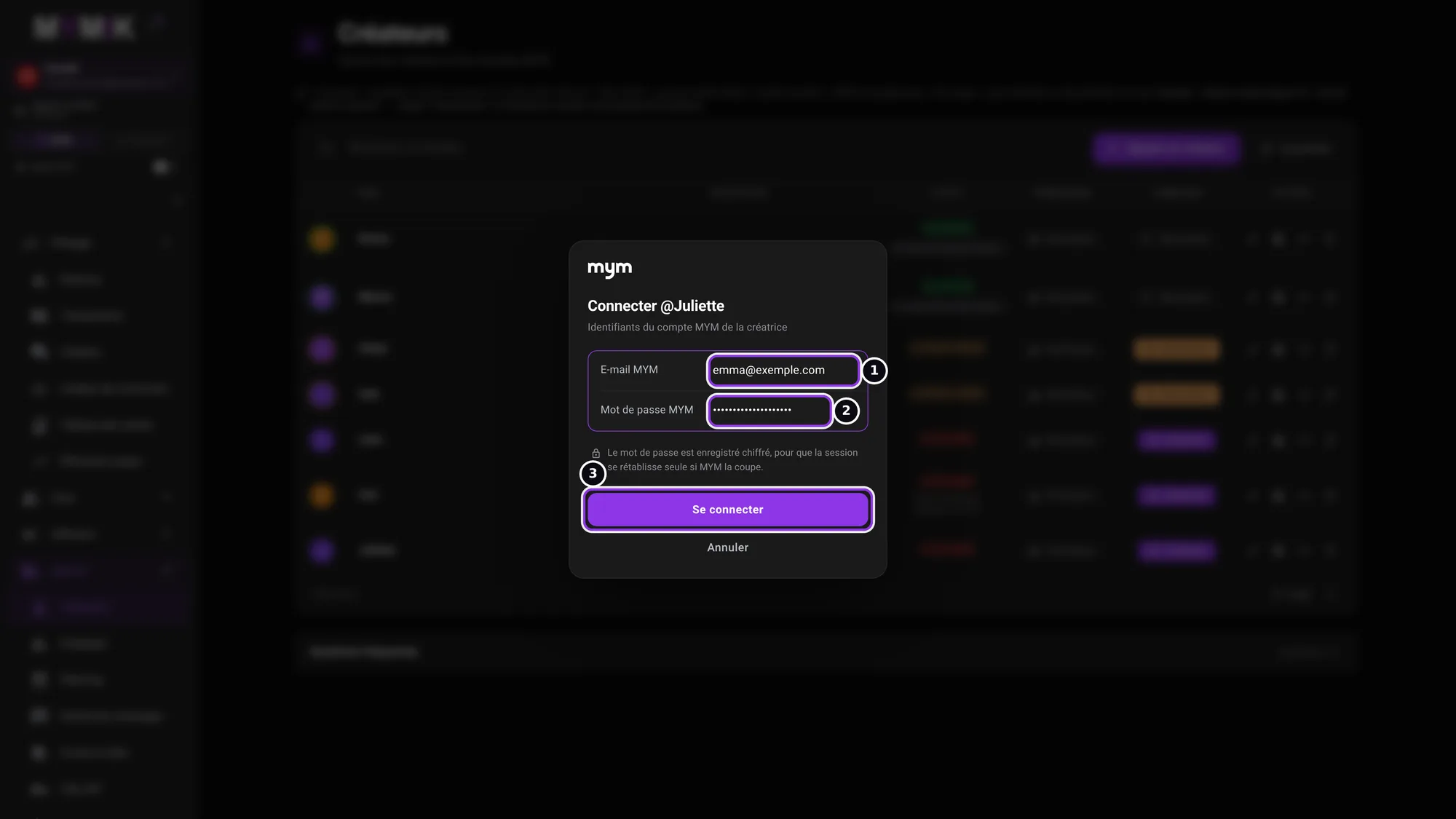 The password is masked: no password appears in this guide.
2. Wait for the connection to finish
The screen says « Connexion en cours… (environ 15 secondes) » (“Connecting… about 15 seconds”) ❶. Do not close the window and do not click several times: a single attempt is enough, and too many tries make MYM block the account.
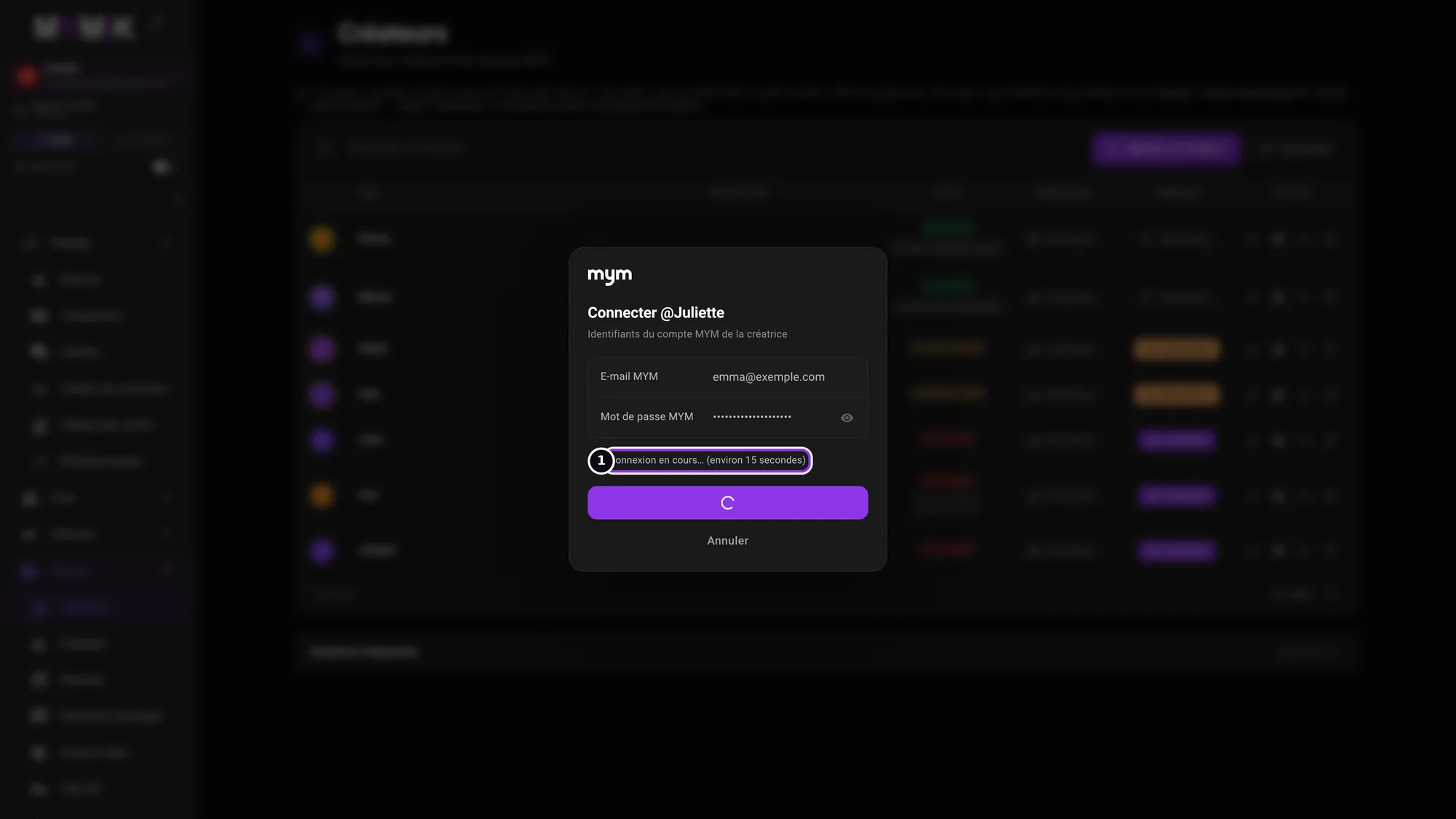 The connection is in progress.
3. « connectée. Le mot de passe est enregistré. »
When MYM accepts, the window shows « @nom connectée. Le mot de passe est enregistré. » (“@name connected. The password is saved.”) ❶ and closes by itself after a moment (the Fermer button closes it right away).
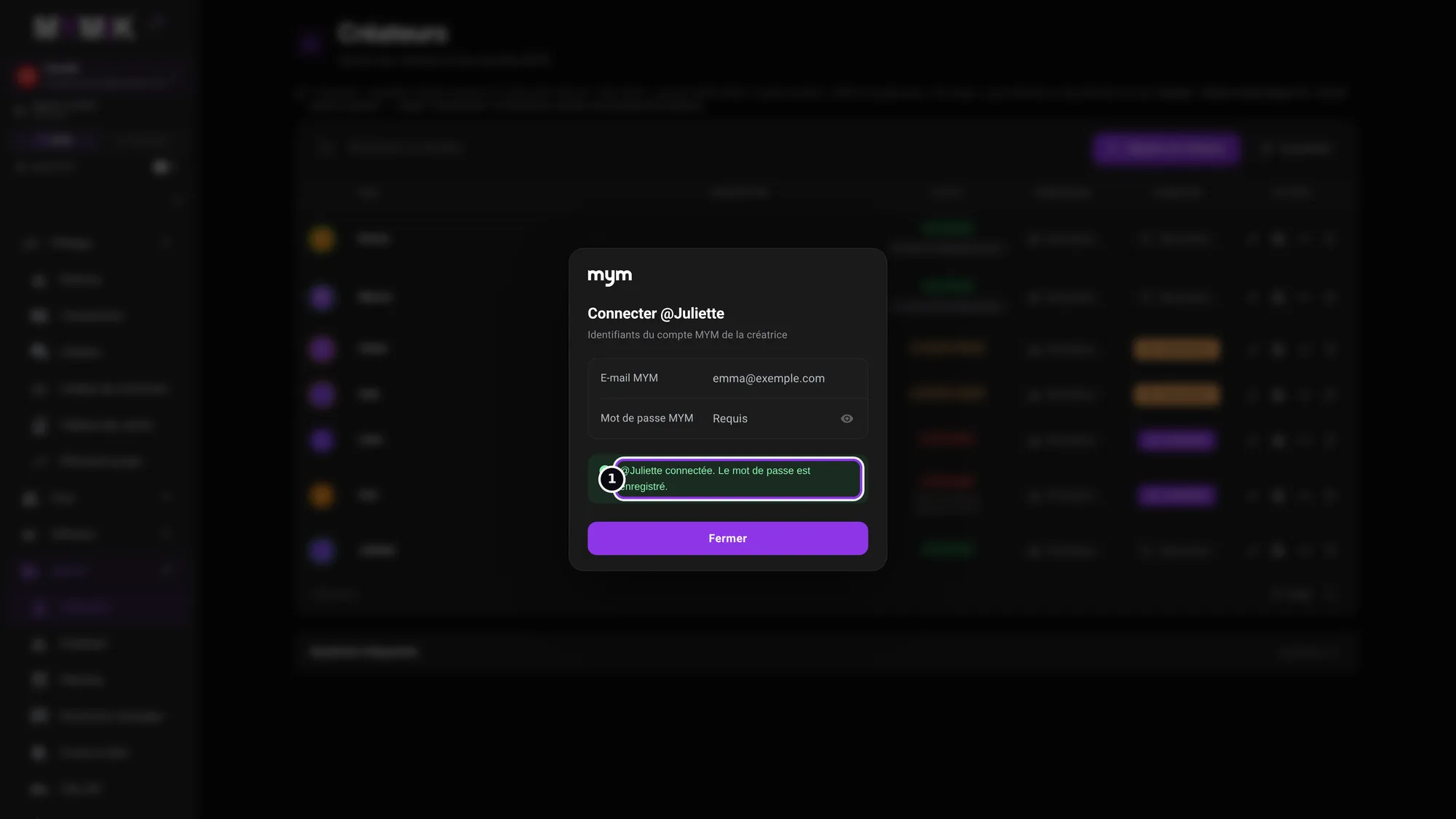 The success message.
4. Check the status in the list
On the creator’s row, the status is Connecté ❶ and the button becomes Déconnexion ❷. Use it only to put her offline on purpose: the row then notes « Déconnectée par Manager le 07/11 » (“Disconnected by Manager on 07/11”, with the real role and date) and the guardian does not reconnect her by itself.
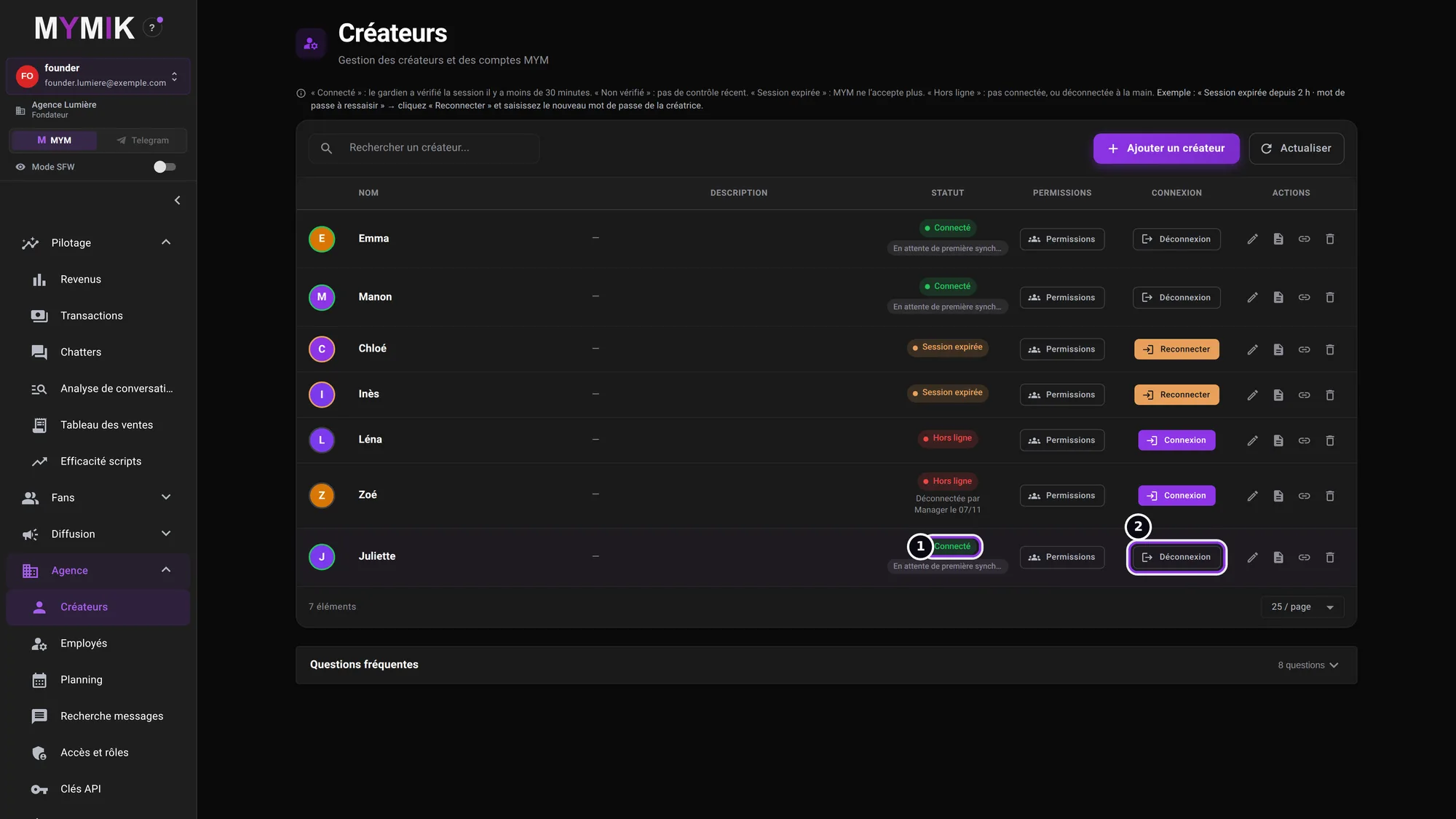 Juliette is connected.
3. Reconnect when the password has changed
« Session expirée »: all it takes is typing the right password again.
1. Spot « Session expirée »
When the creator changes her MYM password, or MYM cuts the session, the row turns to Session expirée ❶, with the cause (for example « identifiants refusés par MYM — mot de passe à ressaisir », “credentials refused by MYM — password to type again”) and the Reconnecter button ❷. Ask the creator for the new password, then click it.
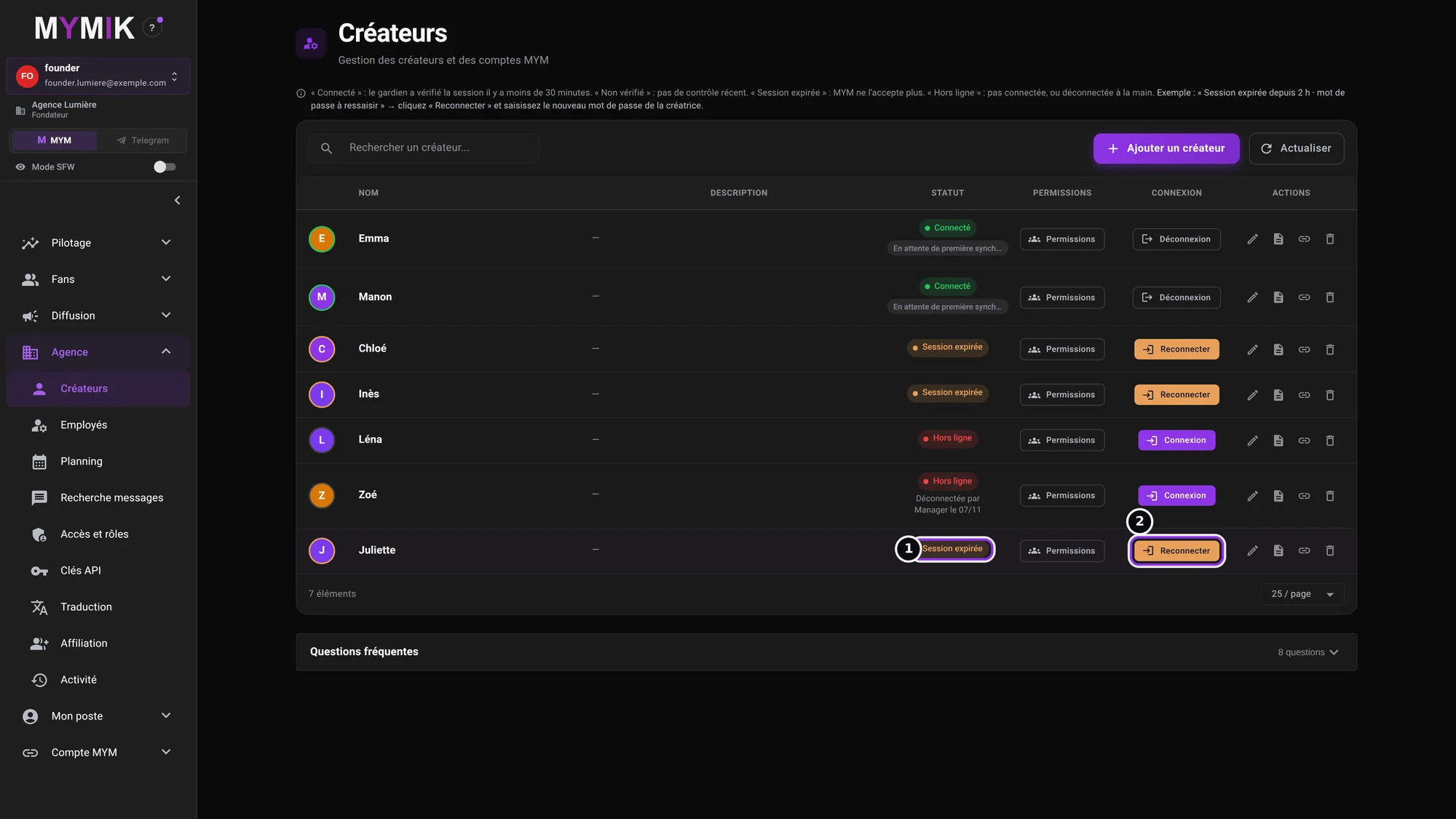 Juliette’s session has expired: the « Reconnecter » button appears.
2. An old password is refused
The window is the same as at the first connection. With the old password (or a typo), MYM refuses: « Identifiant ou mot de passe refusé par MYM. » (“Username or password refused by MYM.”) ❶. Nothing has changed, and the window stays open: correct the password ❷ then click « Se connecter » again, without reopening.
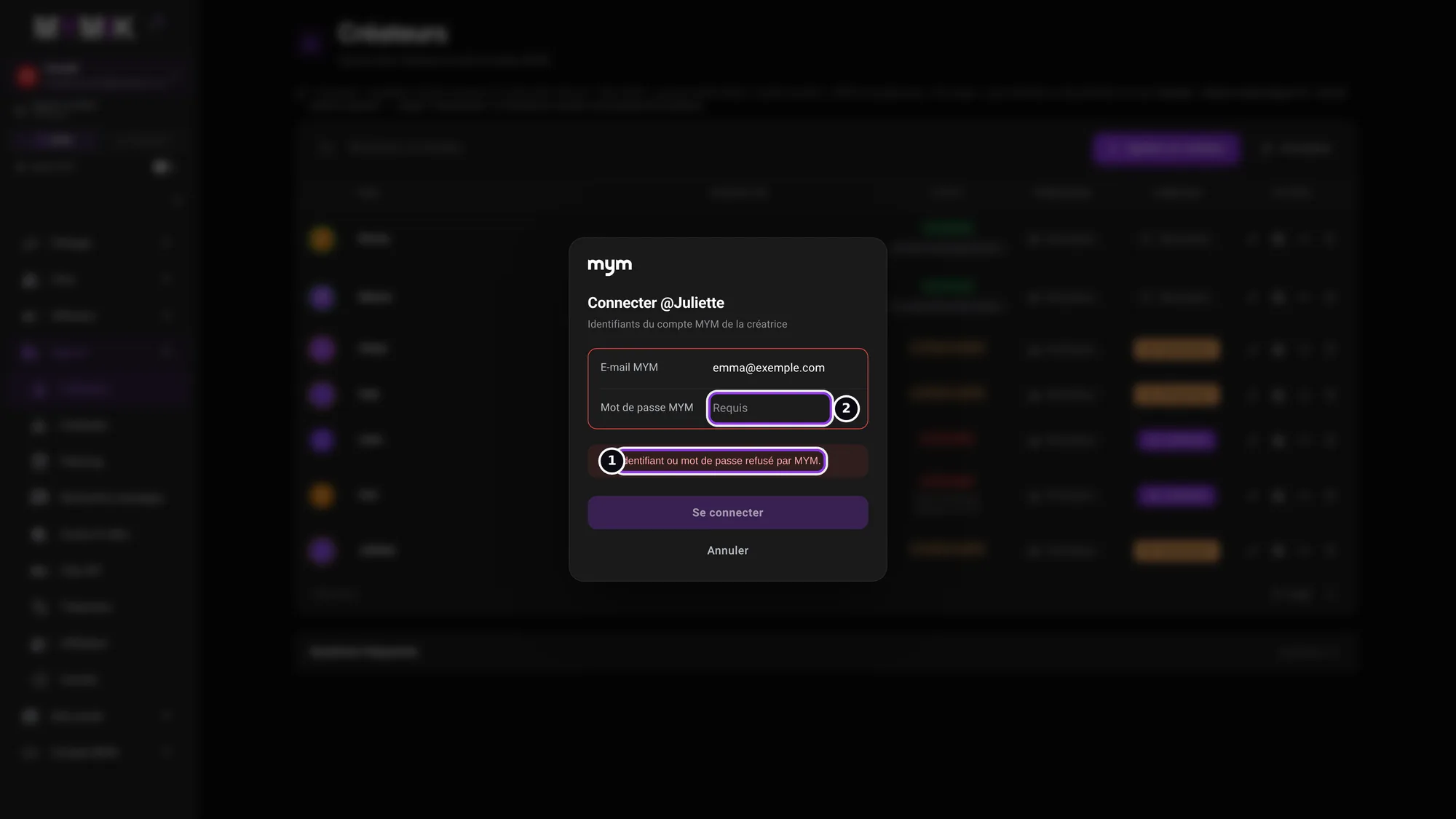 A refused password: the window stays open.
3. The right password goes through
With the right password, the window shows « @nom connectée. Le mot de passe est enregistré. » ❶: the new password replaces the old one, and the status turns back to Connecté.
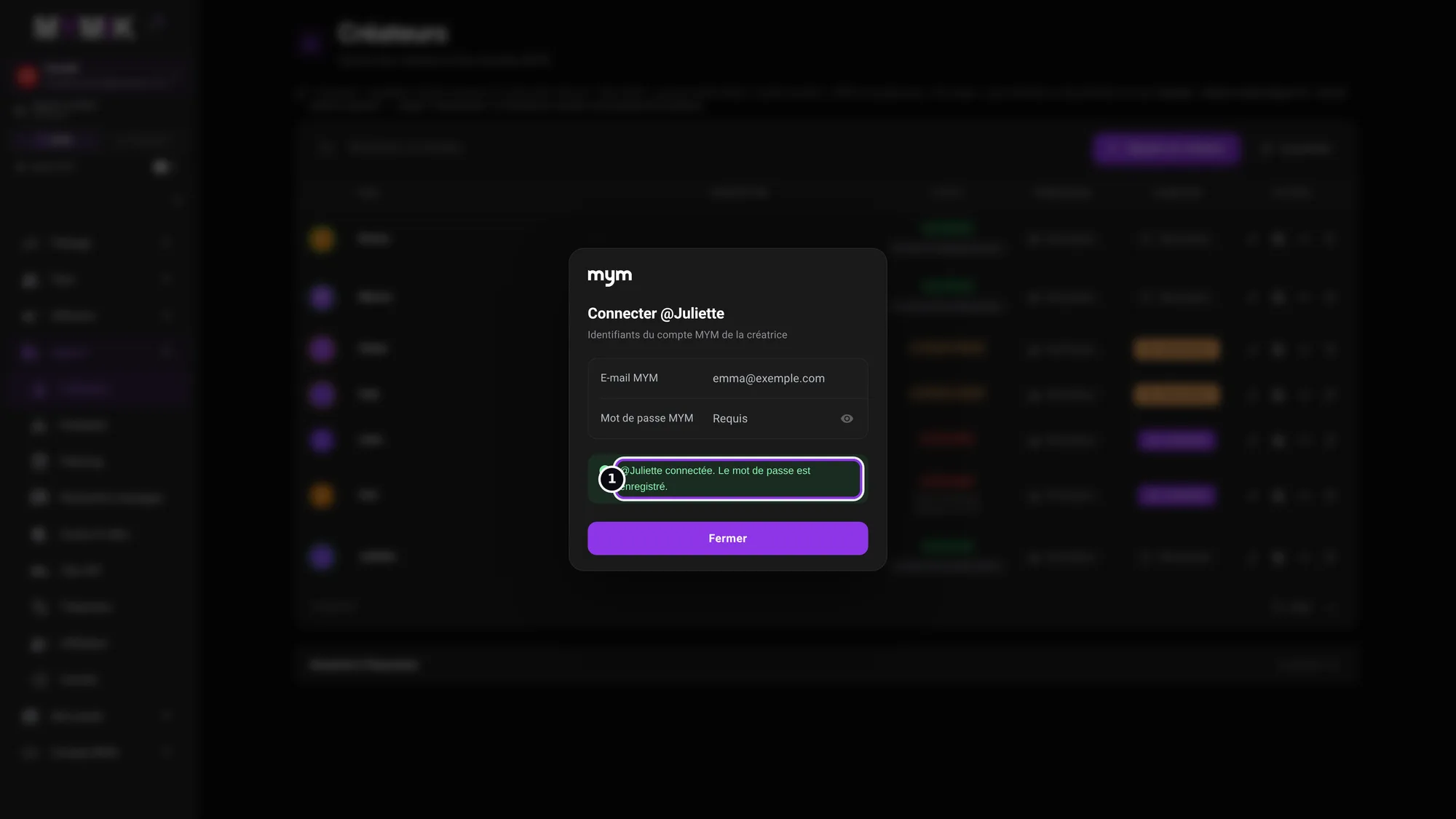 The reconnection succeeded.
4. When MYM refuses
The refusals the screen can explain to you.
1. The MYM account is already taken elsewhere
An MYM account can only be connected to one profile at a time. If you type it on another profile, MYMIK refuses: « Ce compte MYM est déjà connecté dans une autre agence (ou sur une autre fiche). La créatrice doit d’abord être déconnectée là-bas. » (“This MYM account is already connected in another agency (or on another profile). The creator must first be disconnected there.”) ❶. First disconnect the other profile (or ask the other agency to do it), then start again. Annuler (“Cancel”) ❷ closes the window.
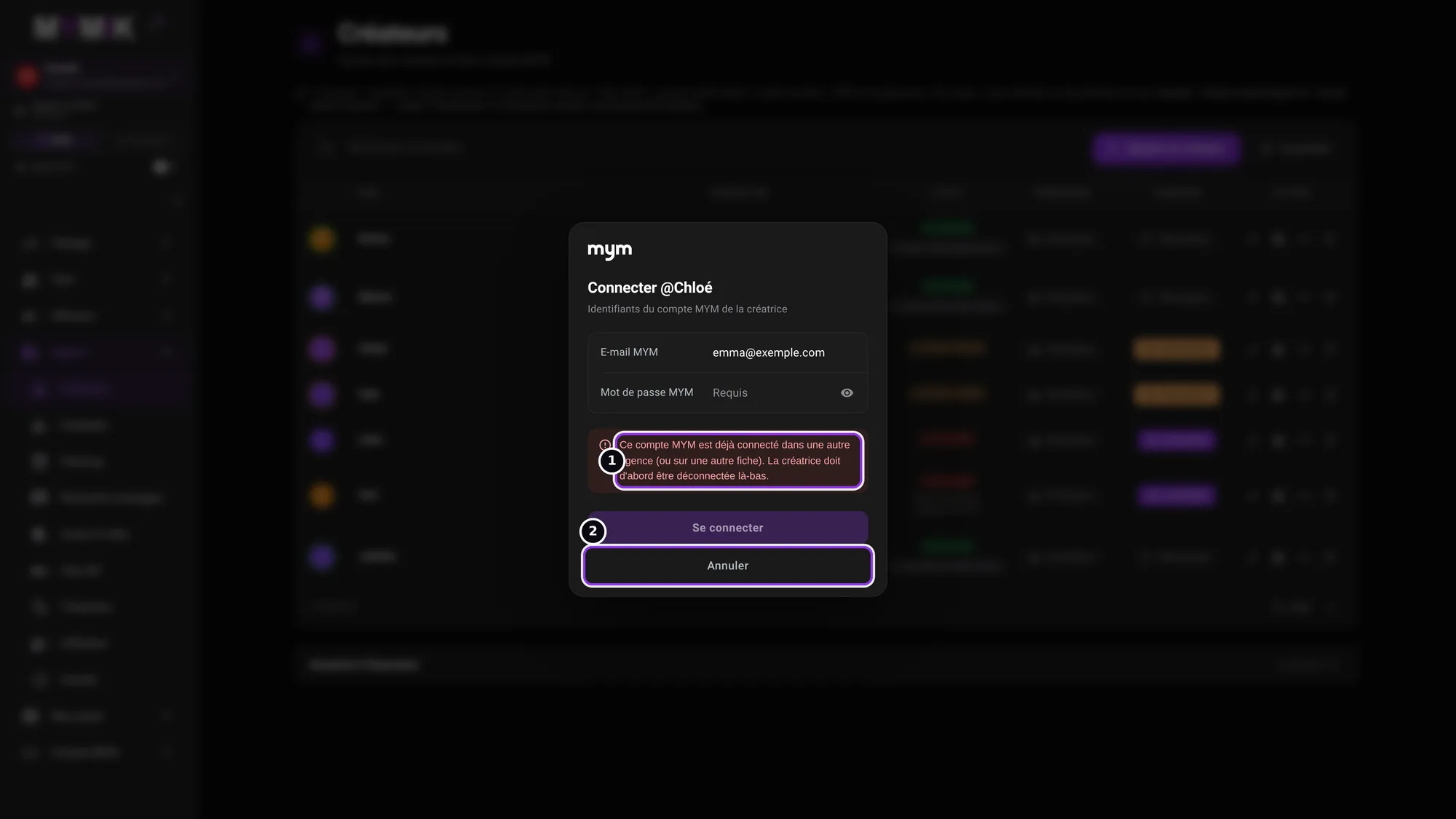 Here, the account is already held by Juliette’s profile: Chloé cannot take it.
2. MYM sends a verification code to the creator
Sometimes MYM asks for a code on top of the password (often by text message to the creator). The Connecter @nom window says so: « MYM a envoyé un code de vérification à @nom » (“MYM sent a verification code to @name”), with how it was sent (for instance « par SMS au », “by text to”, and a masked number), then « Demandez-le-lui et saisissez-le ici. » (“Ask her for it and type it here.”)
- Ask the creator for the code and type it in the Code reçu (“Code received”) field.
- Click Valider le code (“Confirm the code”).
- Wrong code: « MYM a refusé ce code. Vérifiez-le avec la créatrice et réessayez. » (“MYM refused this code. Check it with the creator and try again.”) Expired code: « Ce code a expiré. Demandez un nouveau code : MYM l’enverra à la créatrice. » (“This code has expired. Ask for a new code: MYM will send it to the creator.”) Then click Recevoir un nouveau code (“Get a new code”); the window shows « Nouveau code envoyé à la créatrice. » (“New code sent to the creator.”).
- Waited too long: « Le délai pour saisir le code est dépassé. Saisissez de nouveau le mot de passe MYM pour recevoir un nouveau code. » (“The time to type the code has run out. Type the MYM password again to get a new code.”)
No screenshot for this case
The code screen only shows when MYM sends a real code. If it does not work, write to us in private at @MymikAppBot.
5. Troubleshooting
Symptom shown → cause → what to do. Quoted messages are those of the screen.
| What you see | Cause | What to do |
|---|---|---|
| « Identifiant ou mot de passe refusé par MYM. » | The password is wrong or has changed. | Ask the creator for the current password (she can test it on MYM), type it again with the eye to check, then « Se connecter ». Do not multiply attempts. |
| « Ce compte MYM est déjà connecté dans une autre agence (ou sur une autre fiche). » | The account is already held by another profile, in your agency or elsewhere. | Disconnect the other profile first (« Déconnexion »), then connect this one. If the other profile is in another agency, write to us. |
| « MYM limite les tentatives : réessayez dans quelques minutes. » | Too many recent attempts. | Wait a few minutes before trying again. |
| « MYM bloque les connexions de ce compte après trop d’essais, pendant environ 10 minutes. » | MYM has locked the account. The password is already saved. | Do not try again: each attempt extends the lock. The server will reconnect the creator by itself afterwards. |
| « MYM refuse temporairement les connexions depuis cette adresse. Réessayez plus tard. » | MYM is temporarily blocking connections from our server. | Try again later; if it lasts, write to us. |
| « La connexion par mot de passe n’est pas encore activée. » or no « Connexion » button | Connecting from the web is not open for your agency. | Write to us in private at @MymikAppBot: we will check it with you. |
| « Votre rôle ne permet pas de connecter cette créatrice. » | Your role does not have this right. | Ask a manager or the founder (guide 8 for roles). |
| « MYM a refusé ce code. Vérifiez-le avec la créatrice et réessayez. » (“MYM refused this code…”) | The code typed is wrong. | Check it again with the creator, then « Valider le code ». |
| « Ce code a expiré. Demandez un nouveau code : MYM l’enverra à la créatrice. » (“This code has expired…”) | The code is too old. | « Recevoir un nouveau code », then type the new one. |
| « Le délai pour saisir le code est dépassé. » (“The time to type the code has run out.”) | The window waited too long for the code. | Type the MYM password again: MYM sends a new code. |
| « La connexion n’a pas abouti. Vérifiez le statut de la créatrice avant de réessayer. » | The result is not clear. | Click « Actualiser » (refresh) in the list and look at the status before starting again. |
Still stuck?
Write to us in private at @MymikAppBot with your agency, the creator and the exact text displayed. The MYMIK team
MYMIK guide no. 1, version of 12/11/2026 (MYM verification code typed on the web).
Last updated on
MYMIK documentation
Step-by-step guides to use MYMIK day to day, with the real screens of app.mymik.fr.
Guide 2 · Move from the desktop app to the web before 3 December
Your address, your login, your agencies, your accounts: what changes when the desktop app stops on 3 December 2026, and what stays the same.