Guide 3 · Mass DM and paid push: which to choose, to whom, how to send it
Two ways to send a message to many fans. The Mass DM goes into the conversations, with recipients and a sending you set; the push goes through MYM, with its own limits. This guide helps you choose, then shows each screen.
How to read this guide
The screens are the real MYMIK screens on the web, with a fictional agency (“Agence Lumière”), fictional creators (including Emma) and fans with made-up nicknames: no real data. The numbered black dot and the purple outline show where to click or look; the same number is used in the text.
Language of the screens
The MYMIK interface is not translated yet: the screens stay in French. For each step, the text gives the exact French label shown on screen, followed by its English meaning.
The order to remember
- Choose: Mass DM (in the conversation, adjustable recipients and exclusions) or Push (through MYM, limits set by MYM).
- Mass DM: write the message, choose free or paid, the teaser, the recipients and the exclusions.
- Set the sending: now or scheduled, direct or at the pace you want, then follow the row in the list.
- Push: targets, compulsory media, price, then send or schedule; the Historique des pushs keeps the trace.
0. Before you start
What to know in one minute.
Who, where
- Both tools are in the Diffusion menu: Pushs (MYM officiel), Mass DM (MYMIK) and Historique des pushs (MYM officiel).
- They are open to all agencies. If an entry does not appear in your menu, write to us: we will check it with you.
A golden rule
- Nothing goes out before “Envoyer” (send). Filling in the form, choosing recipients or opening the calendar sends nothing.
- A fan who wrote to you with no answer, or was recently reached, can be “sauté” (skipped) at preparation: the list says so.
Speed
In direct send, everything goes “as fast as MYM allows”: the duration depends on MYM and this guide promises none. To control the pace, use pace mode (step 7).
Which to choose?
| Mass DM (MYMIK) | Push (official MYM) | |
|---|---|---|
| Where the message goes | In each fan’s conversation, from MYMIK. | A group message sent through MYM. |
| Recipients | Active subscribers, former subscribers, interested fans, segments (buyer types), fan lists; precise exclusions. | Subscribers, former subscribers, interested fans. |
| Limits | “Illimité” (unlimited): the push suggests the Mass DM when its quota is used. You set your exclusions. | Subscribers: unlimited. Former subscribers and interested fans: 1 push every 7 days each (limits set by MYM). |
| Media | Optional: text only, free media, or PPV (media + price). | Compulsory: at least 1 media, 5 at most. |
| Price | Paid from €5 to €999.99 (with at least one media), or free. | 0 = free, or from €5 to €1,000; promo price possible, with a duration. |
| Sending | Direct (as fast as MYM allows) or pace mode; “Envoyer maintenant” (send now) or “Planifier” (schedule), Paris time. | “Programmer”: date and time of your computer, at least 10 minutes from now; MYM does the sending. |
1. Write the Mass DM
The list, the message, the price, the teaser, the recipients.
1. Diffusion › Mass DM: the list of sends
Open Diffusion, then Mass DM ❶, and check the creator at the top. Each row follows its send: « Préparation… » (preparing) while the fans are counted, then « En cours · envoyés / total » (in progress · sent / total), then « Envoyé » (sent). Stop pauses, Reprendre (resume) restarts where the send stopped, and Annuler l’envoi (“Cancel the send”, ⋯ menu) stops for good: what has gone out stays out. The Écarts (“Skipped”) column ❸ gives the number of skipped fans: click the number, each skipped fan is listed with its reason (excluded, unread message, already reached, held by a chatter…). + Nouveau Mass DM ❷ opens the form.
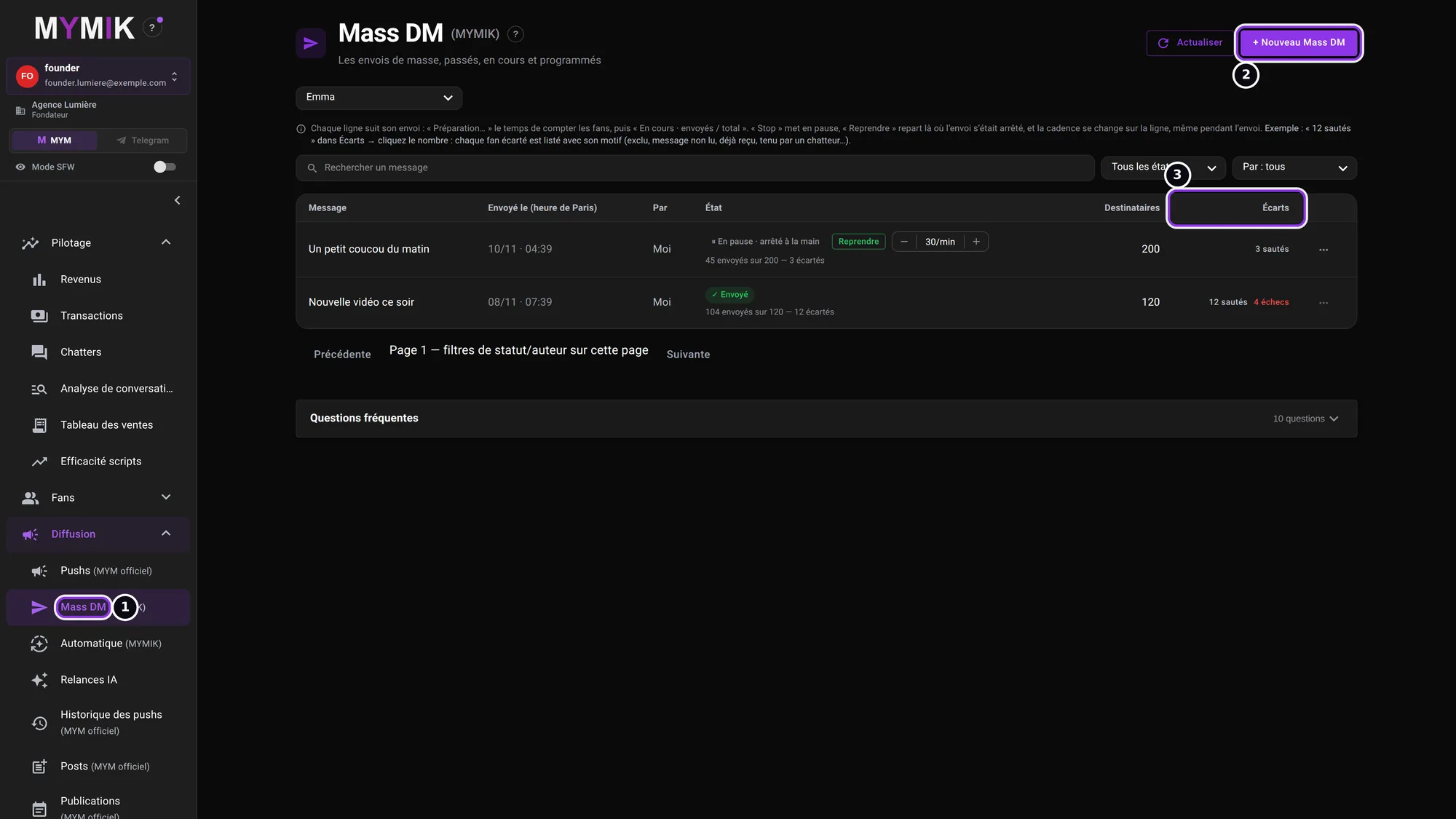 Two sample sends: one sent (12 skipped, 4 failed) and one paused. Under the list, « Questions fréquentes » answers the usual questions.
2. Write the message: free or paid
A single message goes to everyone, 2,000 characters at most; no {firstname}, it would arrive as is. Write it ❶. Gratuit (free) ❷: the text alone, or the free media. Payant (paid) ❸: a PPV the fan unlocks. The « Message unique » / « ✦ Smart Push » selector is described in guide 5.
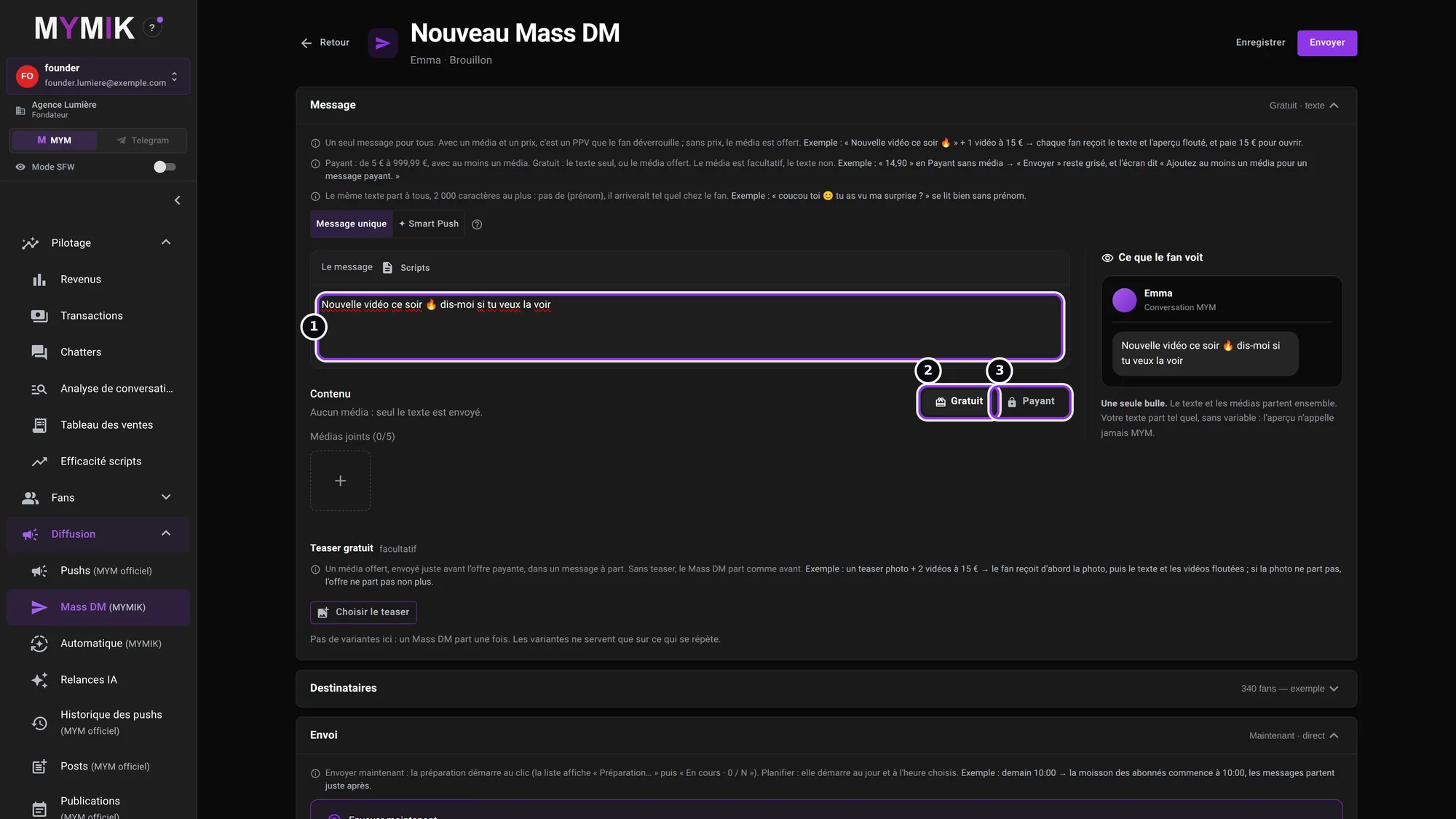 The « Nouveau Mass DM » form; on the right, the « Ce que le fan voit » (“What the fan sees”) preview. Nothing is sent.
3. Paid: a price and at least one media
In Payant ❶, the price runs from €5 to €999.99 (shortcuts 10, 20, 50, 100, 200 €), with at least one media ❷ (up to 5). Without media, Envoyer ❸ stays greyed out and the screen says « Ajoutez au moins un média pour un message payant. » (“Add at least one media for a paid message.”) The text stays compulsory, the media is optional in Gratuit.
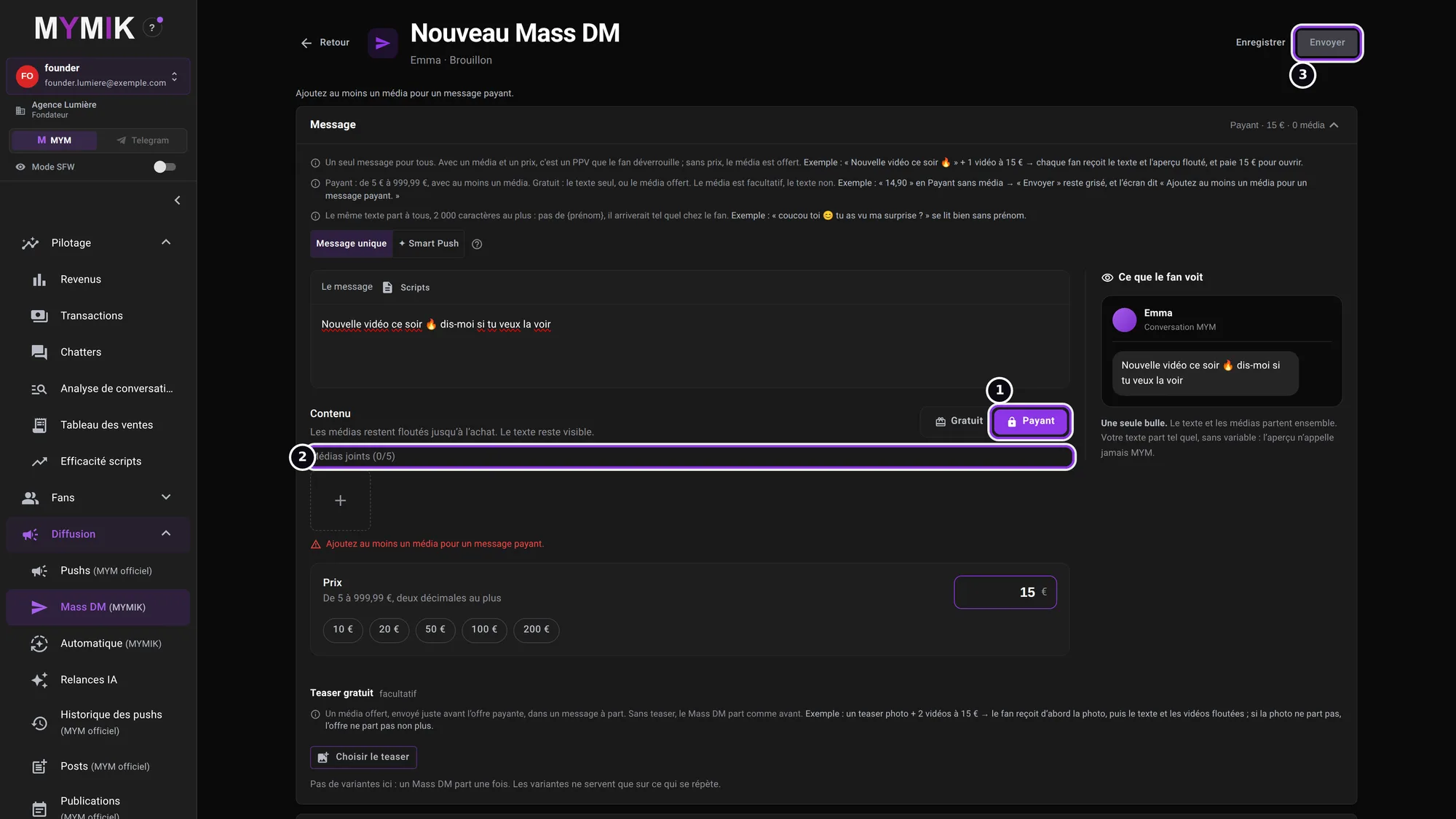 Price at €15, no media yet: the send button is greyed out.
4. Free teaser (optional)
The free teaser ❶ is a free media, sent just before the paid offer, in a separate message. Choisir le teaser (“Choose the teaser”) ❷ opens your galleries. If the teaser photo does not go out, the offer does not either. Without a teaser, the Mass DM goes out as before.
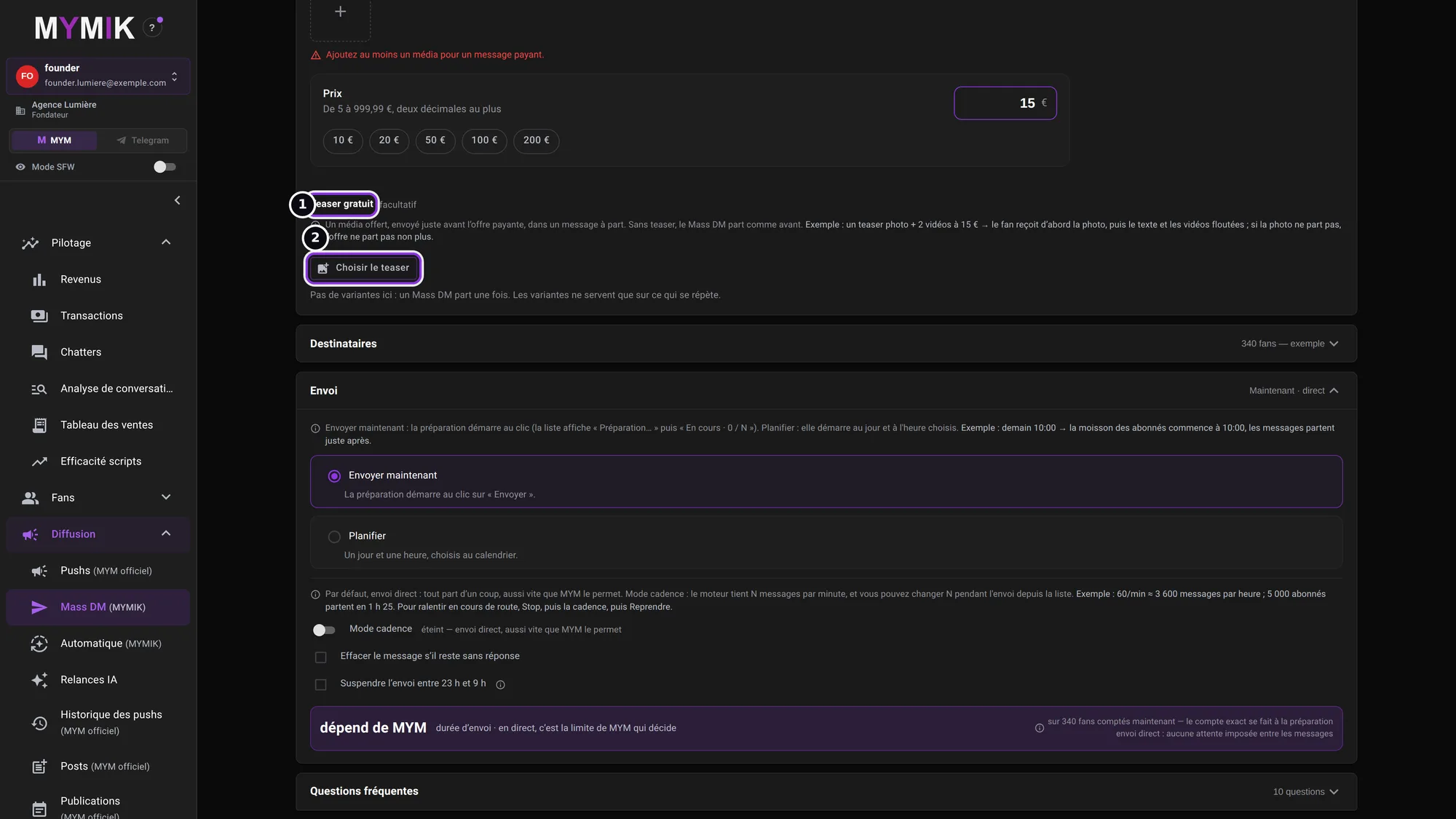 The « Teaser gratuit » section.
5. Recipients: include, exclude
Expand Destinataires. On the left, Inclure (“Include”) ❶: by default, all active subscribers; you can add former subscribers and interested fans (nothing goes to them until ticked), segments (buyer types: Baleine, Régulier, Potentiel…), fan lists (guide 7) and « Uniquement les fans en ligne » (“Only fans online”). On the right, Exclure (“Exclude”) ❷: everything ticked is removed, even if it was included; by default the “do not contact” fans and those « Avec un message non lu » (“With an unread message”) are already ticked. Déjà touchés récemment (“Recently reached”) ❸ sets aside fans whose last exchanged message is under 12 h old. These two reasons are decided at preparation: the send’s row shows them as “sautés” (skipped).
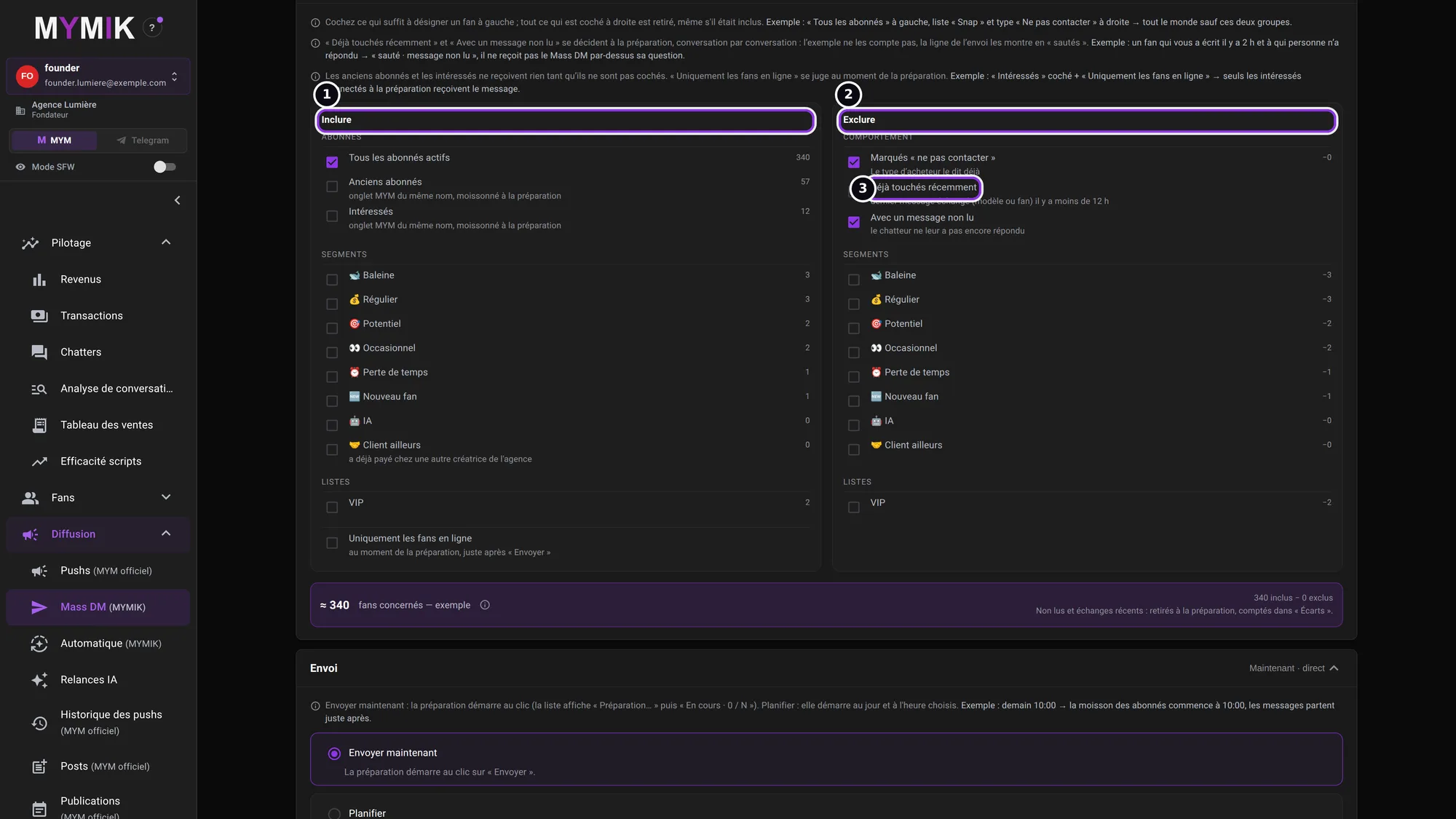 Include and Exclude. The number at the bottom (“≈ 340 fans concernés — exemple”) is an example: the real number is counted at preparation, right after “Envoyer”.
2. Set the sending
Now or later, direct or at the pace you want.
1. Send now or schedule
In Envoi (“Sending”): Envoyer maintenant (send now) — preparation starts on the click of “Envoyer” — or Planifier (schedule) ❶: a day and time chosen on the calendar. Une fois (once) sends on the chosen date; Chaque jour (every day) ❷ prepares a series of daily sends (this guide does not detail it). The Heure (time) ❸ is read in Paris time, whatever your computer’s time zone. Nothing goes out before the set time; a past date blocks the send. Preparation starts at the set time and the messages go out right after.
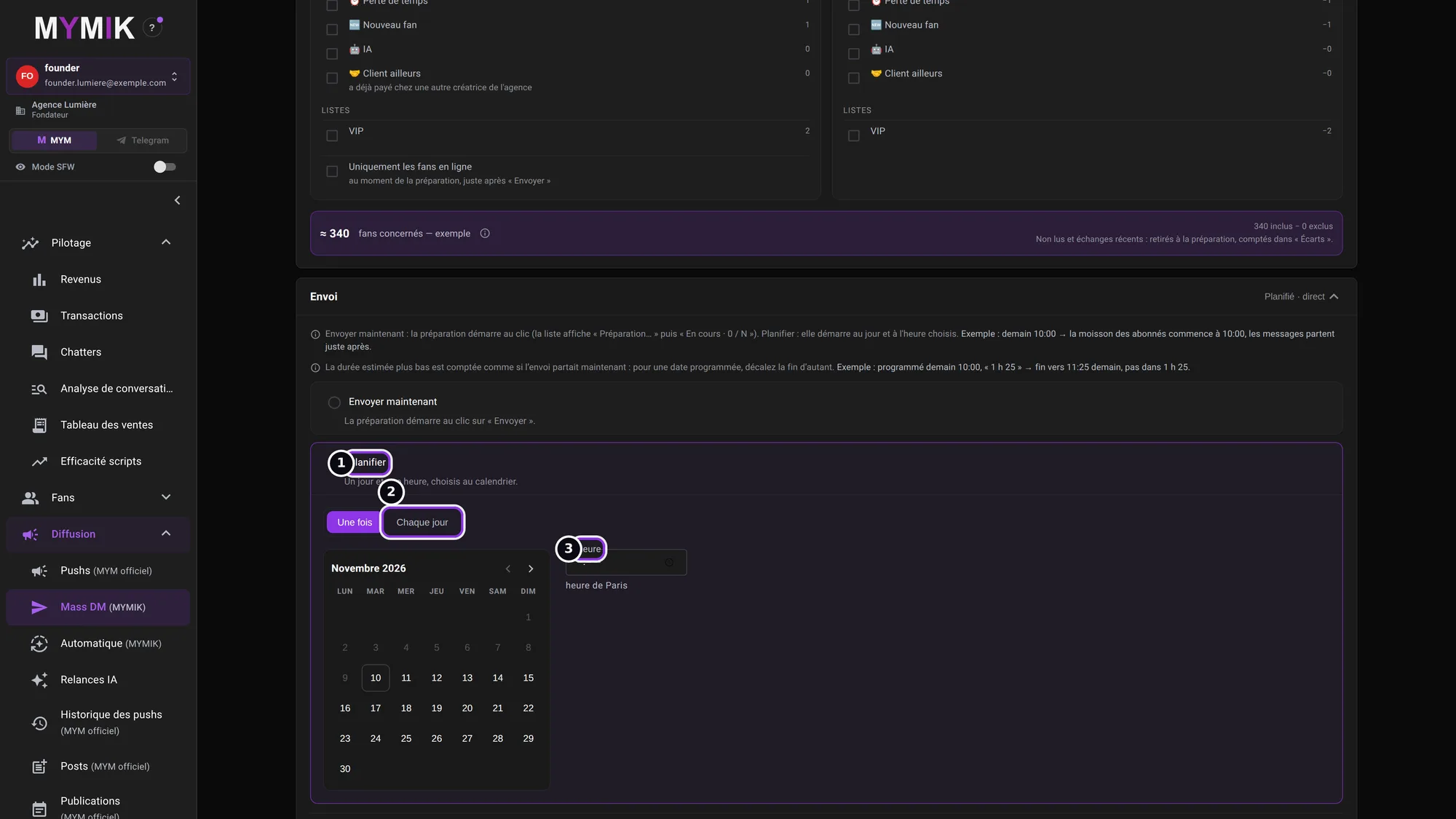 « Planifier » chosen: the calendar and the time appear. Nothing is sent.
2. Speed: direct send or pace mode
By default the send is direct: everything goes at once, as fast as MYM allows, and the duration depends on MYM. Mode cadence (“Pace mode”) ❶ makes the engine hold N messages per minute, N being your choice; you can change it during the send from the list (Stop, then the pace, then Reprendre). Effacer le message s’il reste sans réponse (“Erase the message if it stays unanswered”) ❷ removes the message after a delay you choose (1 h to 168 h) if it was neither read nor answered; the box is greyed out when the message carries a media. Suspendre l’envoi entre 23 h et 9 h (“Pause the send between 11 pm and 9 am”) ❸ pauses the send at night.
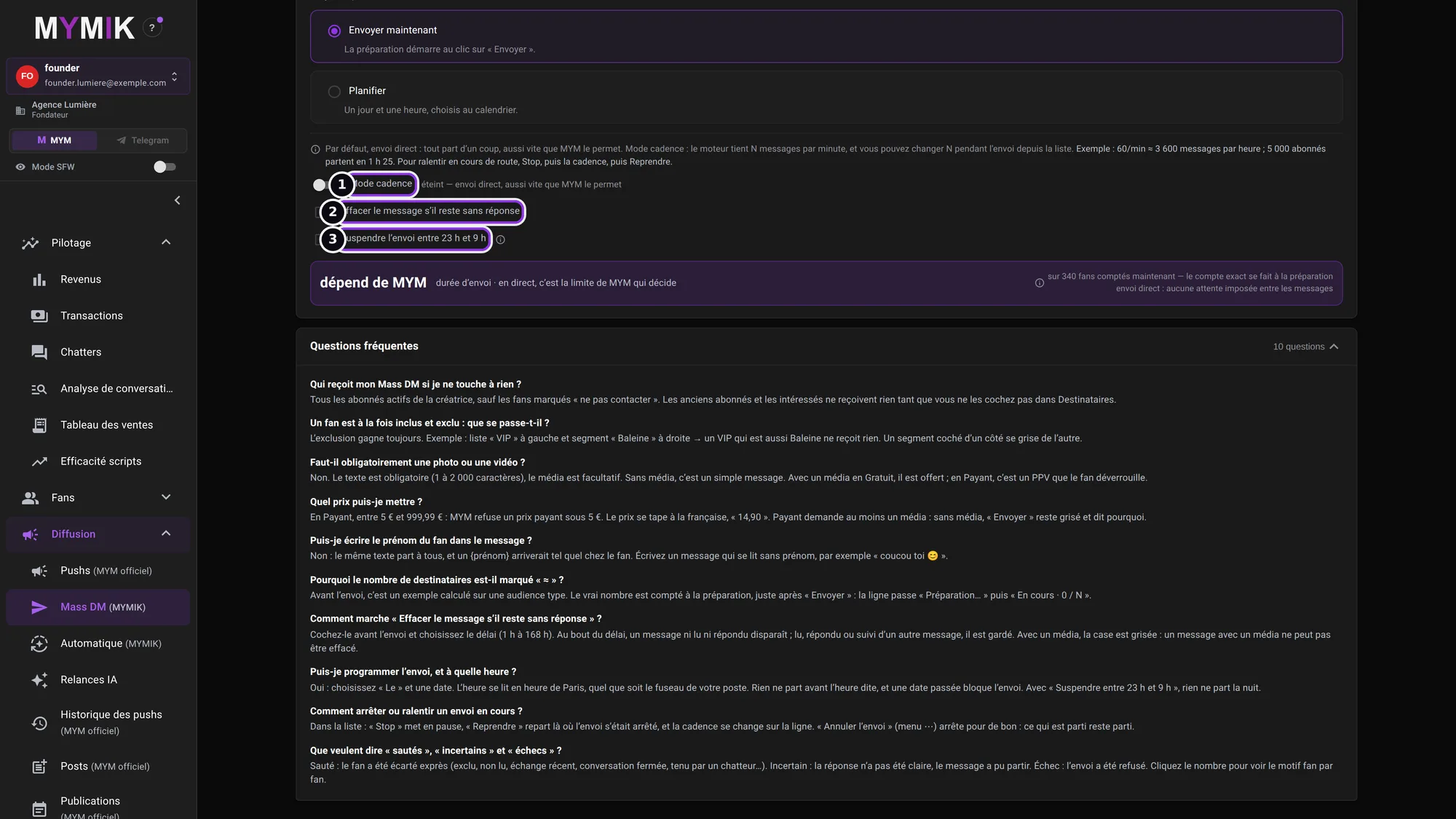 Pace mode off: direct send. The « dépend de MYM » (“depends on MYM”) block reminds you that the duration of a direct send is MYM’s limit.
No duration is promised
The small figures the screen shows above the pace mode illustrate a calculation: they guarantee nothing. In direct send, MYM’s limit decides; with the pace, the duration follows the number of messages per minute you choose.
3. The paid push (official MYM)
Limits set by MYM, a compulsory media.
1. Diffusion › Pushs: targets, media, message
Open Pushs: the Nouveau Push tab prepares the send, Historique the past pushes. The recipients: Abonnés (subscribers, unlimited), Anciens abonnés (former subscribers) ❷ and Intéressés (interested fans) (1 push every 7 days each) — limits set by MYM; fans inactive for over a year do not receive pushes to former subscribers and interested fans. When the quota is used, the screen offers the Mass DM (unlimited), the first free day, or removing the target. A free teaser is possible. Média ❸ is compulsory at MYM: at least 1, 5 at most, from the Cloud or « Importer » (import). The message is 1,000 characters at most; a word banned by MYM blocks the send. Programmer (“Schedule”) ❶ picks a date (step 10).
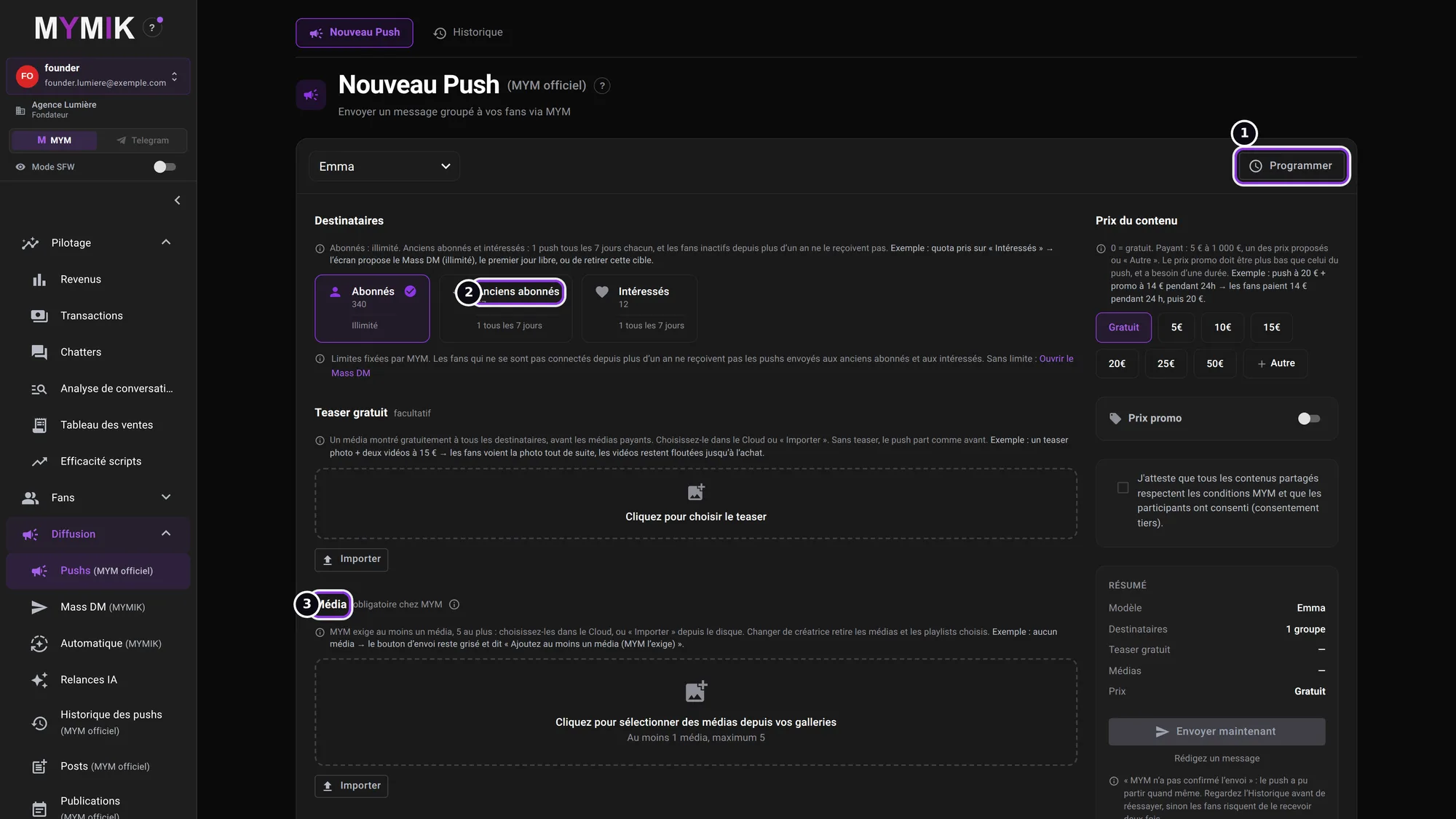 The « Nouveau Push » page: targets and teaser on the left, price and summary on the right; the « Envoyer maintenant » button stays greyed out without media or message.
2. The price, the promo price and the consent
Prix du contenu (“Content price”) ❶: 0 = free; paid from €5 to €1,000, one of the proposed prices (5, 10, 15, 20, 25, 50 €) or « Autre » (other). Prix promo (“Promo price”) ❷: it must be lower than the push’s and needs a duration (screen example: €20 push + €14 promo for 24 h → fans pay €14 for 24 h, then €20). Tick the participants’ consent attestation, then read the Résumé (summary) before « Envoyer maintenant ».
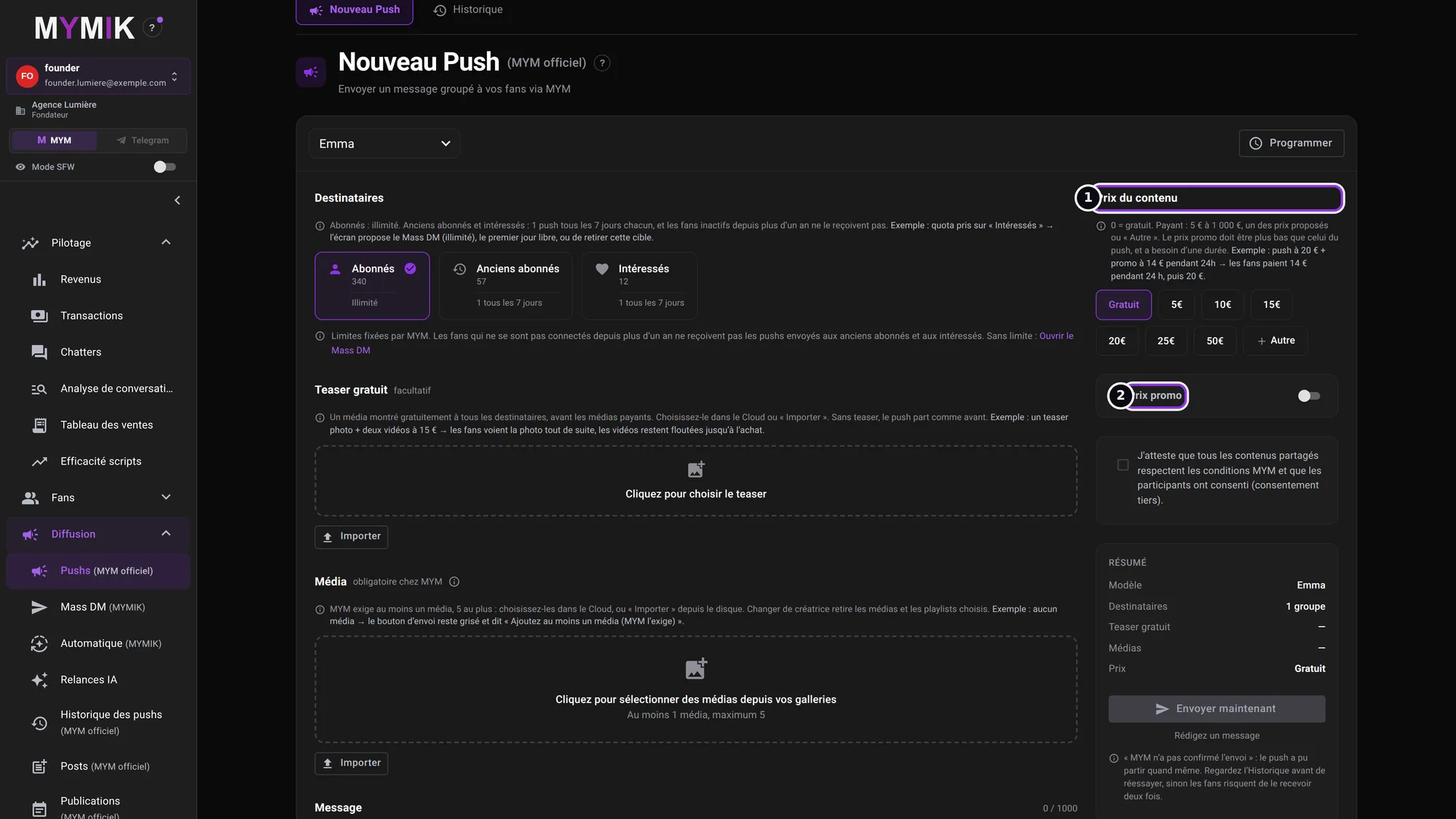 The proposed prices and the « Prix promo » switch.
3. Schedule a push
Programmer opens Date et heure (heure de votre poste) (“Date and time, your computer’s time”) ❶: “Le push sera envoyé automatiquement à cette date” (the push will be sent automatically on that date) ❷. The time must fall at least 10 minutes from now. MYM sends the push at the set time: you have nothing to leave open. You will then find it in the Historique des pushs.
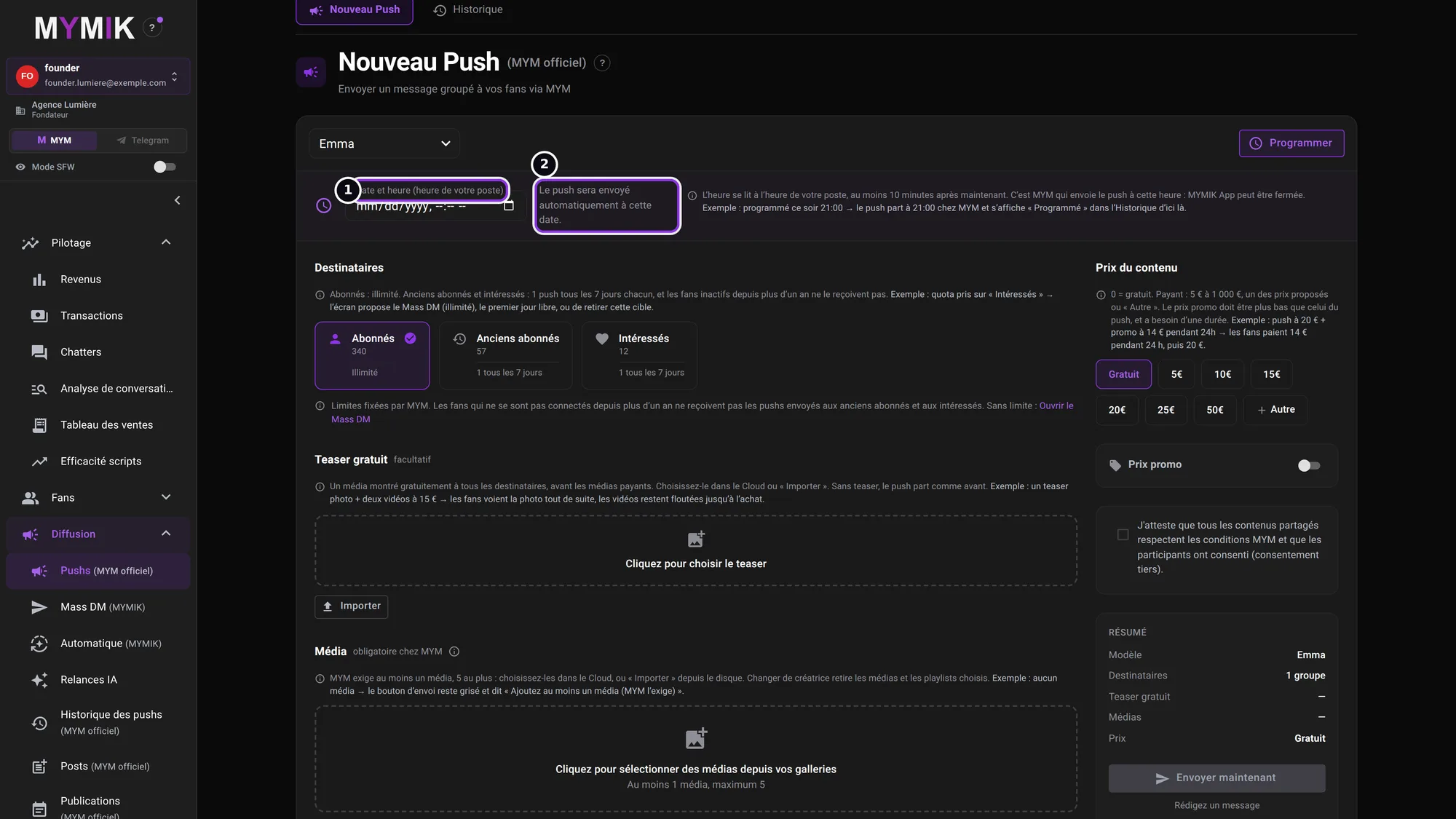 The date and time field, empty: nothing is scheduled.
4. Historique des pushs: what went out
Historique des pushs (MYM officiel) (“Push history”) ❶ lists “the pushes sent and scheduled, with their MYM stats”: message, date (Paris time), author, target, state, recipients and results. Filter by state ❷, by target or by period (last 30 days by default). Rafraîchir (“Refresh”) ❸ re-reads the list at MYM. Check it before sending again a push whose sending was not confirmed.
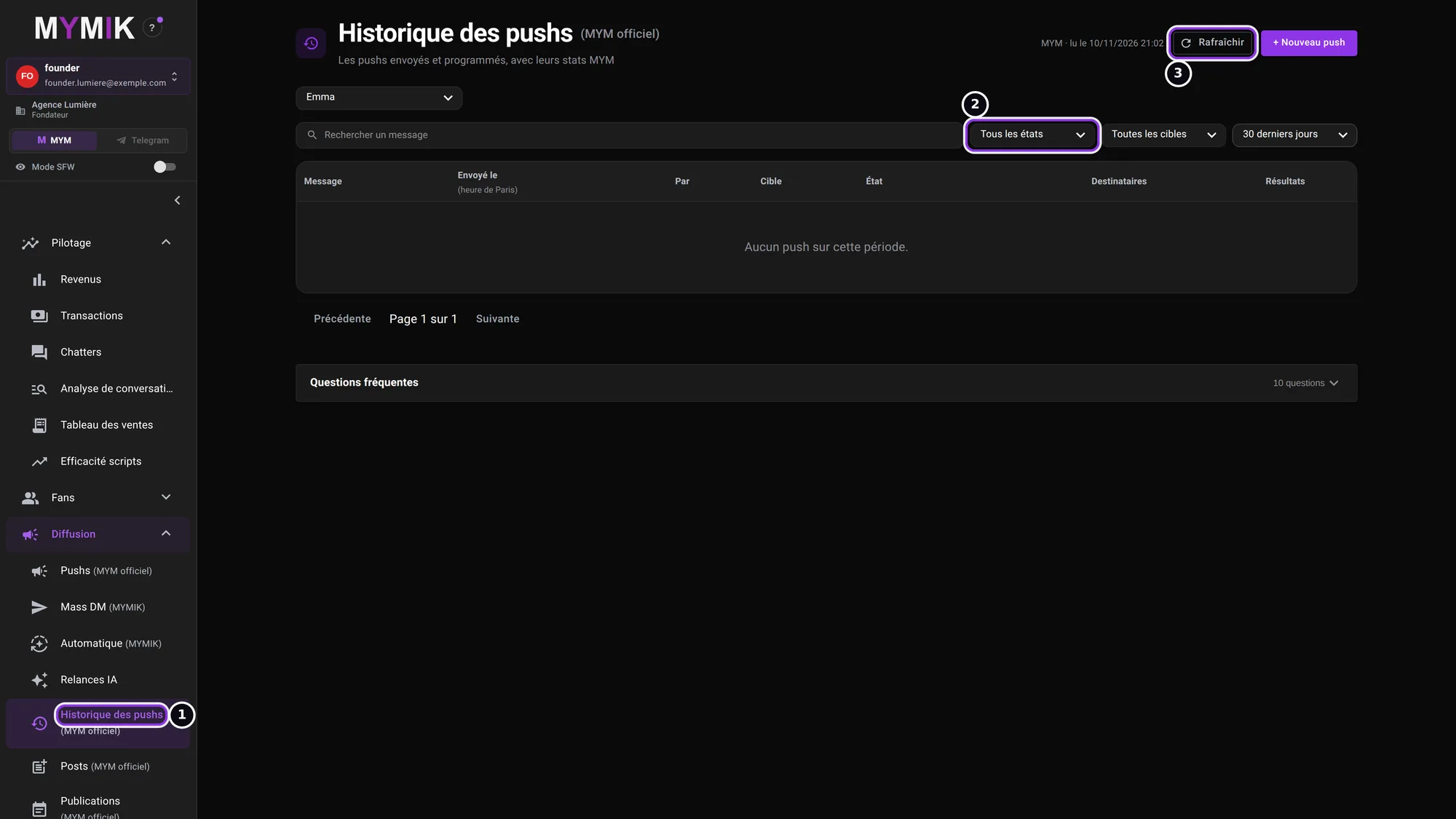 No push in the period in the test database: the screen says « Aucun push sur cette période. »
4. Troubleshooting
Symptom shown → cause → what to do. Quoted messages are those of the screen.
| What you see | Cause | What to do |
|---|---|---|
| « Ajoutez au moins un média pour un message payant. » | A paid Mass DM requires a media. | Add a media, or switch back to « Gratuit ». |
| « Ajoutez au moins un média (MYM l’exige) » (push) | MYM requires 1 to 5 media in a push. | Choose them in the Cloud or « Importer ». |
| A red banner under the push message | A word is banned by MYM: it blocks the send (a “hidden” word goes through, but MYM hides it). | Remove the named word, click elsewhere: the button unlocks. |
| The push quota is used (former subscribers, interested fans) | These targets get 1 push every 7 days, a limit set by MYM. | The screen offers the Mass DM (unlimited), the first free day, or removing the target. |
| « MYM n’a pas confirmé l’envoi » under the push button | The push may have gone out anyway. | Look at the Historique des pushs before trying again: otherwise fans may receive it twice. |
| The row stays on « Préparation… » | MYMIK is still counting the fans to write to. | Click « Actualiser »; if it lasts, write to us with the creator’s name. |
| Some fans are “sautés” (skipped) | They are excluded, have an unread message, were reached under 12 h ago, or are held by a chatter. | Click the number in « Écarts »: each fan is listed with its reason. |
| Historique des pushs: « MYM ne répond pas — réessayez dans quelques minutes. » (MYM is not answering) | MYM is not returning the list at this moment. | Click « Réessayer »; if it lasts, write to us. |
Still stuck?
Write to us in private at @MymikAppBot with your agency, the creator and the exact text displayed. The MYMIK team
MYMIK guide no. 3, version of 10/11/2026.
Last updated on
Guide 2 · Move from the desktop app to the web before 3 December
Your address, your login, your agencies, your accounts: what changes when the desktop app stops on 3 December 2026, and what stays the same.
Guide 4 · Find your sales and attribute them to chatters
Four Pilotage screens answer four questions: how much did the agency sell, what is the list of sales, who sold what, and what each chatter does. This guide says where to read each figure and what it measures.