Guide 5 · Smart Push: a sentence written for each fan, reviewed before sending
Every fan who has already written to you gets a sentence written for them. You prepare, you review, then you send: nothing goes out before you have reviewed it.
How to read this guide
The screens are the real MYMIK screens on the web, with a fictional agency (“Agence Lumière”), a fictional creator (Emma) and fans with made-up nicknames: no real data. The numbered black dot and the purple outline show where to click or look; the same number is used in the text. No message was sent to take these screenshots.
Language of the screens
The MYMIK interface is not translated yet: the screens stay in French. For each step, the text gives the exact French label shown on screen, followed by its English meaning.
The order to remember
- In Diffusion › Mass DM, create a Mass DM and choose ✦ Smart Push.
- Set the tone, emojis and instructions, write your message, click Préparer (“Prepare”): nothing goes out.
- When the row shows ✦ Prêt à relire (“Ready to review”), open Relire et envoyer (“Review and send”) and read every sentence.
- Click Envoyer à N fans (“Send to N fans”): only then does the campaign go out.
0. Before you start
What to know in one minute.
Who, where
- The founder, HR and managers. Chatters do not see this mode.
- For MYM creators only (not Telegram, not Uncove).
- In an agency where Smart Push is open.
What it does
- Every fan who has already written to you gets a sentence written for them, based on your exchange, around your message.
- The others get your base text, as is.
- The voice comes from the creator’s profile.
Nothing goes out before you have reviewed it
« Préparer » (“Prepare”) writes the sentences without sending anything. You read them, then « Envoyer » (“Send”) starts the campaign. Without a saved review, the system sends no line of a Smart Push.
Single message or Smart Push?
| Single message | ✦ Smart Push | |
|---|---|---|
| Text received | The same for everyone. | A sentence of its own for each fan who has written to you; the base text for the others. |
| Review before sending | No: « Envoyer » sends. | Yes, compulsory: sentence by sentence. |
| Who can choose it | The roles with access to Mass DM. | Founder, HR, manager. |
1. Prepare a Smart Push
Four settings, then « Préparer ».
1. Open Diffusion › Mass DM and click « + Nouveau Mass DM » (“+ New Mass DM”)
In the left menu, open Diffusion, then Mass DM ❶. Check the creator selected at the top of the list, then click + Nouveau Mass DM ❷.
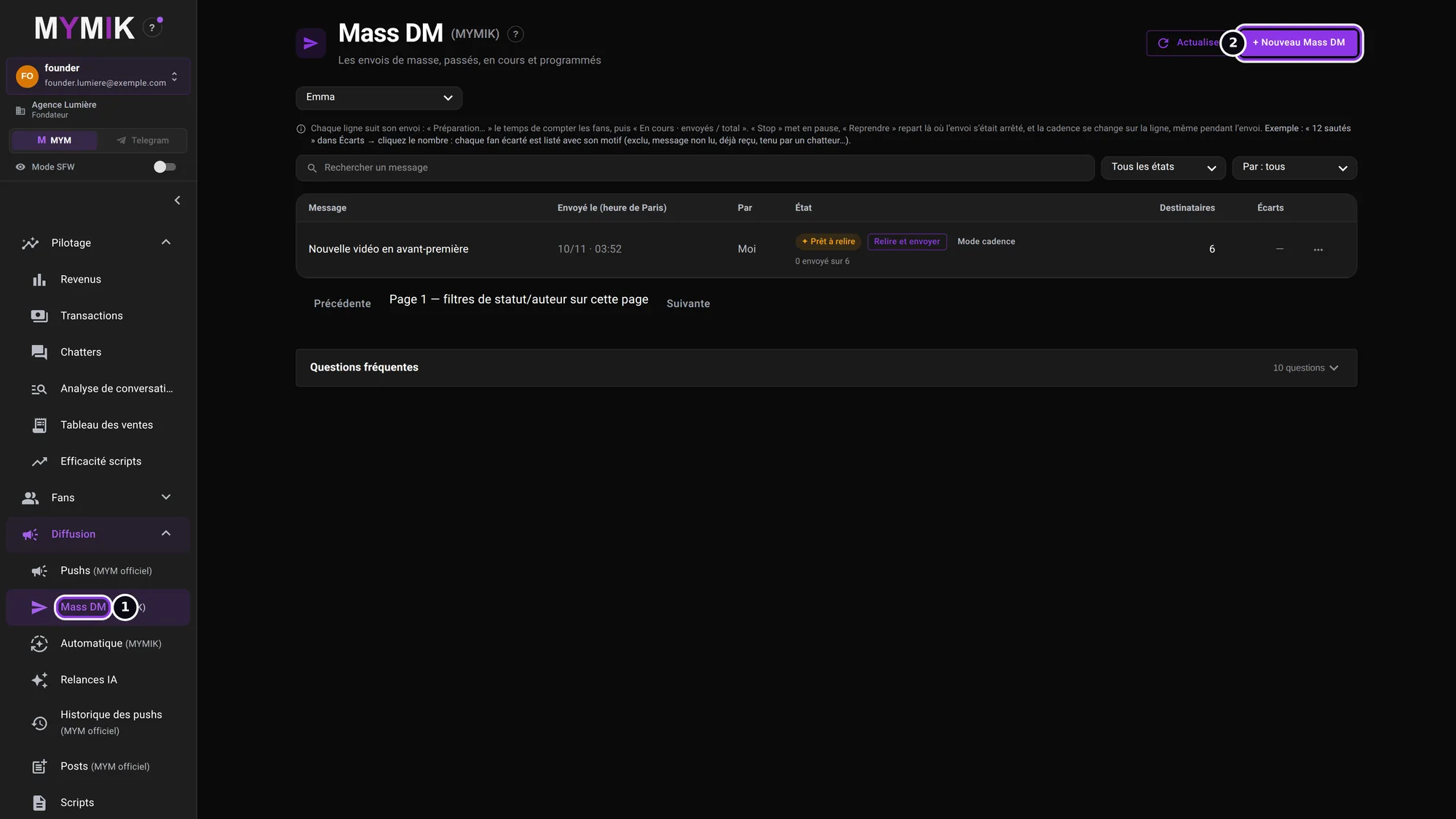 Emma’s (fictional) Mass DM list. The visible row is an example of a Smart Push already prepared.
2. Choose « ✦ Smart Push » (“✦ Smart Push”)
At the top of the form, the selector offers « Message unique » (“Single message”) or ✦ Smart Push ❶. Once chosen, the text ❷ recalls the principle: « Préparer » writes the sentences, nothing goes out before you review. The “?” help dot next to the selector gives the same reminder.
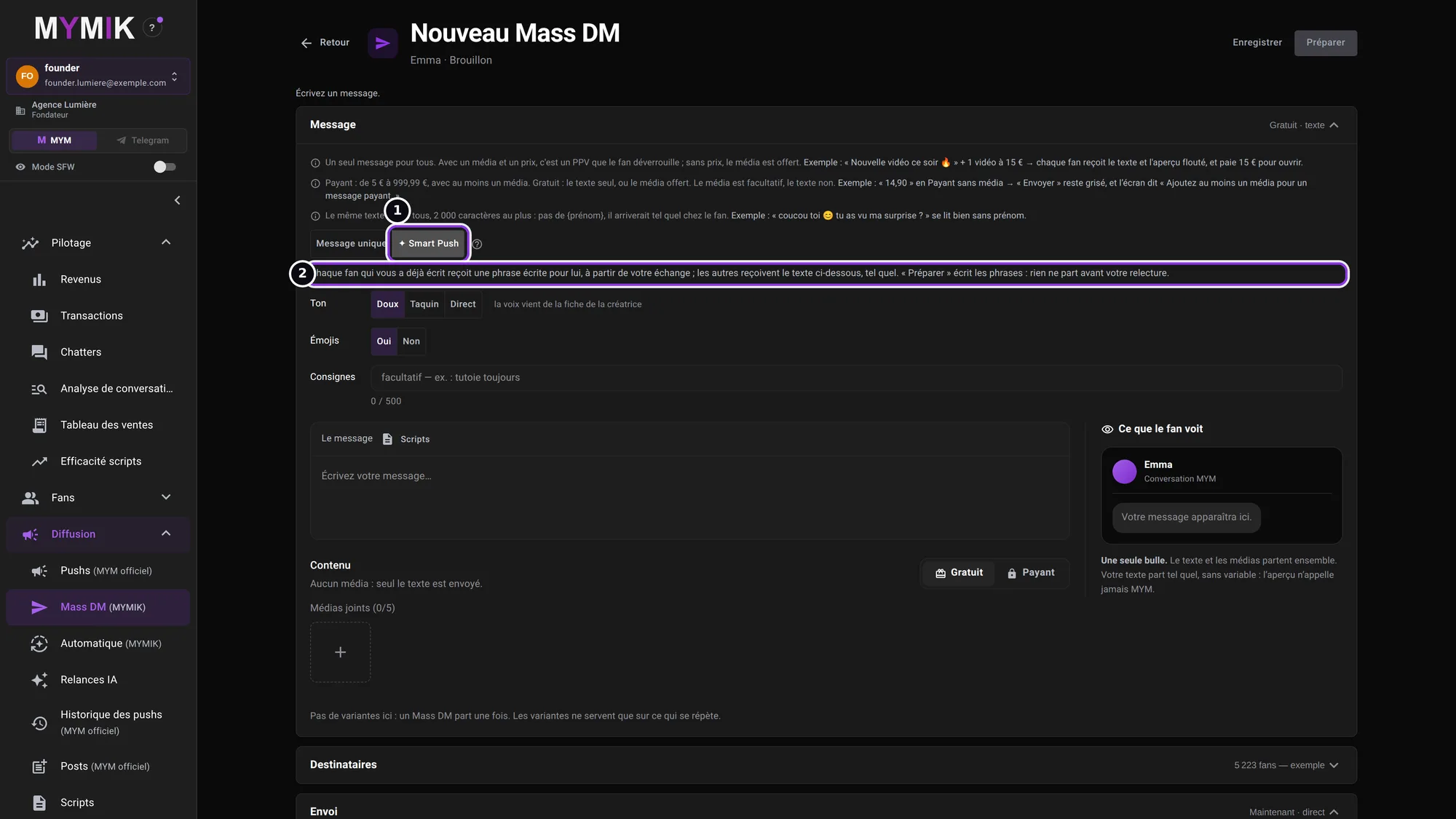 The form in Smart Push mode. If this choice does not appear, see troubleshooting.
3. Set the tone, the emojis and the instructions
Ton (“Tone”) ❶: « Doux » (soft), « Taquin » (teasing) or « Direct ». Émojis ❷: « Oui » (yes) or « Non » (no). Consignes (“Instructions”) ❸: optional, 500 characters at most (for example « Tutoie toujours. », “Always use the informal ‘tu’.”). The creator’s voice comes from her profile: these settings nuance it, they do not replace it.
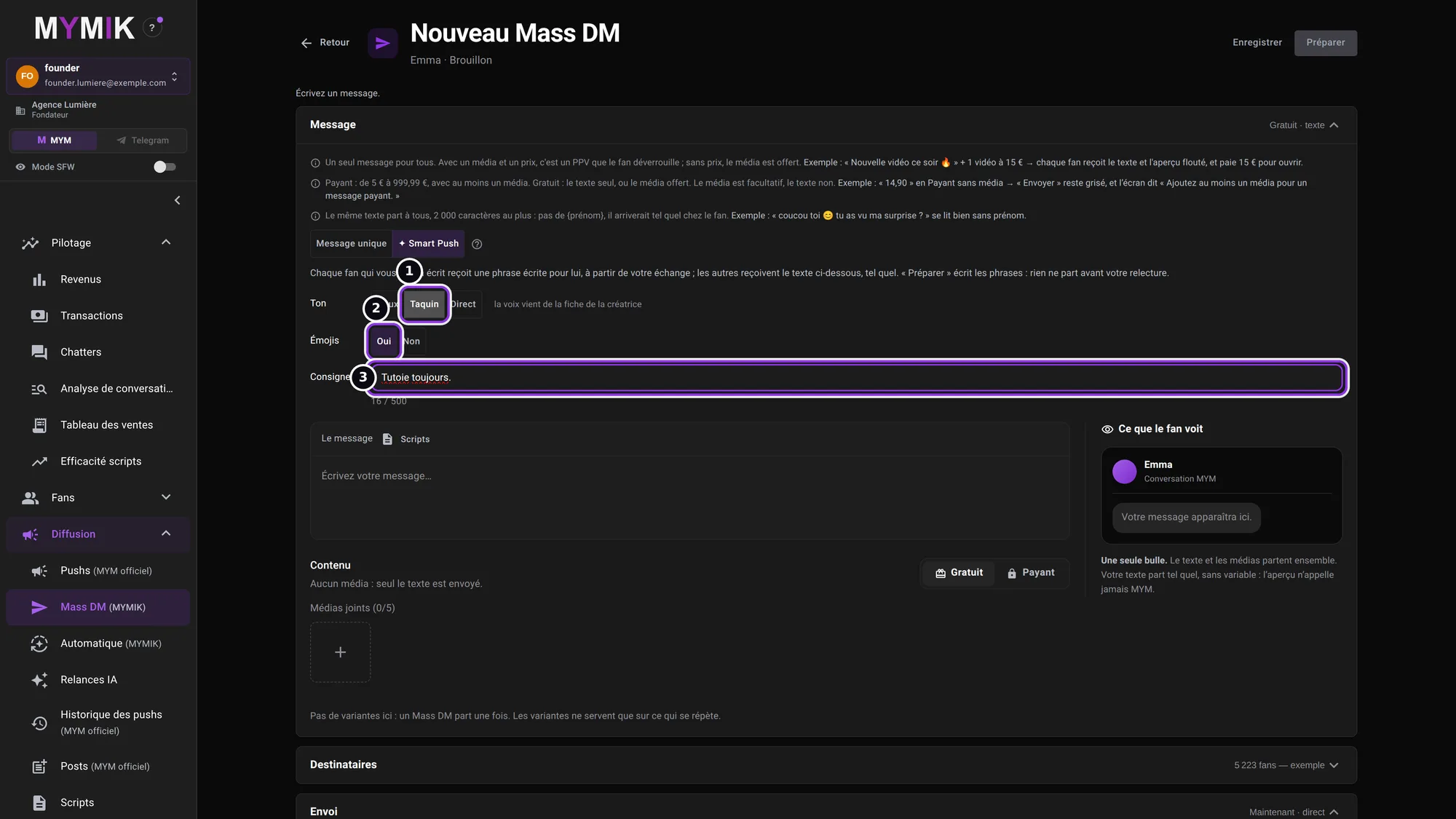 Here: tone « Taquin », emojis « Oui », instruction « Tutoie toujours. ».
4. Write your base message and click « Préparer » (“Prepare”)
Write the message ❶: it is the text fans without a conversation will receive, and the basis of the sentences for the others. Check the recipients ❷ and the sending, then click Préparer ❸. Nothing goes out: the row shows « ✦ Préparation des textes » (“Preparing the texts”) while the sentences are written.
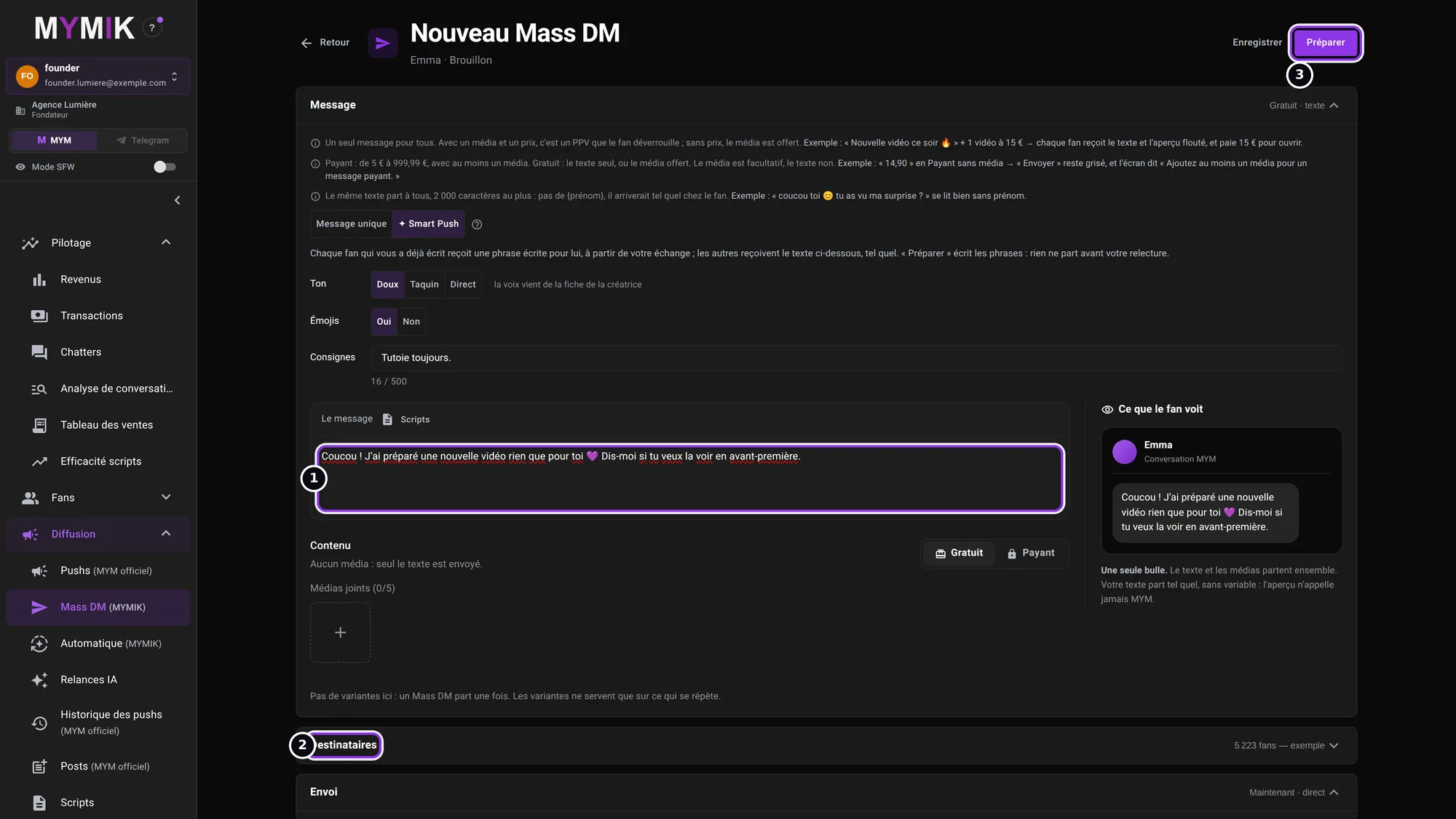 The typed message, the « Destinataires » (“Recipients”) section and the « Préparer » button (not clicked for this screenshot).
2. Review, then send
Nothing goes out before this last click.
1. Spot « ✦ Prêt à relire » (“✦ Ready to review”) and click « Relire et envoyer » (“Review and send”)
When the sentences are written, the row status becomes ✦ Prêt à relire ❶. Click Relire et envoyer ❷. The « Reprendre » (“Resume”) button does not apply to a Smart Push waiting for review: only the reviewed send makes it go out.
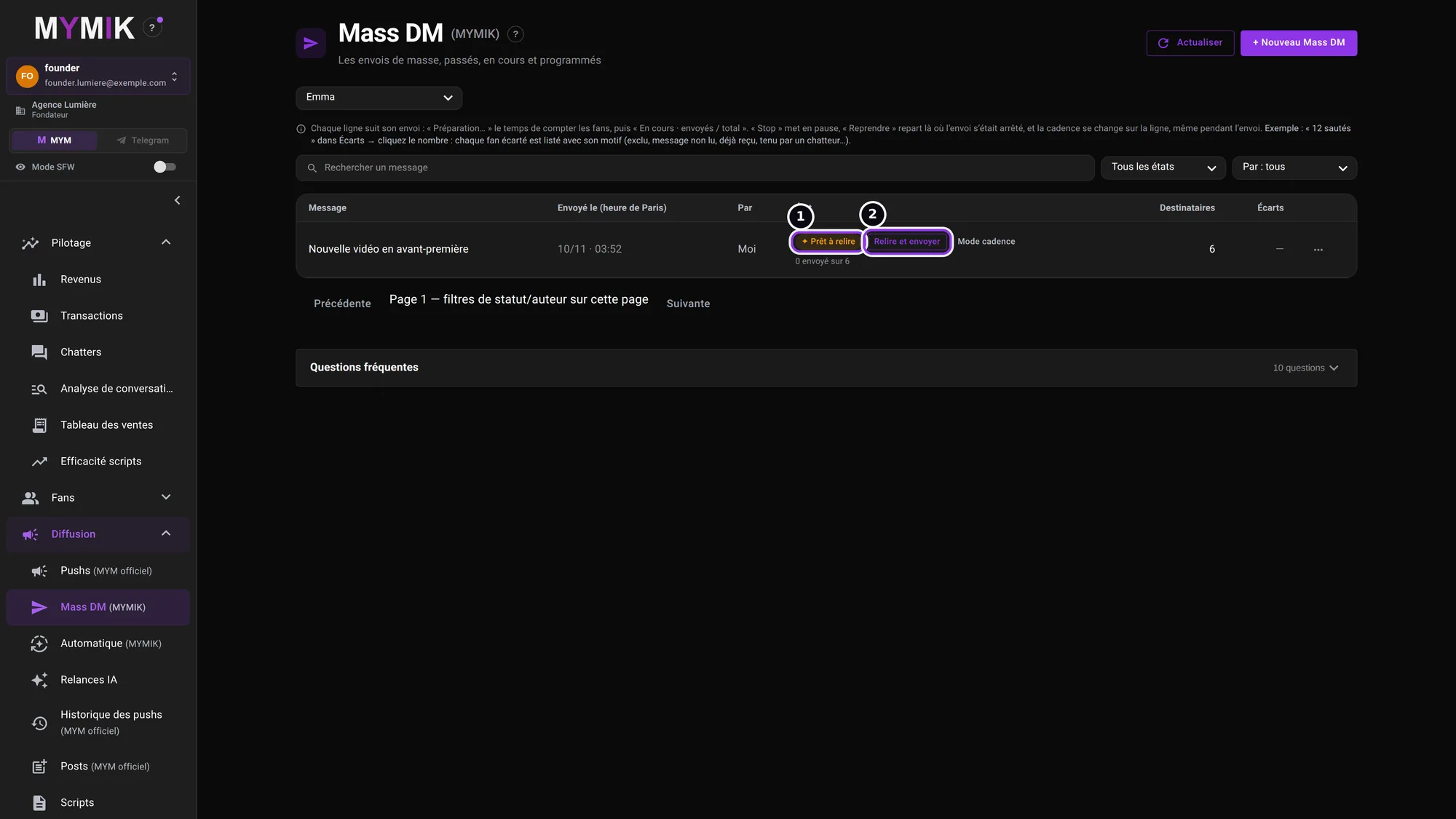 The row « Nouvelle vidéo en avant-première »: ready to review, 0 sent out of 6.
2. Read every sentence
A panel opens on the right: « Relisez chaque phrase : rien n’est parti. » (“Read every sentence: nothing has gone out.”) The counters ❶ say how many fans have a ✦ Personnalisé (personalised) sentence and how many get the « Texte de base » (base text) ❷. The table lists, for each fan, the sentence, the type and the status (« En attente » = waiting: nothing has gone out).
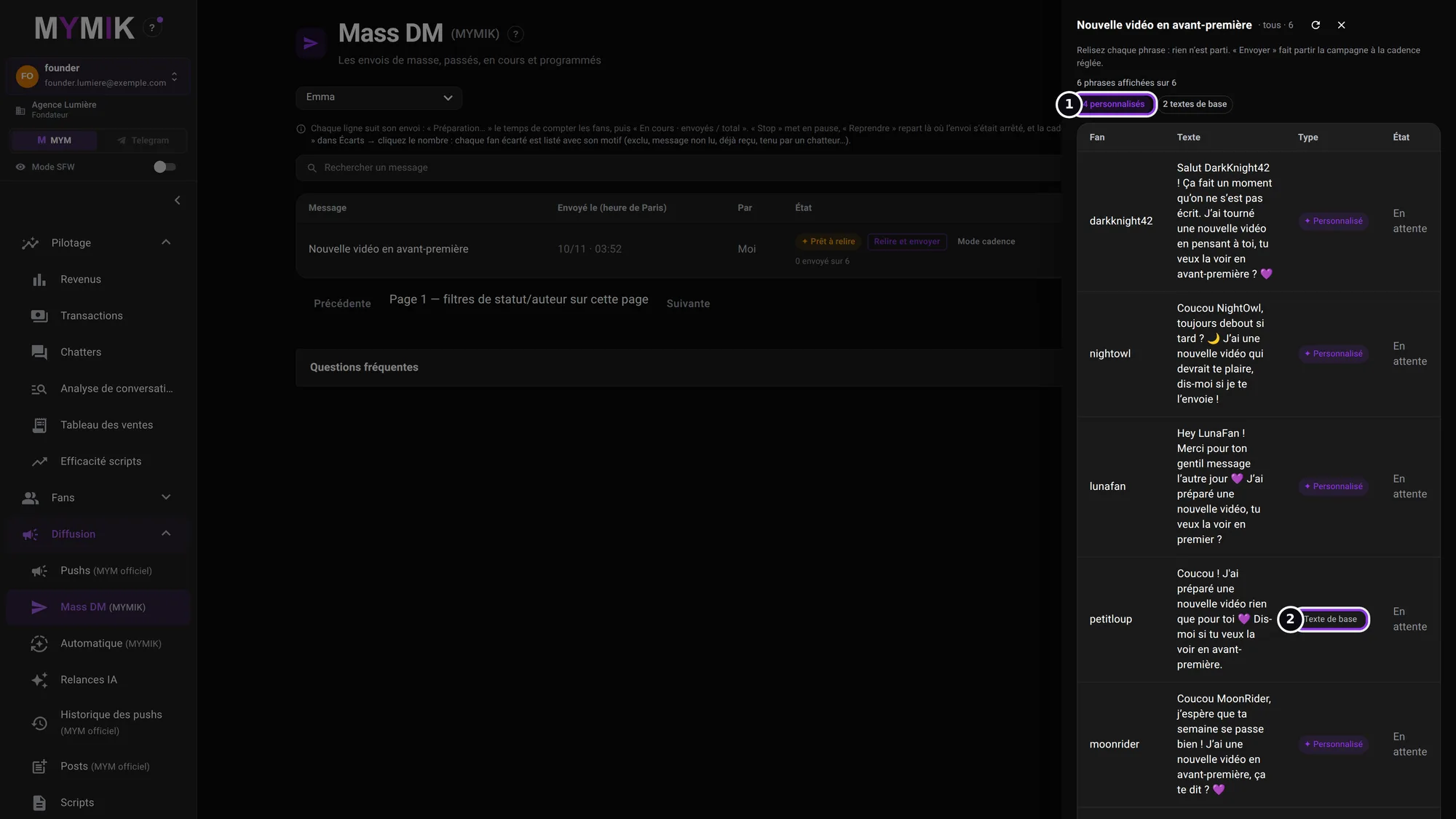 The review panel: 4 personalised, 2 base texts (fictional fans and sentences).
3. Click « Envoyer à N fans » (“Send to N fans”)
Scroll to the bottom of the panel: the « Envoyer à 6 fans » (“Send to 6 fans”) button ❶ starts the campaign at the set pace. It stays greyed out until all the sentences are loaded and read (« lecture de la suite… », “reading the rest…”). A fan without a personalised sentence receives the base text.
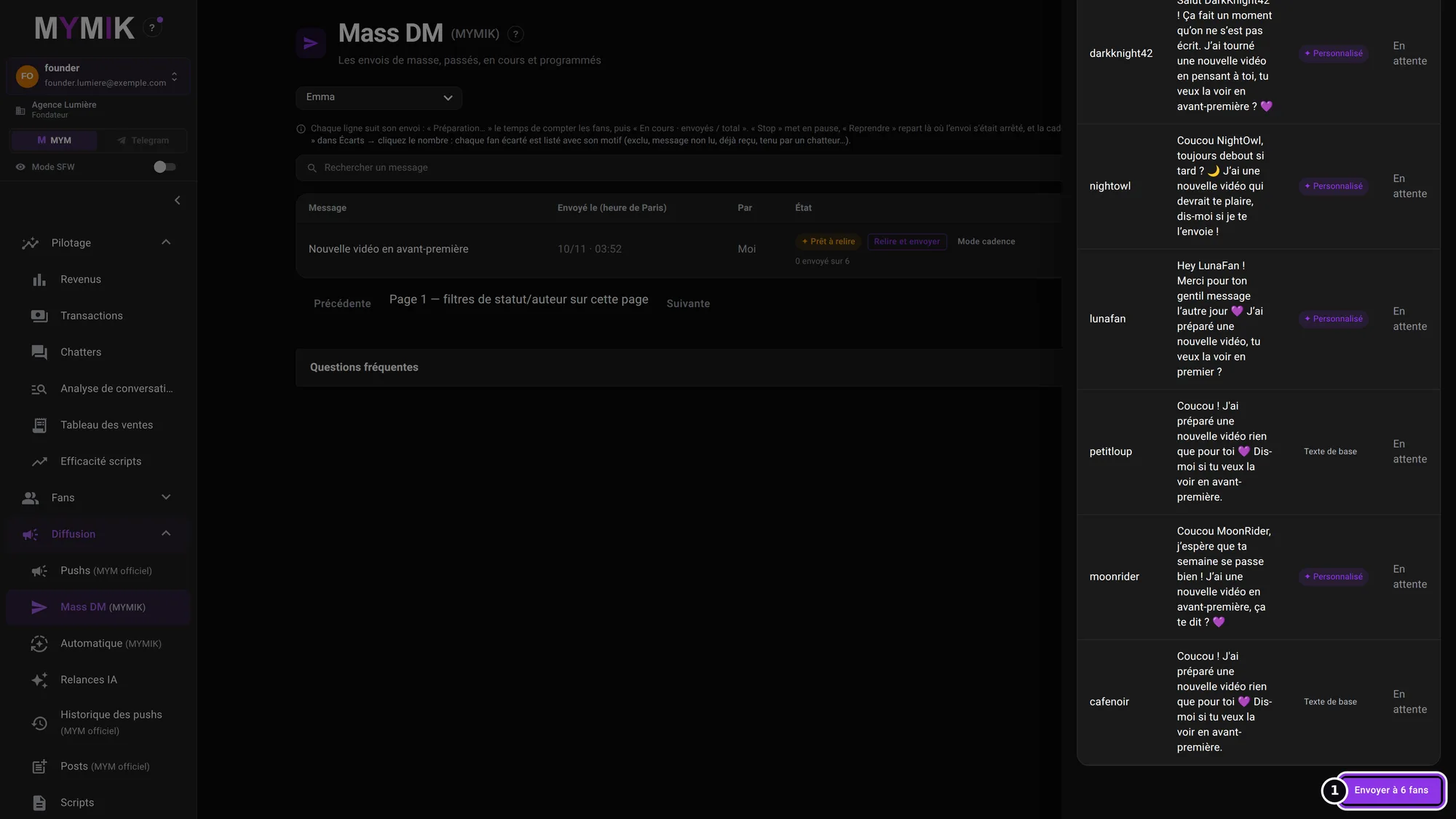 Bottom of the panel: the send button (not clicked for this screenshot).
After sending
The row follows the send like any Mass DM: « En cours · envoyés / total » (“In progress · sent / total”), « Stop » to pause, « Reprendre » to resume where the send stopped.
3. Good to know
Five points to avoid surprises.
| Topic | What to know |
|---|---|
| Row type | ✦ Personnalisé: a sentence written for this fan. Texte de base: your message as is (fan without a conversation, or a sentence the checks did not validate). |
| Every day | In « Planifier › Chaque jour » (“Schedule › Every day”), Smart Push writes the messages the day before; they go out at the set time after your review. Never the same message twice to a fan within 31 days. |
| Chatters | They do not see the Smart Push mode (screenshot below). |
| Retention | The sentences written for each fan are erased after 30 days. |
| Excluded fans | Fans in lists excluded from mass sends (Groupes de fans › “Exclude from Mass DMs, Smart Push, automations and AI follow-ups”) do not get a Smart Push. |
1. What a chatter sees
Same form, signed in as a chatter: the « Message » section ❶ offers only the single message, without « ✦ Smart Push ».
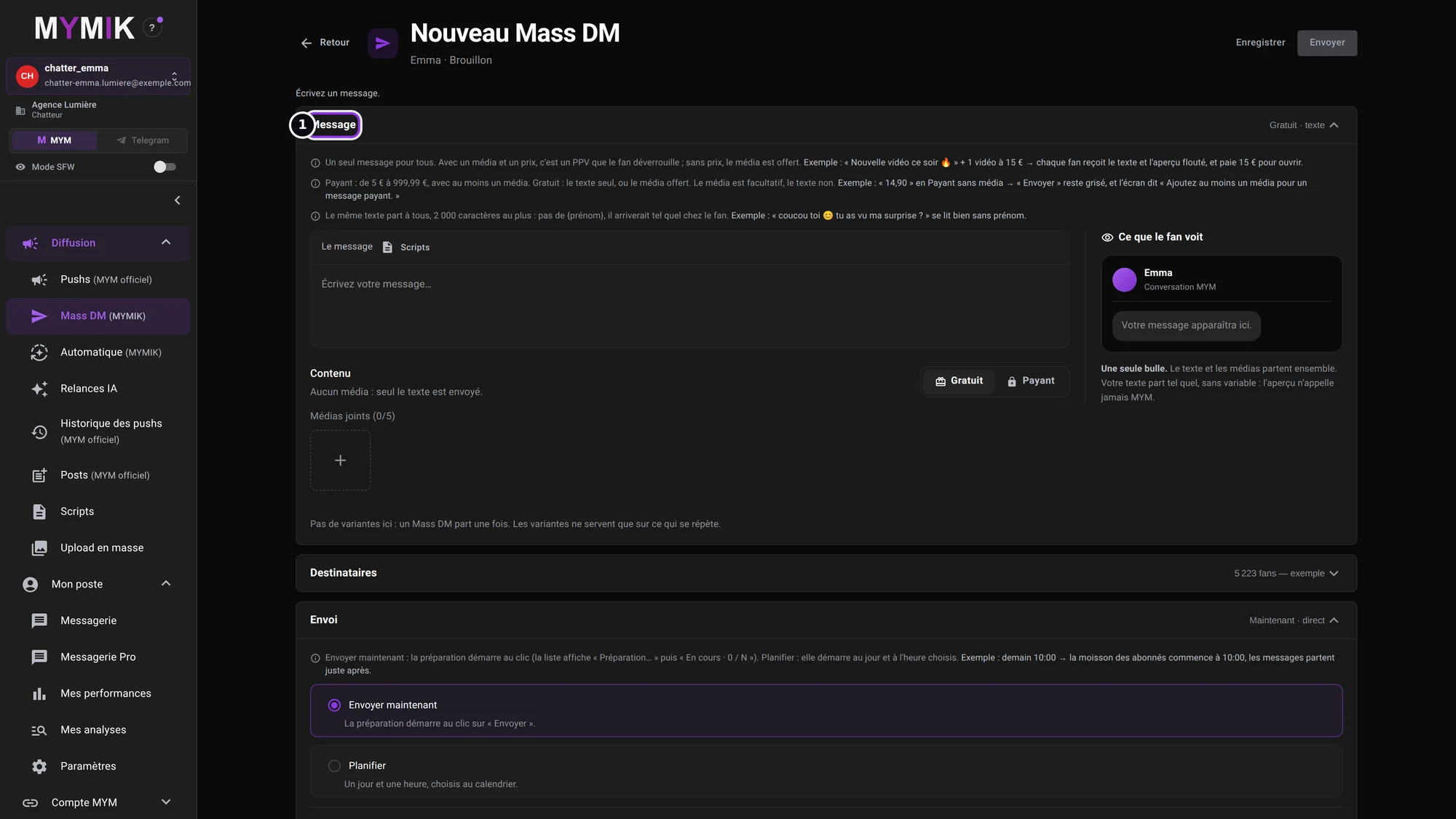 The « Nouveau Mass DM » form on the chatter side: no « Smart Push » choice.
4. Troubleshooting
Symptom shown → cause → what to do. Quoted messages are those of the screen.
| What you see | Cause | What to do |
|---|---|---|
| No « ✦ Smart Push » choice in the form | Your role is not founder, HR or manager; or the creator is not on MYM; or Smart Push is not open for your agency. | Check your role and the selected creator. Otherwise, write to us. |
| « Le Smart Push n’est pas ouvert pour votre agence » (“Smart Push is not open for your agency”) | Your agency does not have this mode. | Write to us with the agency name. |
| « Le Smart Push n’est pas encore disponible pour cette créatrice » (“…not yet available for this creator”) | This mode is not open for this creator yet. | Pick another creator or write to us. |
| « Relisez les textes du Smart Push, puis cliquez sur « Envoyer » » (“Review the Smart Push texts, then click ‘Envoyer’”) | You clicked « Reprendre » on a row waiting for review. | Click « Relire et envoyer », read, then « Envoyer à N fans ». |
| The row stays on « ✦ Préparation des textes » | The sentences are still being written. | Wait, then click « Actualiser » (“Refresh”). Nothing has gone out. |
| « Envoyer à N fans » is greyed out | Not all sentences are loaded yet (« lecture de la suite… »). | Wait for loading to finish. |
| Pause « Smart Push fermé pendant la préparation » | Smart Push was closed for the agency or the creator while writing. | Nothing has gone out. Write to us before trying again. |
| Pause « rédaction indisponible » | The sentences could not be written. | Nothing has gone out. Try again later; otherwise write to us. |
Still stuck?
Write to us on @MymikAppBot with your agency, the creator and the exact text displayed. The MYMIK team
MYMIK guide no. 5, version of 10/11/2026.
Last updated on
Guide 4 · Find your sales and attribute them to chatters
Four Pilotage screens answer four questions: how much did the agency sell, what is the list of sales, who sold what, and what each chatter does. This guide says where to read each figure and what it measures.
Guide 6 · Messagerie Pro for chatters: conversation, fan card, paid offers, boxes
The screen where a chatter spends the day: a creator’s list of fans, the conversation, the composer and the fan card. This guide shows each area, what it does and what it does not do.