Guide 10 · Script branches: 2 to 8 paths depending on the fan’s answer
A script is not always a straight line. A branch waits for the fan’s answer, then the chatter takes the matching path: “yes”, “no”, “hesitating”…
How to read this guide
The screens are the real MYMIK screens on the web, with a fictional agency (“Agence Lumière”), fictional creators (including Emma) and fans with made-up nicknames: no real data. The numbered black dot and the purple outline show where to click or look; the same number is used in the text.
Language of the screens
The MYMIK interface is not translated yet: the screens stay in French. For each step, the text gives the exact French label shown on screen, followed by its English meaning.
The order to remember
- Open a script in Diffusion › Scripts and click Embranchement (“Branch”).
- Say what you are waiting for from the fan, name each path (2 to 8), choose whether MYMIK should suggest the right one.
- Add each path’s messages with Message dans « … » (“Message in …”).
- Check the result in the Aperçu du parcours (“journey preview”).
0. Before you start
What to know in one minute.
When to use it
- When what comes next depends on the fan’s answer: liked it or not, his age, a word he writes.
- Example from the screen: a free “Bonsoir 😊” → a €15 photo → branch “did he like it?”: “yes” path with the €30 video, “no” path with another photo.
What to know
- A branch has 2 to 8 paths, each with a name and a colour.
- Nothing goes out without the chatter’s click: MYMIK can only suggest the right path.
- After the choice, all paths resume at the script’s next step.
Prerequisite
First create the script and its first messages (guide 9). The branch is placed after the messages already there.
1. Create a branch
What we wait for, the paths, the suggestion.
1. Open a script and click « Embranchement »
In Diffusion › Scripts, open a script. Next to Nouveau Pack ❶, the Embranchement button ❷ adds the choice point after the messages.
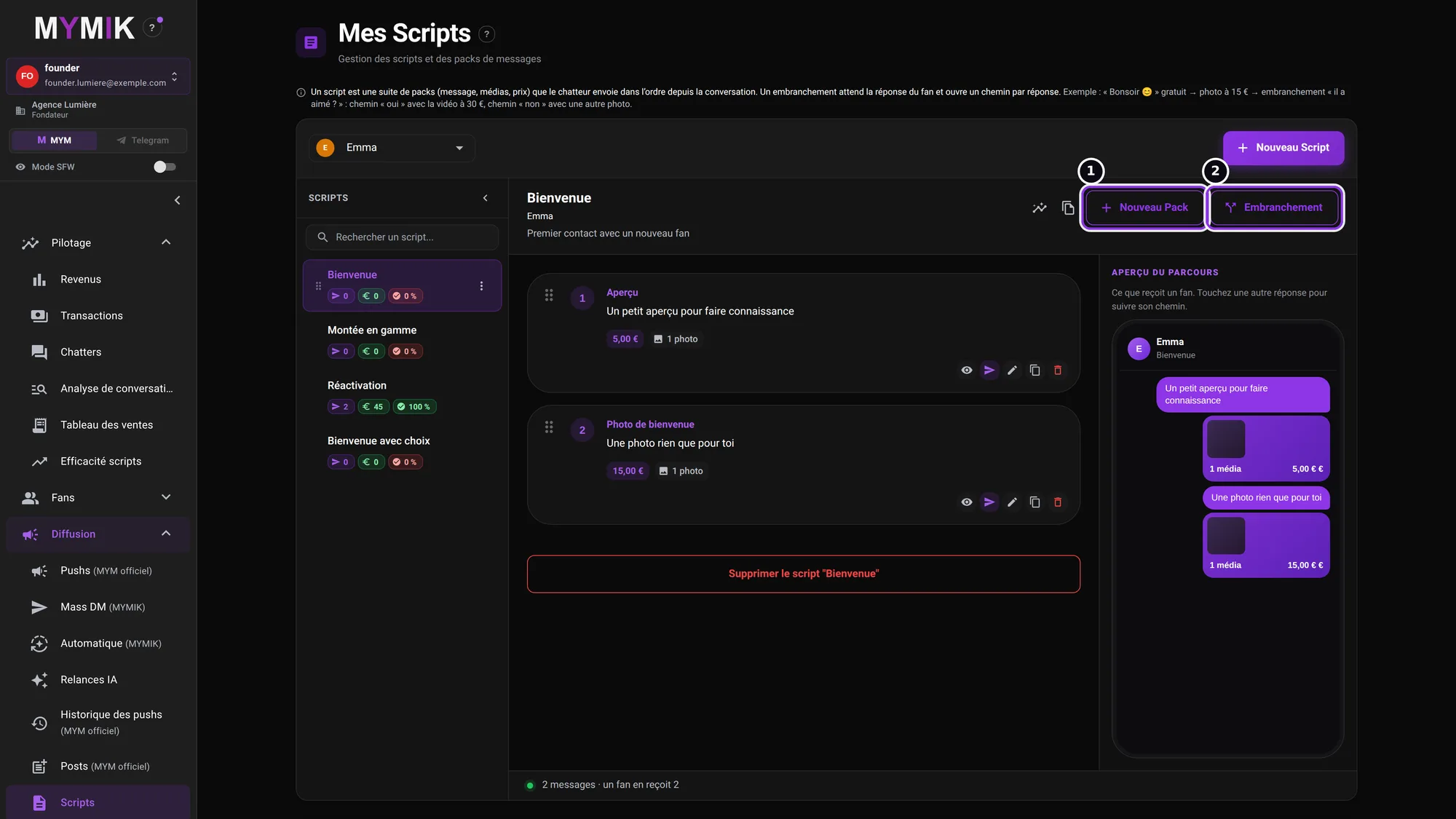 The « Bienvenue » script: two messages, no branch yet.
2. Say what we wait for and name two paths
The window explains: “We wait for the fan’s answer, then the chatter takes a path. MYMIK can suggest the right one.” In Ce qu’on attend (“What we wait for”) ❶, write the question or expected answer (here « Il a aimé ? », “Did he like it?”). Name Chemin 1 ❷ and Chemin 2 ❸. Each path has a colour (« Couleur »).
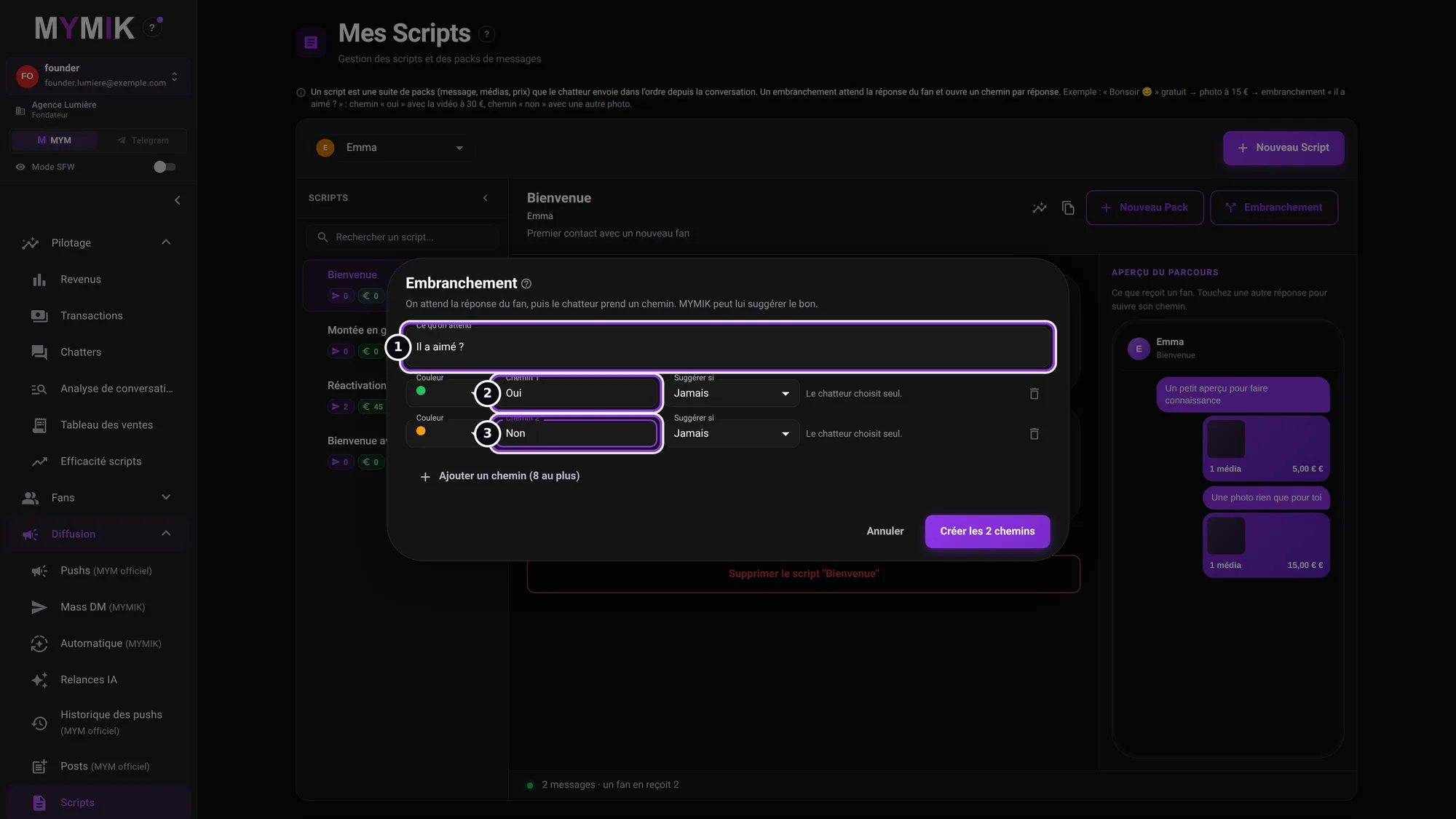 Two paths, « Oui » and « Non » (nothing is created for this screenshot).
3. Choose when MYMIK suggests the path
On each path, Suggérer si (“Suggest if”) ❶ offers three choices: Jamais (never: the chatter chooses alone), Il donne un âge (he gives an age) or Il écrit un mot (he writes a word).
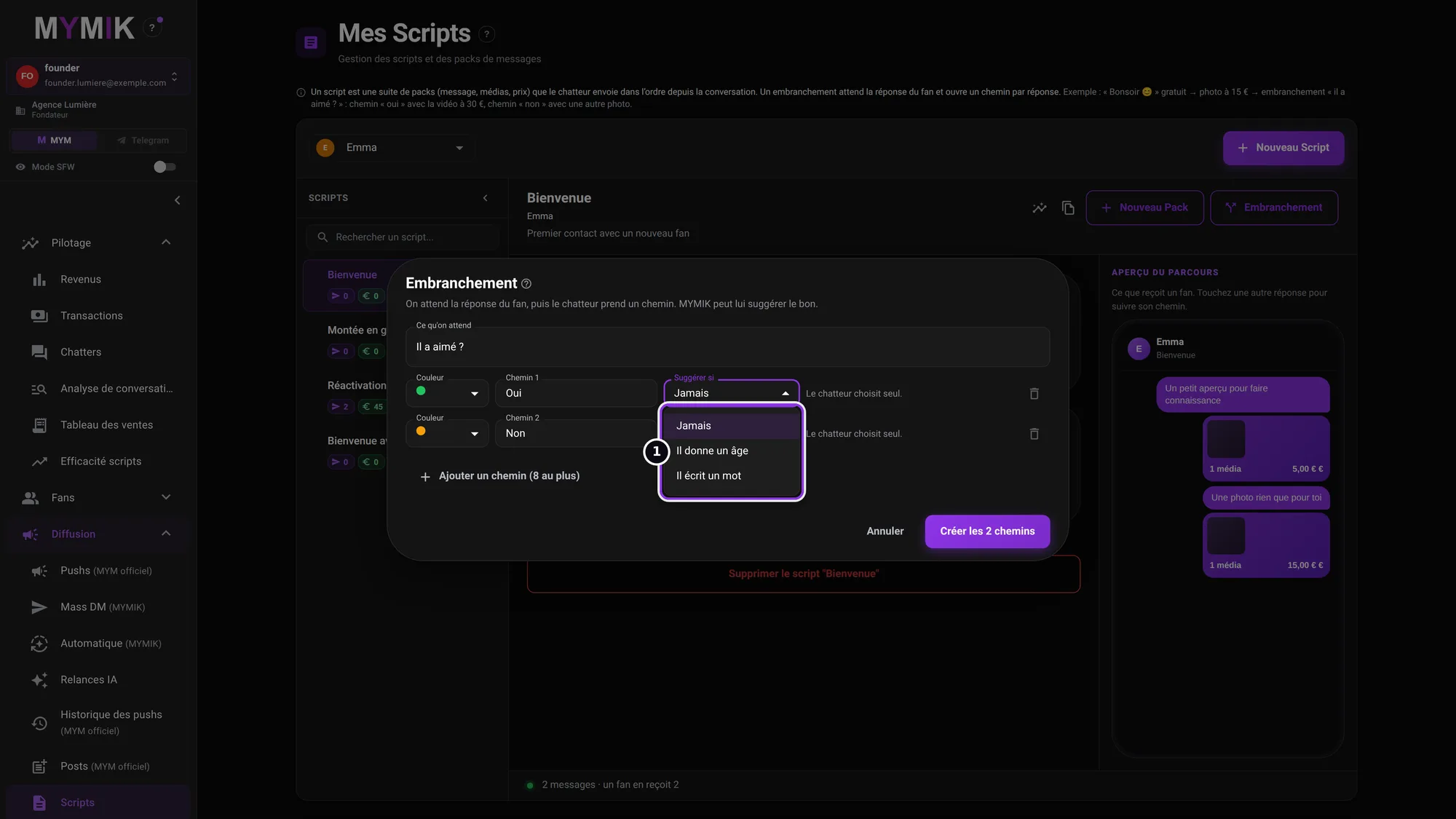 The three choices of « Suggérer si ».
4. Fill in the words (or the age range)
With Il écrit un mot ❶, enter the words separated by commas (« Mots, séparés par des virgules ») ❷ (1 to 20 words). With Il donne un âge, give a De… À… (“From… To…”) range (whole age from 18 to 99). When the fan’s latest answer contains one of these words, or an age in the range, the path is preselected. If two paths match, nothing is suggested.
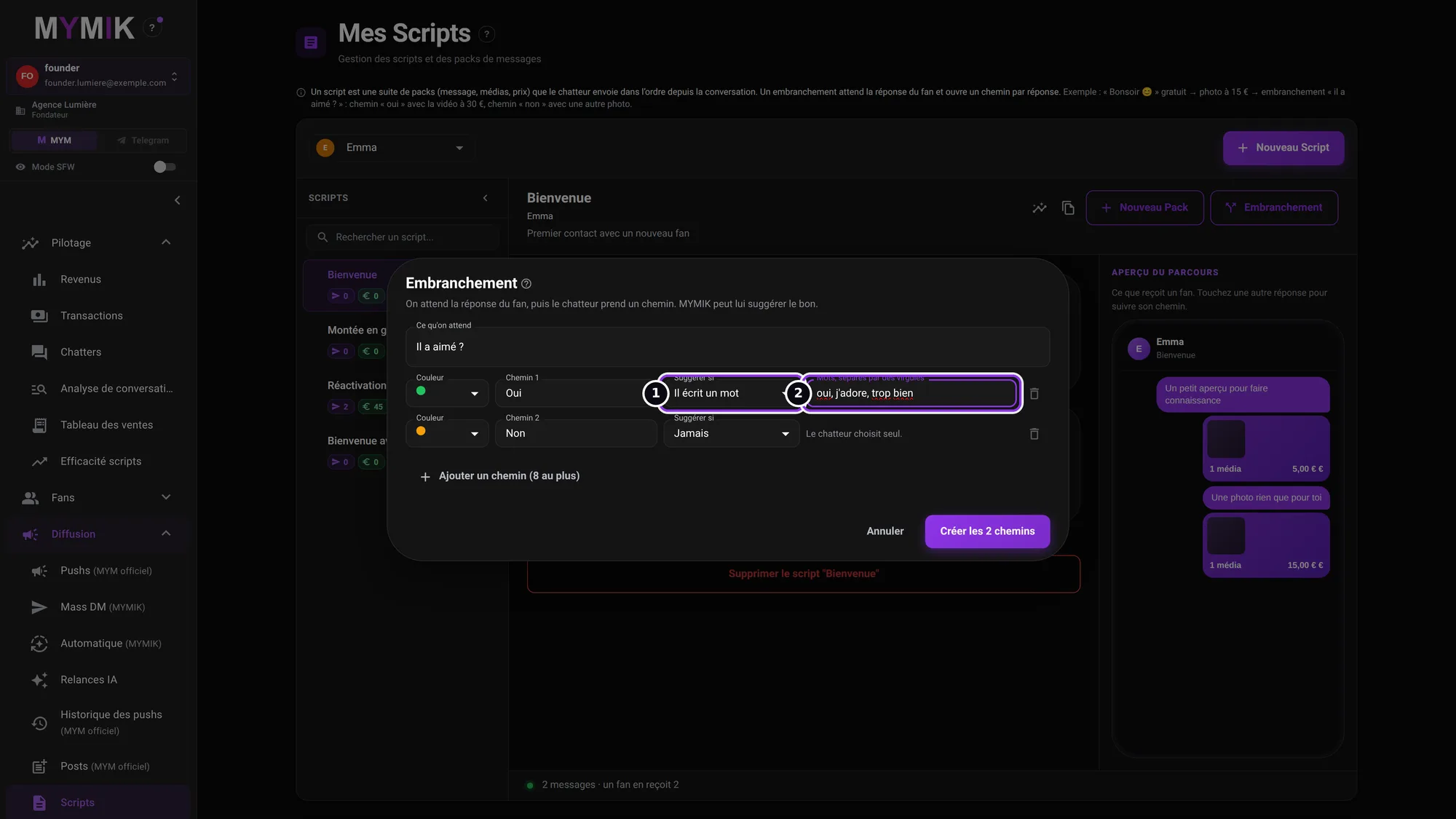 The « Oui » path is suggested if the fan writes « oui », « j’adore » or « trop bien ».
5. Add a path, then « Créer les N chemins »
Ajouter un chemin (8 au plus) (“Add a path (8 at most)”) ❶ adds a line (here « Il hésite », “He hesitates”). When everything is named, the Créer les 3 chemins (“Create the 3 paths”) button ❷ creates the branch in the script.
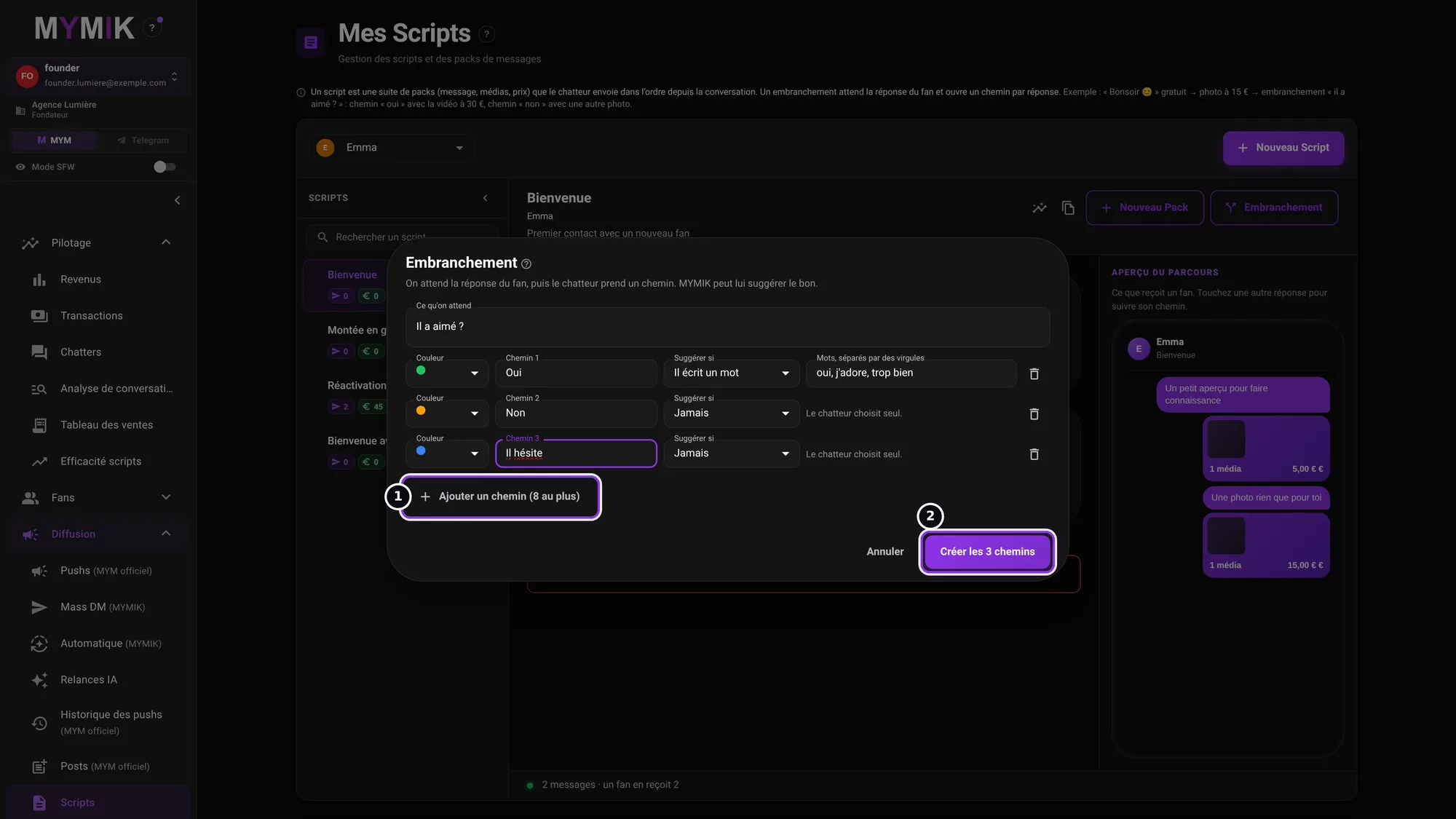 Three paths ready to be created (not clicked for this screenshot).
2. Fill the paths
Each path has its own messages.
1. Spot the branch and its paths
In the script, an Embranchement · Il a aimé ? block ❶ appears after the messages. Its paths are coloured tabs with their number of messages (« Oui · 1 ») ❷. Message dans « Oui » ❸ adds a message to that path. At the bottom of the block: « Les 3 chemins reprennent ensuite à l’étape suivante » (“The 3 paths then resume at the next step”).
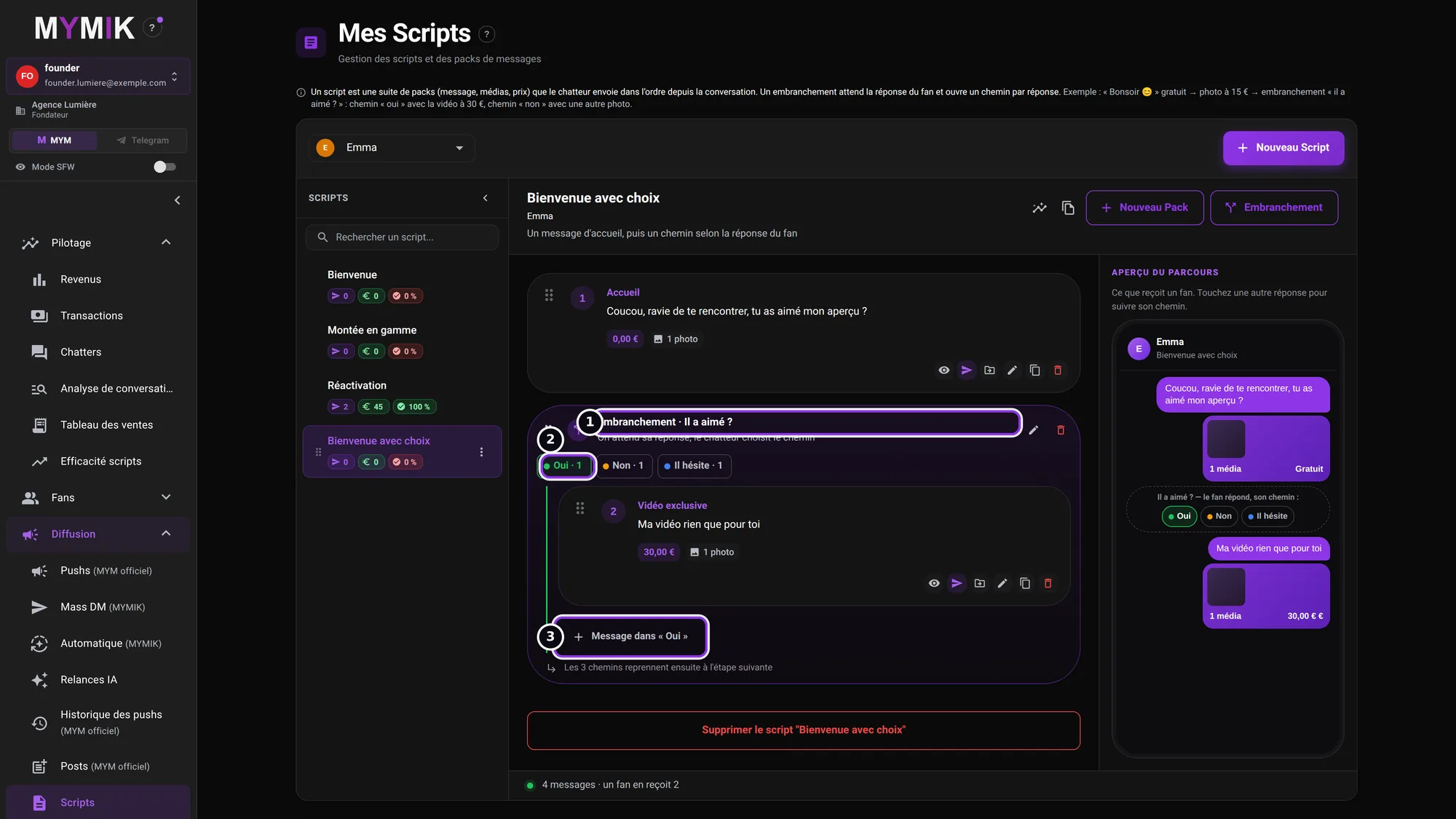 The « Bienvenue avec choix » script: a welcome message, then the branch.
2. Switch path
Click another tab ❶ to see and complete that path: Message dans « Non » ❷. Each message of a path is set like an ordinary pack (name, description, price, media: see guide 9).
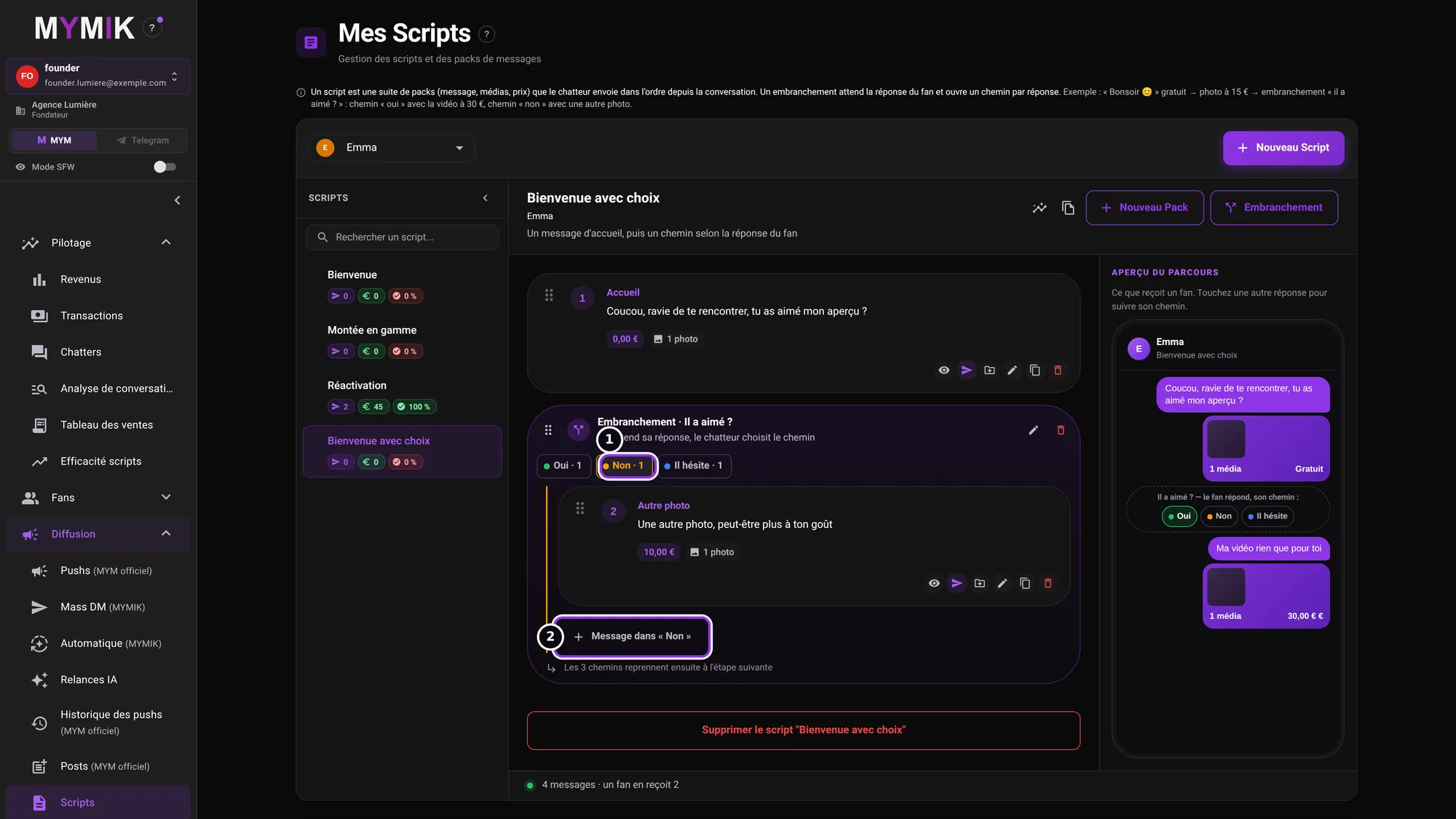 The « Non » path: another photo at €10.
3. Check the Aperçu du parcours
The right-hand panel ❶ shows what a fan receives: the welcome message, then the line « Il a aimé ? — le fan répond, son chemin : » (“Did he like it? — the fan answers, his path:”) with the choices, and the messages of the selected path. Tap another answer to follow its path. The footer counts the messages (« un fan en reçoit N », “a fan receives N”).
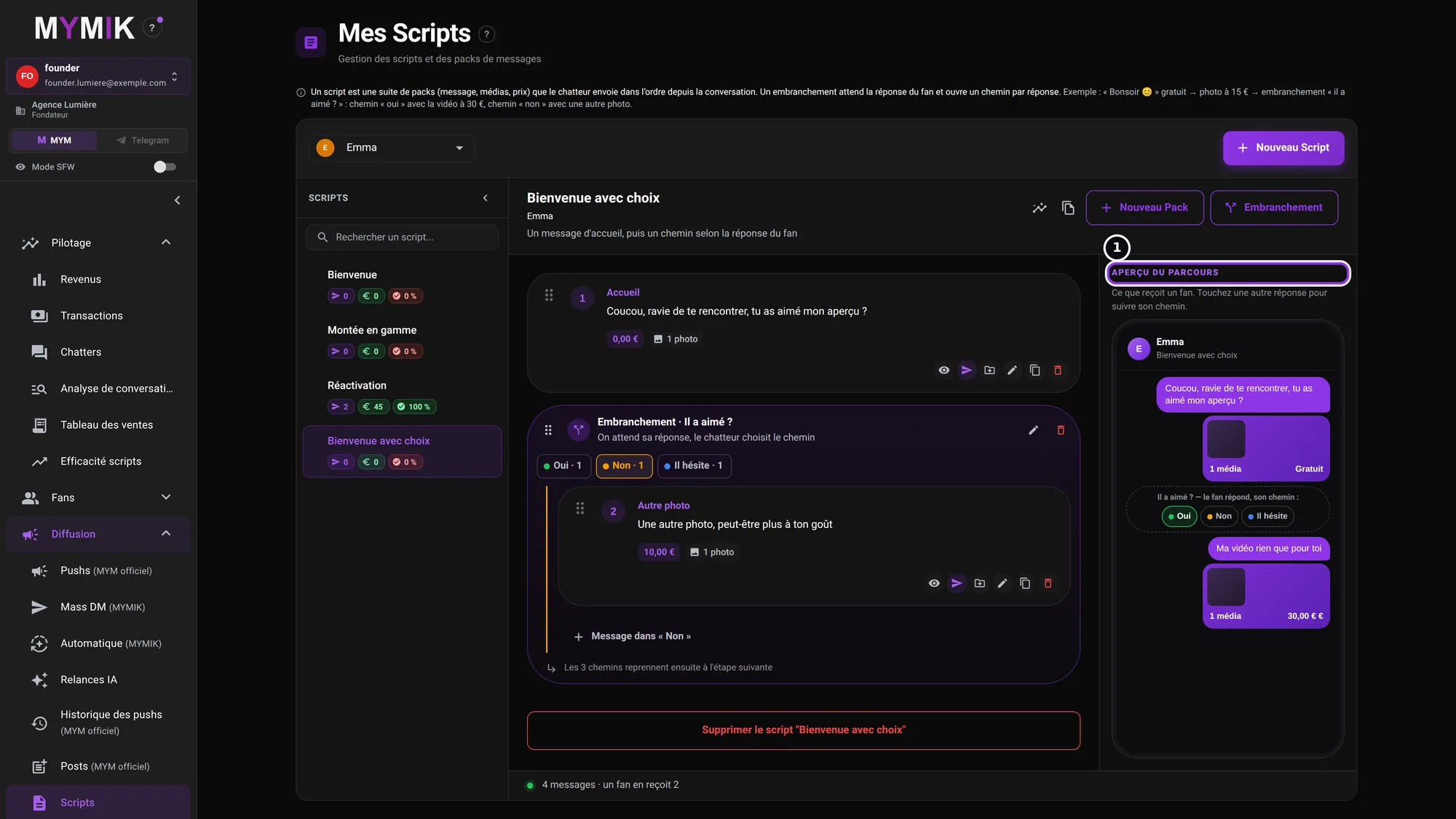 The script preview with the fan’s choice.
3. Edit, move, delete
The actions on an existing branch.
1. The branch icons
On the block header ❶: a handle to move the branch, the pencil Modifier l’embranchement (path names, colours, suggestions) and the bin Supprimer l’embranchement. On each message, the icon ❷ Déplacer vers un chemin ou la ligne principale (“Move to a path or the main line”) lets you file it elsewhere.
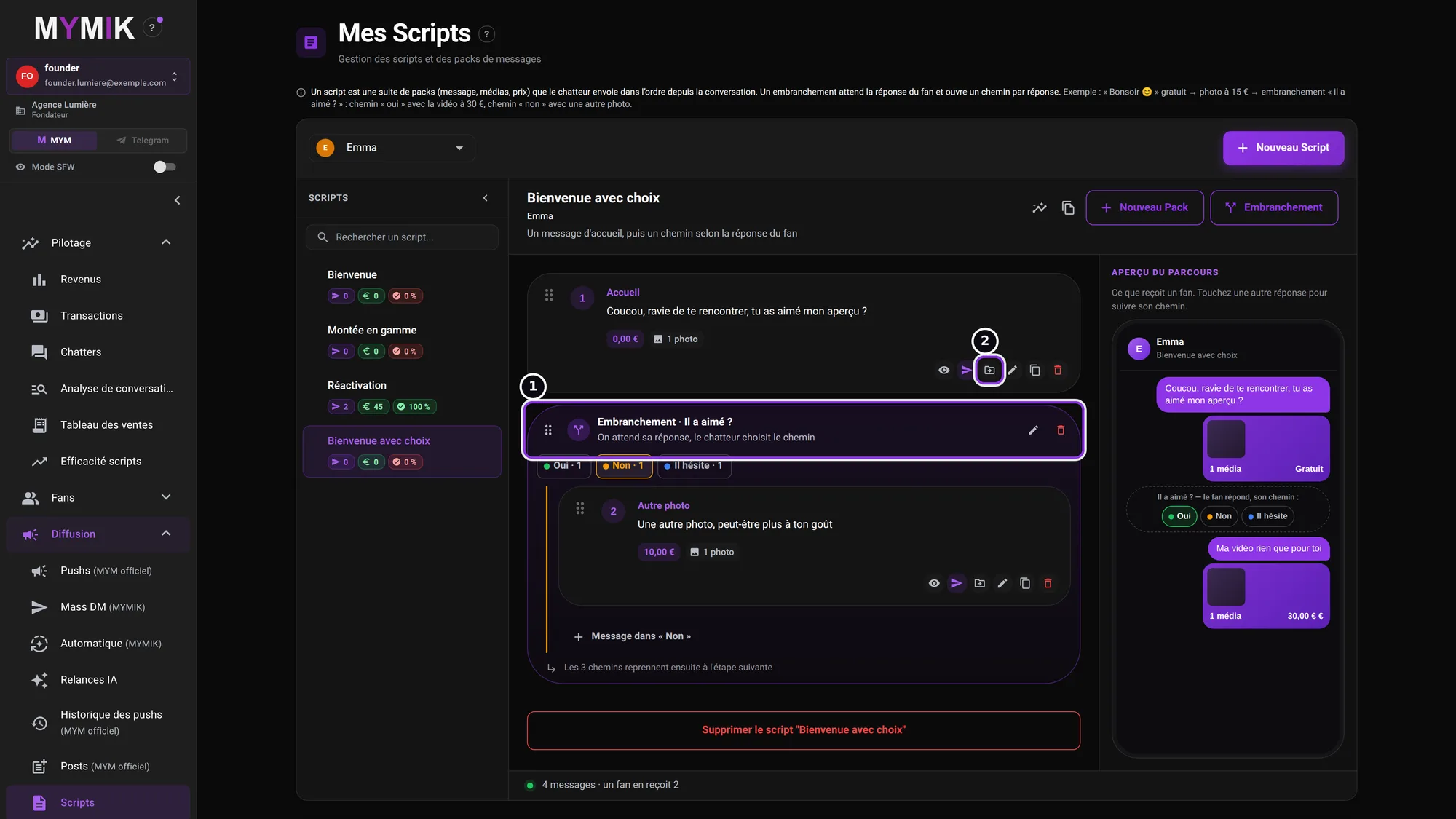 The branch header and a message’s move icon.
2. Delete without losing the messages
The window ❶ asks what to do with the messages: Garder les messages (“Keep the messages”) brings them back to the main line, in place, path after path; Supprimer aussi les messages (“Delete the messages too”) erases them with the branch; Annuler (“Cancel”) changes nothing.
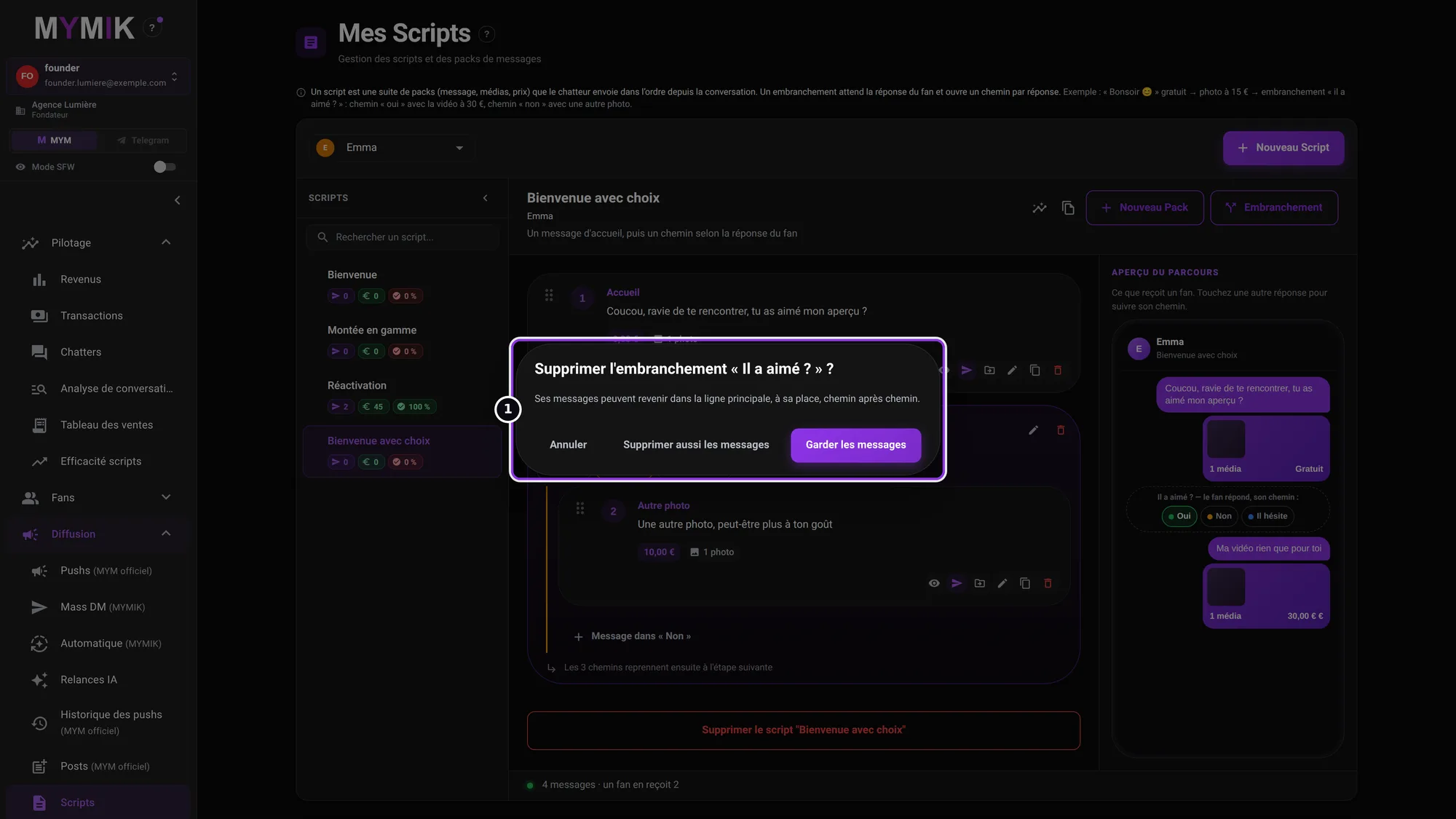 The deletion window (nothing is deleted for this screenshot).
What the chatter does
In the conversation, the chatter opens the script: at the branch, the panel asks « Le fan a répondu ? Choisissez le chemin » (“Did the fan answer? Choose the path”). If your suggestion matches, the path is preselected with the label suggéré (suggested); they confirm it or pick another, then send. Nothing goes out without their click. Under each branch on the Scripts page, the paths are then compared: fans who went through, purchases, the path’s revenue (calculated from the sends already made).
4. Troubleshooting
Symptom shown → cause → what to do. Quoted messages are those of the screen.
| What you see | Cause | What to do |
|---|---|---|
| No « Embranchement » button | No script is open, or your role cannot edit scripts. | Open a script; otherwise ask a manager. |
| « Créer les N chemins » stays greyed out | A path has no name, or « Ce qu’on attend » is empty. | Name every path. |
| « un âge entier de 18 à 99 » (a whole age from 18 to 99) | The age entered is outside 18–99, or not a whole number. | Correct the « De… À… » range. |
| « l’âge minimum dépasse le maximum » (minimum age above maximum) | The age range is the wrong way round. | Swap « De » and « À ». |
| « de 1 à 20 mots, séparés par des virgules » (1 to 20 words, comma-separated) | No word, too many words, or a word over 40 characters. | Keep 1 to 20 short words. |
| The chatter sees no suggested path | No path matches the latest answer, or two match: in that case nothing is suggested. | They choose themselves. Refine the words or age ranges. |
Still stuck?
Write to us in private at @MymikAppBot with your agency, the creator and the exact text displayed. The MYMIK team
MYMIK guide no. 10, version of 10/11/2026.
Last updated on
Guide 9 · Scripts: create, organise, see what goes out
A script is a series of messages (with their media and price) that the chatter sends in order. You create them once per creator, reuse them, and see which ones work.
Guide 11 · AI follow-ups: a silent fan gets a follow-up written for him
AI follow-ups pick up conversations that have gone quiet, with a message written for each fan, in the creator’s voice. You set who, when and how many; you switch on; you follow.