Guide 11 · AI follow-ups: a silent fan gets a follow-up written for him
AI follow-ups pick up conversations that have gone quiet, with a message written for each fan, in the creator’s voice. You set who, when and how many; you switch on; you follow.
How to read this guide
The screens are the real MYMIK screens on the web, with a fictional agency (“Agence Lumière”), fictional creators (including Emma) and fans with made-up nicknames: no real data. The numbered black dot and the purple outline show where to click or look; the same number is used in the text.
Language of the screens
The MYMIK interface is not translated yet: the screens stay in French. For each step, the text gives the exact French label shown on screen, followed by its English meaning.
The order to remember
- In Diffusion › Relances IA, pick the creator and open Réglages (“Settings”).
- Set Audience (who), Moment (when), Voix (voice) and Limites (limits), then Enregistrer (“Save”).
- Read the summary in the Activer… (“Activate…”) window, then Activer pour ….
- Follow the Vue d’ensemble (“Overview”) and the Journal (“Log”).
0. Before you start
What to know in one minute.
What it does
- A silent fan receives, after the delay you set, a message written for him from his conversation.
- Tone, emojis, nicknames and banned words come from the creator’s profile.
- Sends are spread out over the time range you choose.
The trap to know
- In Types d’acheteurs (“Buyer types”): if you choose none, all eligible fans are followed up. As soon as you choose one, only fans marked with those types are.
- A fan with no recorded type is therefore not followed up: open « Pourquoi les autres n’en reçoivent pas » (“Why the others do not get one”) (section 2, step 3).
Nothing is caught up
Activation starts the sends at the next slot: fans who have been silent for a long time do not get a burst at once, the sends are spread out (500 a day by default).
1. Set up AI follow-ups
Four tabs: Audience, Moment, Voix, Limites.
1. Open Diffusion › Relances IA
In the left menu, open Diffusion, then Relances IA ❶. Pick the creator under the title. As long as nothing is saved, the page says so (« À configurer », “To configure”). Réglages ❷ opens the settings panel; Activer… ❸ stays unavailable: « Enregistrez d’abord les réglages, puis activez. » (“Save the settings first, then activate.”)
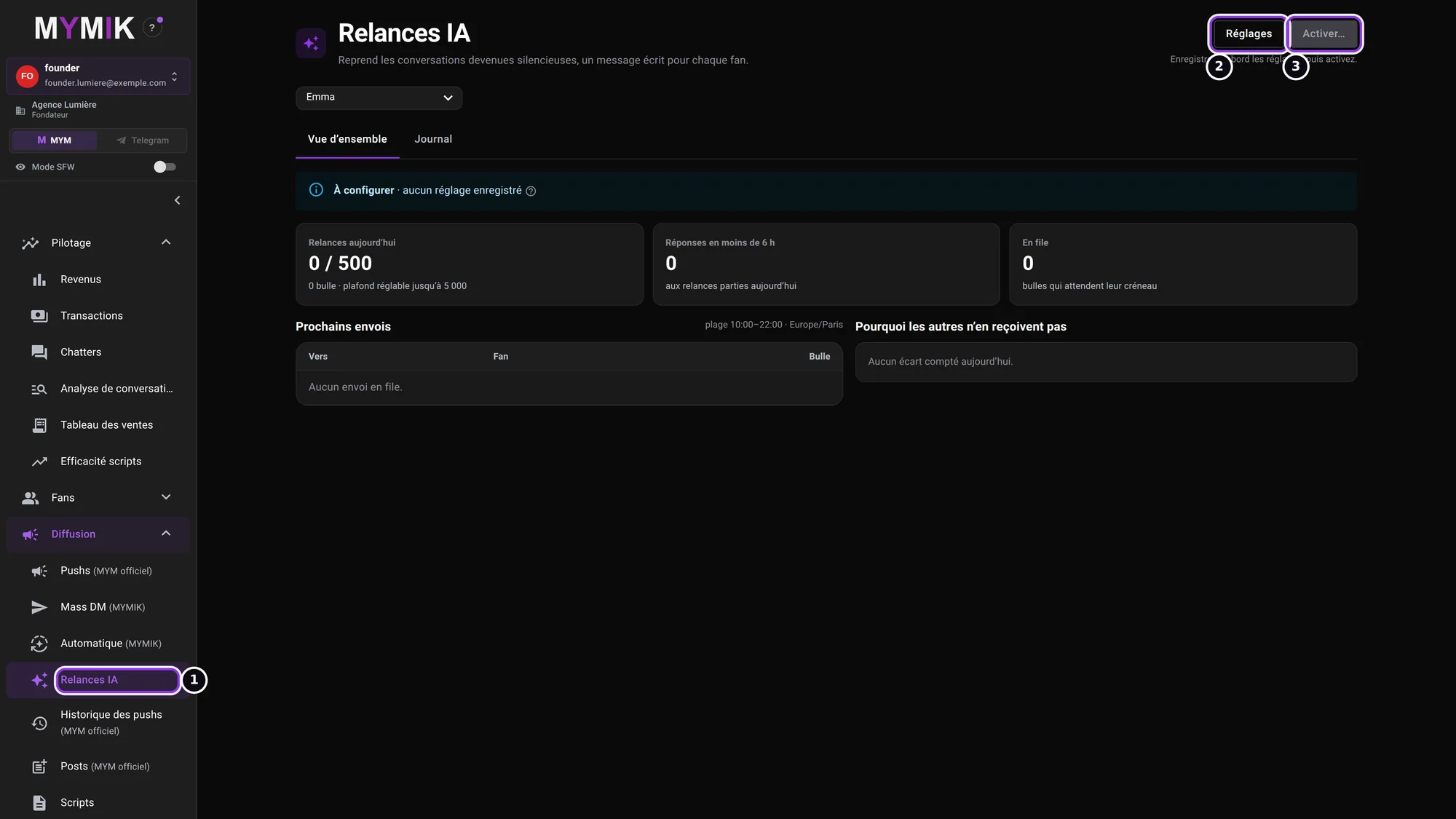 The page of the fictional creator Emma, before any setting.
2. Audience: who to follow up
The Audience tab starts with QUI RELANCER (“WHO TO FOLLOW UP”) ❶: active subscribers who have already written (the others have no conversation to pick up). The buyer types ❷ narrow the list: here « Baleine » (whale) and « Régulier » (regular) are chosen. Further down, « Ne jamais relancer ces listes » (“Never follow up these lists”): an excluded fan list always wins. The always-on protections ❸ cannot be switched off.
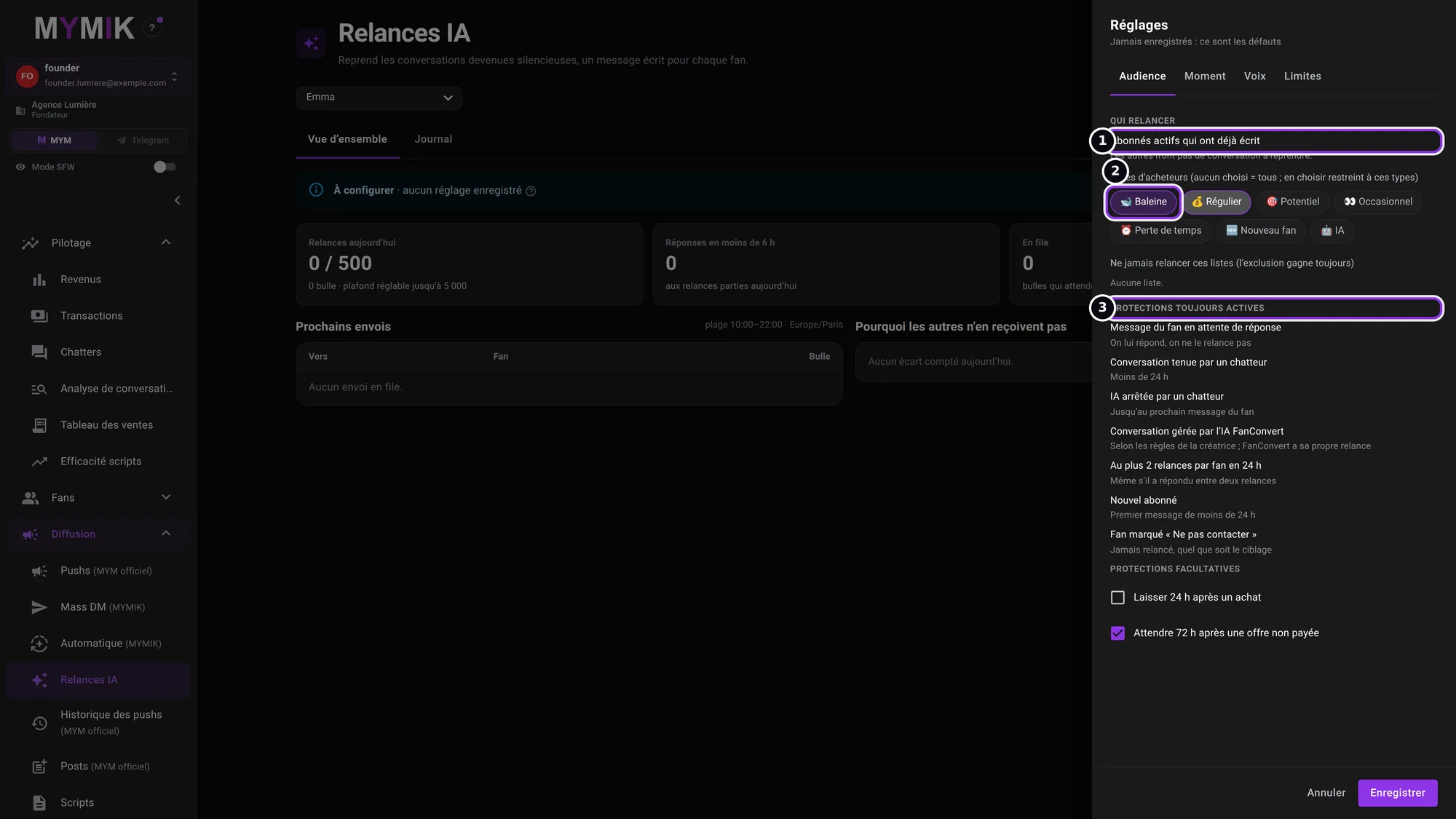 Two types chosen; no choice = all eligible fans.
3. The protections
Always on: a fan whose message is waiting for an answer is not followed up; neither is a conversation held by a chatter (less than 24 h), nor a fan whose AI was stopped by a chatter (until his next message), nor a conversation already handled by the FanConvert AI; at most 2 follow-ups per fan in 24 h; nor a new subscriber (first message under 24 h old), nor a fan marked « Ne pas contacter » (“Do not contact”). Optional ❶: « Laisser 24 h après un achat » (“Leave 24 h after a purchase”) ❷ and « Attendre 72 h après une offre non payée » (“Wait 72 h after an unpaid offer”).
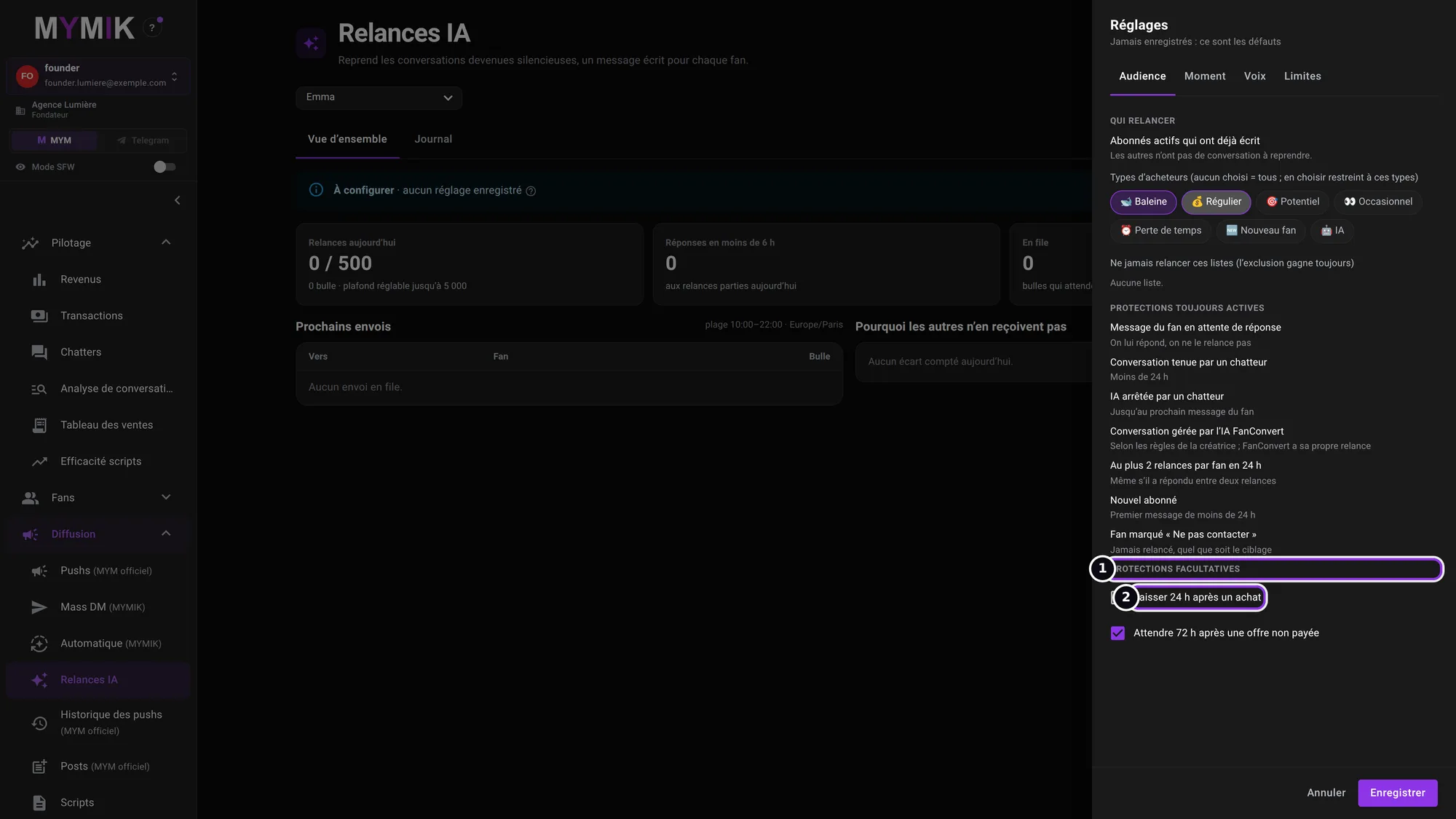 The two optional protections: the first is unticked, the second ticked by default.
4. Moment: when to follow up
Silence avant de relancer (heures) (“Silence before following up (hours)”) ❶: the delay since the last message, his or yours (1 h to 30 days). Plage start / end (time range) and the agency time zone: sends stay within that range. S’il ne répond pas : relances au plus (“If he does not answer: at most N follow-ups”) ❷ (1 to 3), then nothing until his next message; gap between two follow-ups from 6 h to 7 days.
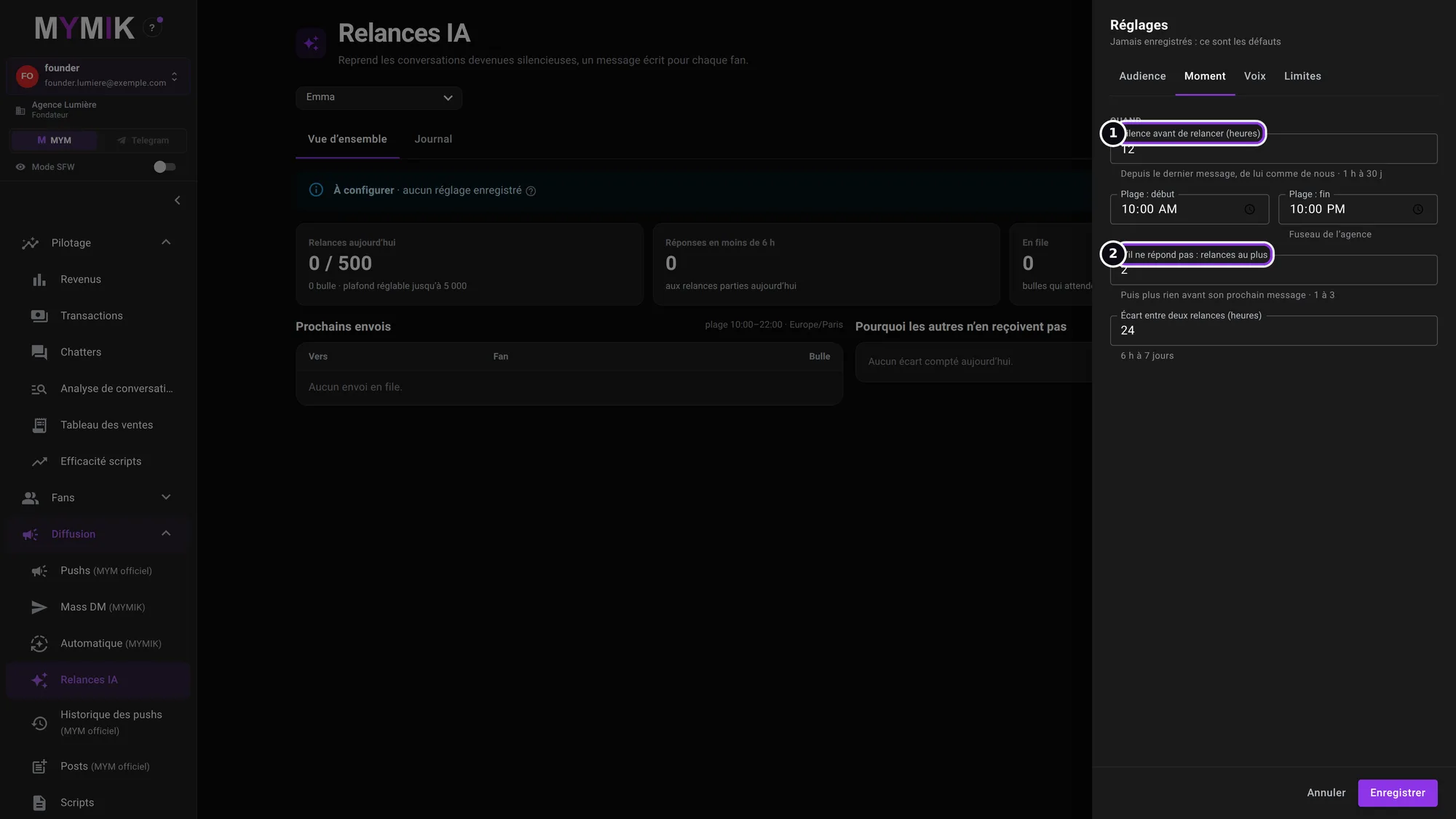 Default values: 12 h of silence, from 10:00 to 22:00, at most 2 follow-ups, 24 h apart.
5. Voix: how to write
Voix de la créatrice (“The creator’s voice”) ❶: tone, emojis, nicknames and banned words come from her profile, shared with Suggestions and Smart Push. Specific to follow-ups: the language when the fan’s is unknown, the number of bubbles per follow-up ❷ (1 to 3, the writing picks) and the time between two bubbles.
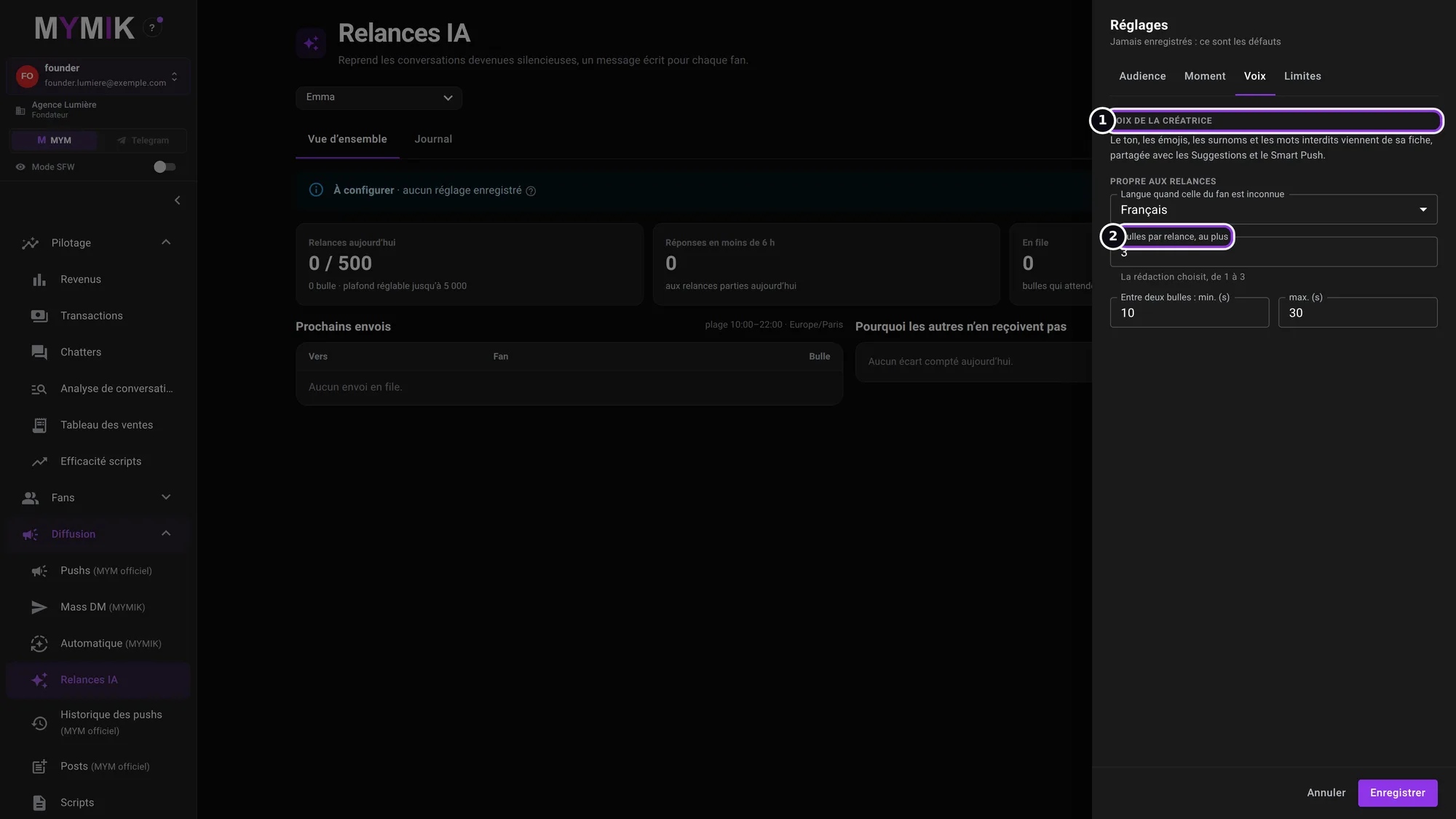 Settings specific to follow-ups: language, bubbles, delay between bubbles.
6. Limites, then « Enregistrer »
Relances par jour, au plus (“At most N follow-ups a day”) ❶ (up to 5,000). Pause si trop de fans attendent une réponse (“Pause if too many fans are waiting for an answer”) ❷: above a number of unread messages, follow-ups stop, then resume below a lower threshold. Click Enregistrer ❸: nothing goes out yet.
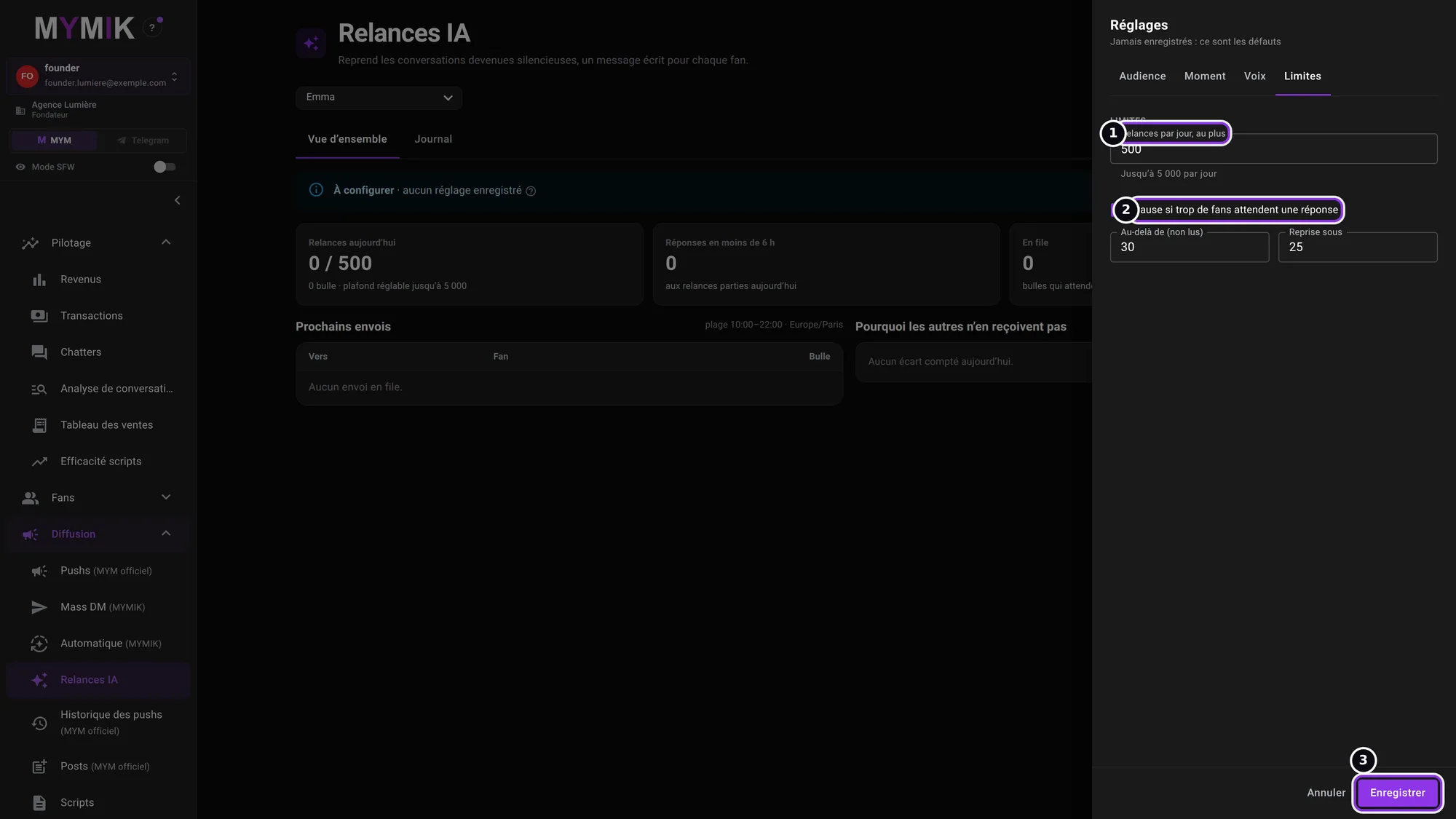 The default limits and the « Enregistrer » button.
2. Activate and follow
A review window, then two follow-up screens.
1. After saving: « Brouillon · pas encore activées »
The settings are saved but the follow-ups are not active: the status ❷ says « Brouillon · pas encore activées » (“Draft · not yet activated”). Activer… ❶ is now available.
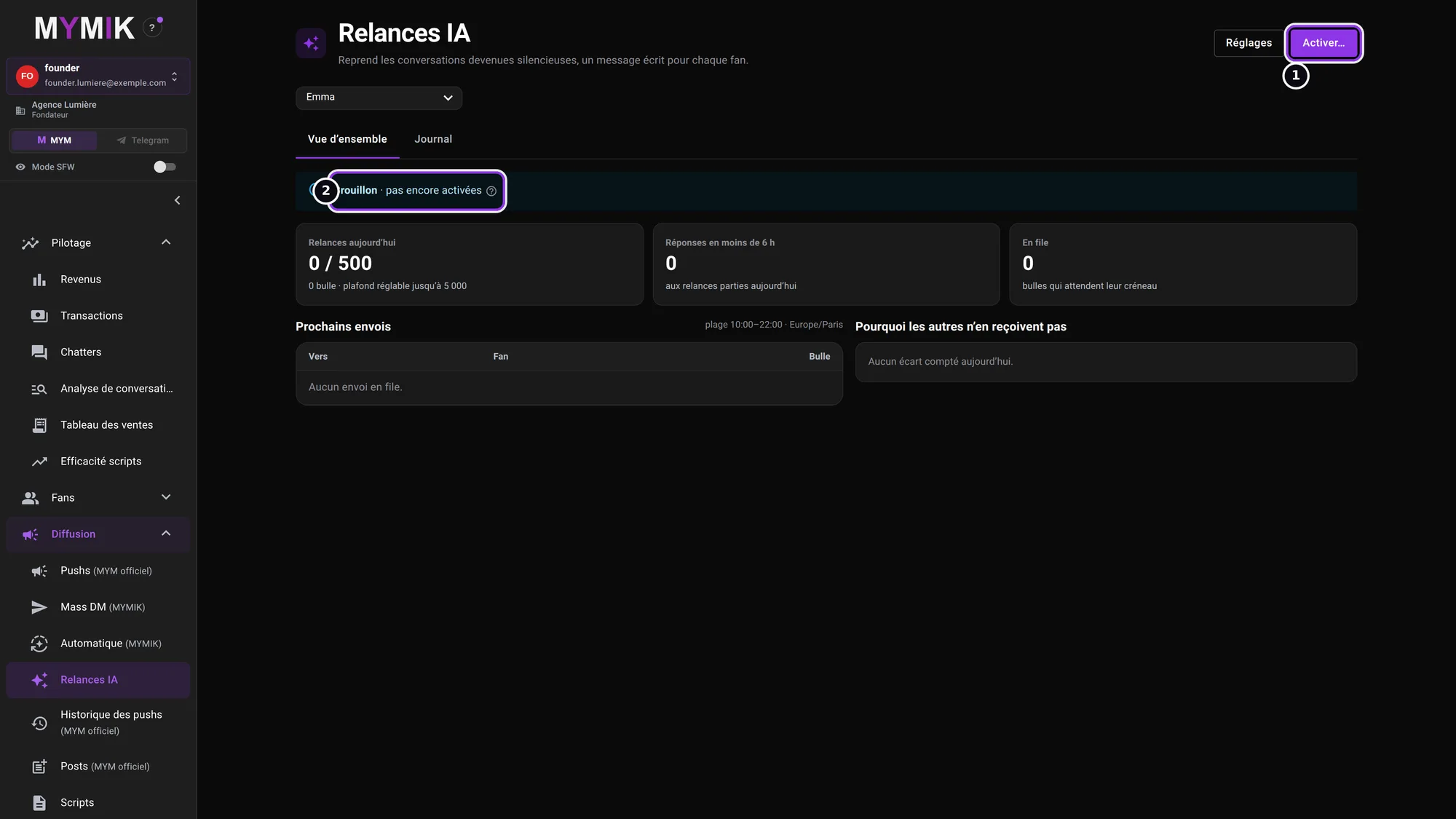 The creator’s status after « Enregistrer ».
2. Read the « Activer les relances pour … ? » window
The window ❶ sums up what will happen: “Sends start at the next slot, at most 500 a day, spread out. Nothing is caught up.” Then Qui (who; here “Subscribers of type Baleine, Régulier”), Quand (when), Comment (how: voice, language, bubbles) and Protections. Garder en brouillon (“Keep as draft”) changes nothing; Activer pour … (“Activate for …”) starts the follow-ups.
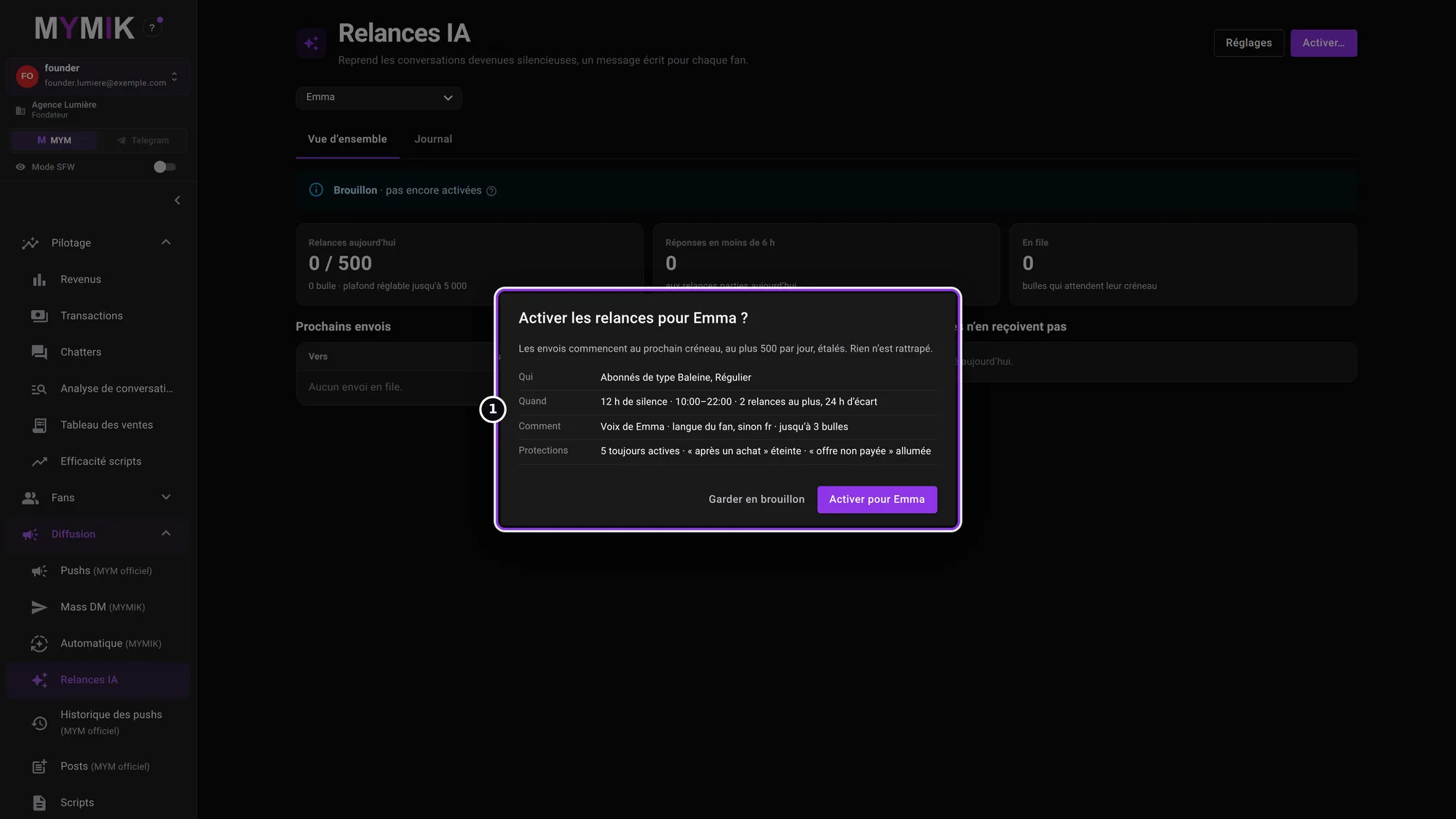 The review window (not confirmed for this screenshot).
3. The Vue d’ensemble: « Pourquoi les autres n’en reçoivent pas »
At the top ❷: Relances aujourd’hui (follow-ups today, against the day’s cap), Réponses en moins de 6 h (answers within 6 h) and En file (queued: bubbles waiting for their slot). Under Prochains envois (next sends), the list of upcoming fans. The Pourquoi les autres n’en reçoivent pas block ❶ counts, reason by reason, the fans set aside today: that is where you see that a fan with no type, or a protected fan, was not followed up.
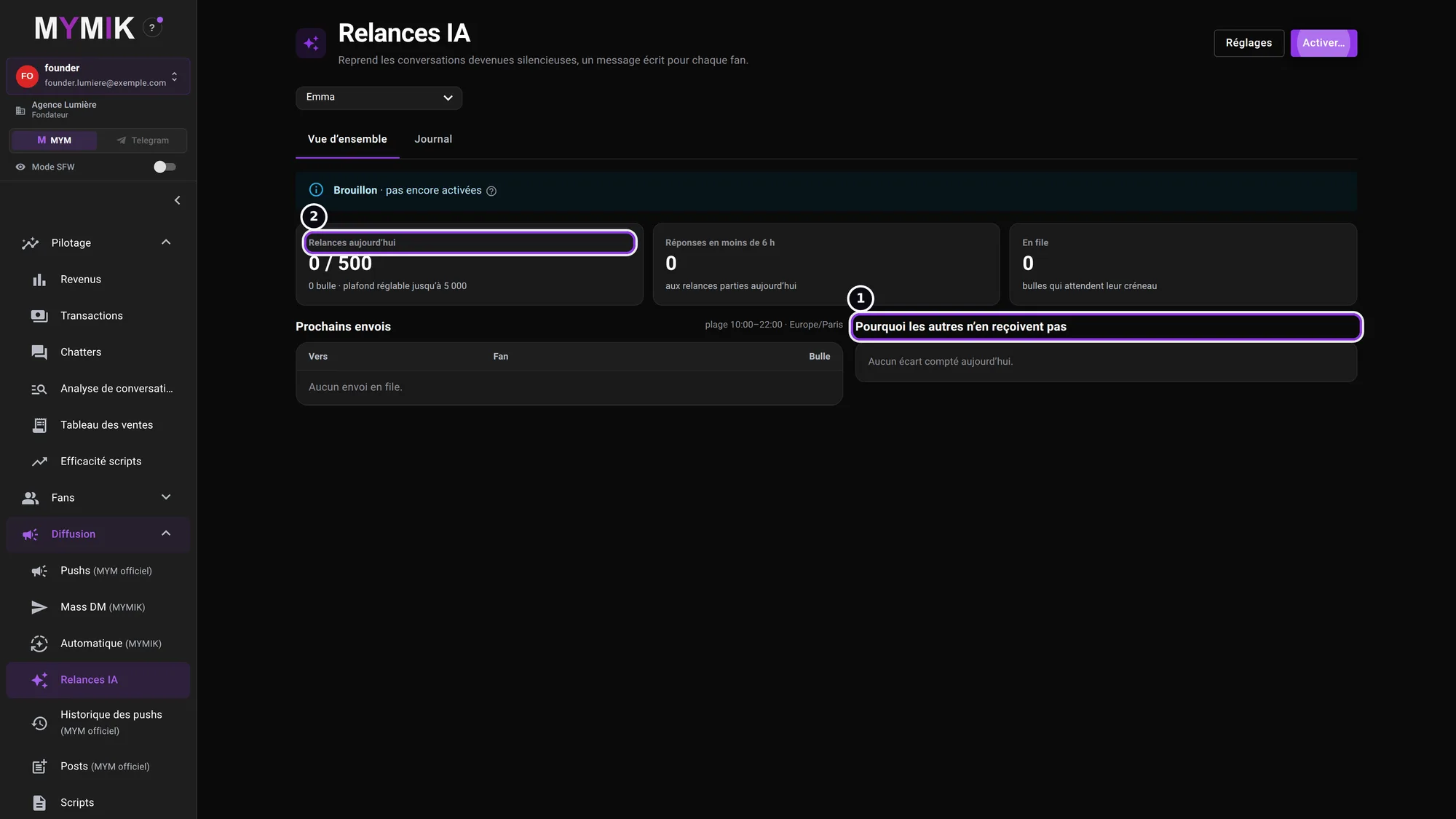 The overview before activation: all counters are at zero.
4. The Journal
The Journal tab ❶ lists follow-ups by time, fan, status and message or reason, with the filters Tout (all), Envoyées (sent), Écartées (set aside) and À vérifier (to check).
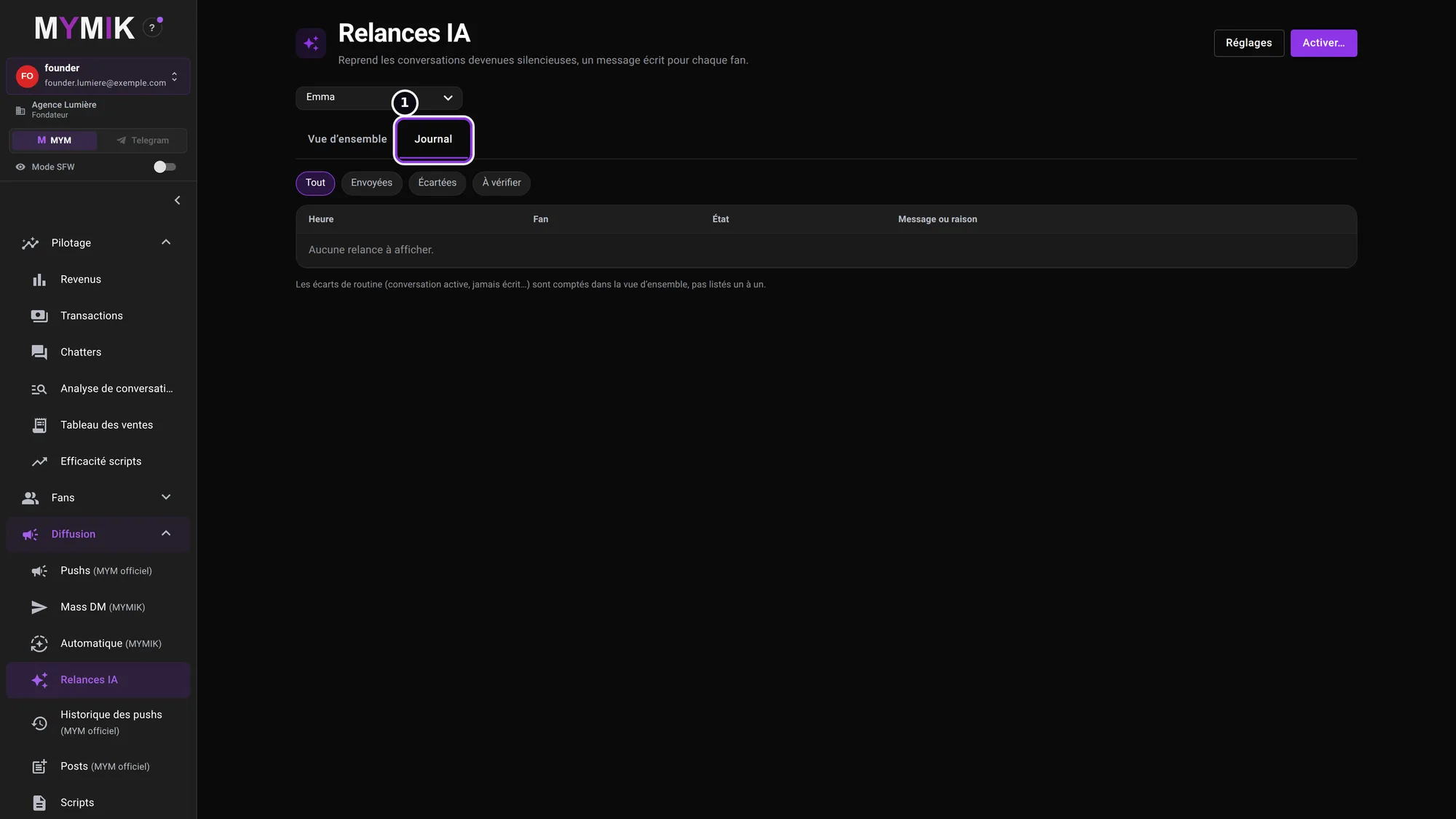 The log, empty before activation.
3. Troubleshooting
Symptom shown → cause → what to do. Quoted messages are those of the screen.
| What you see | Cause | What to do |
|---|---|---|
| « Enregistrez d’abord les réglages, puis activez. » (save first) | No setting is saved yet. | Open « Réglages » and click « Enregistrer ». |
| A silent fan is not followed up | He does not have the chosen buyer type, or a protection applies (message waiting, conversation held by a chatter, new subscriber, “Do not contact”, excluded list…). | Look at « Pourquoi les autres n’en reçoivent pas » and the Journal. With no type chosen, all eligible fans are followed up. |
| No follow-up goes out after activation | Sends start at the next slot of the time range; nothing is caught up. | Check the range, the time zone and the silence delay in « Moment ». |
| Follow-ups stop during the day | The day’s cap is reached, or the “too many fans are waiting for an answer” pause has kicked in. | Answer the waiting fans; raise the cap in « Limites » if needed. |
Still stuck?
Write to us in private at @MymikAppBot with your agency, the creator and the exact text displayed. The MYMIK team
MYMIK guide no. 11, version of 10/11/2026.
Last updated on
Guide 10 · Script branches: 2 to 8 paths depending on the fan’s answer
A script is not always a straight line. A branch waits for the fan’s answer, then the chatter takes the matching path: “yes”, “no”, “hesitating”…
Guide 14 · Publications Studio: schedule MYM posts and stories
The Publications Studio sends MYM feed posts and stories out on your days and at your times, even with the application closed. You create a campaign, you activate it, then you follow what goes out.